I just want to reach through the internet, take control of your laptop, and do it for you.







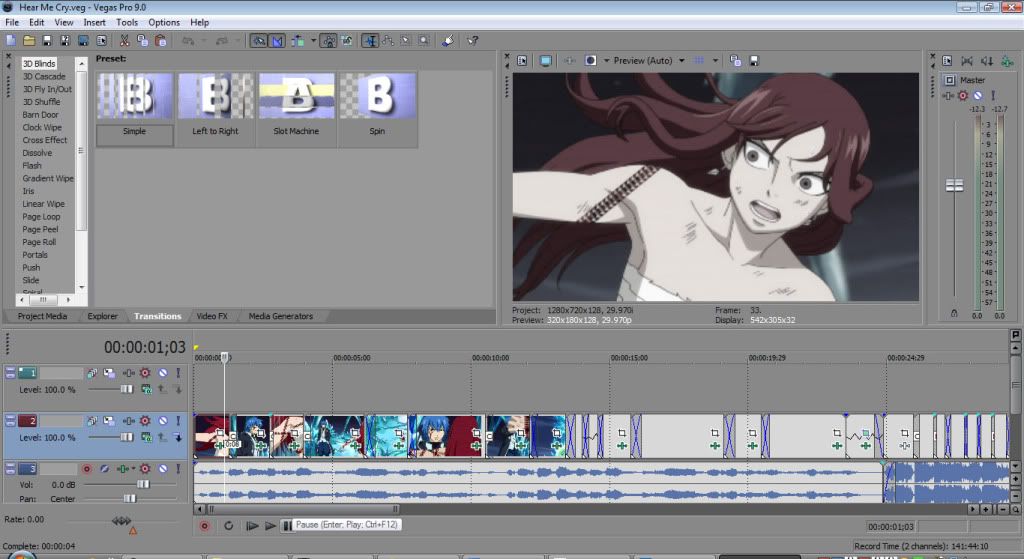
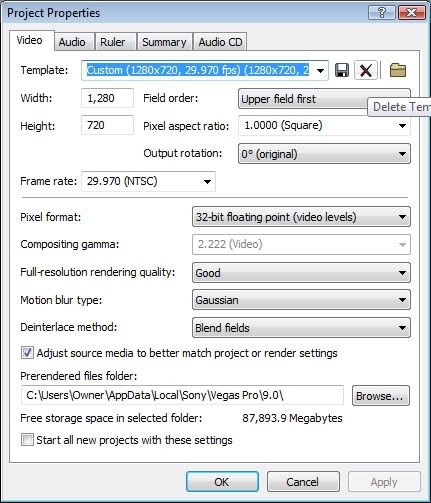
idk actually I think it was when I had issues with the preview screen being black. but I changed it. It still kinda lags.Kionon wrote:Why isn't your project set to progressive?
Sorry im posting two things. But ok so in the other forum I had about quality someone replied about the lagging saying this. And im reading it over and over again breaking it down and im trying to figure out how to do this or make sure that this is happening so my Vegas doesn't lag so much.important tip, keep the resolution as as similar to original as possible, if you are going to change it, escale it to a smaller one, Do Not reduce frame per seconds, it will just result on a bigger "lag" on the video, the really important fact for quality is kbps, +kilobytes +quality.
as instructed .avi lagaryth, bring you the gretest quality and a file that can size a couple of gb, but without correct codec, only black image and sound.
I use . mov for working in vegas, few problems, except sometimes with masking, but it is vegas, yet it will size a lot too(and Im using a commercial converter). just discover it because a friend have a camera that record with that extension and other one with .avi, , i was curious and test it, avi get stucked, but .mov flows nicely, without even converting, and a lot of pages recommend to update quicktime version to troubleshoot some issues with vegas, it just ended kind of obvious.(don´t use mp4, it´s too compress, just suckingmemoryram)

