*runs in circles*
All this bitrate stuff would be lost on both of us.
The source is a video game. He recorded the scenes onto his PC using some kind of device.
My editor is WMM.>_>; Don't give me that look.;-;
Help finding the right video editor to...
-
SyberiaWinx
- Joined: Thu Dec 02, 2004 8:39 am
-
Kionon

- I ♥ the 80's
- Joined: Fri Mar 02, 2001 10:13 pm
- Status: Ayukawa MODoka.
- Location: I wonder if you know how they live in Tokyo... DRIFT, DRIFT, DRIFT
- Contact:
Didn't answer my question though. Can we start over? I'll still help you add the letterboxing, but I want you to start off with the best footage quality you can (and in fact, there may be a way to rip the scenes directly from the video game if it's a disc). There should be a way to set the resolution, codec, container, and bitrate for his capture device.SyberiaWinx wrote:*runs in circles*
All this bitrate stuff would be lost on both of us.
The source is a video game. He recorded the scenes onto his PC using some kind of device.
Too late. And WMM should be able to handle lossless .avi, I think.My editor is WMM.>_>; Don't give me that look.;-;


-
SyberiaWinx
- Joined: Thu Dec 02, 2004 8:39 am
I tried ripping the scenes from the disk, but only got a few. He could probably do it again technically, but that's asking a lot of him. He had to play through the entire game to get those scenes.
"I've found that you're never to old to dive headfirst into a room full of plastic balls."
-Rosanne Conner
-Rosanne Conner
-
SyberiaWinx
- Joined: Thu Dec 02, 2004 8:39 am
-
Kionon
- I ♥ the 80's
- Joined: Fri Mar 02, 2001 10:13 pm
- Status: Ayukawa MODoka.
- Location: I wonder if you know how they live in Tokyo... DRIFT, DRIFT, DRIFT
- Contact:
Resolution: 640x480 (fairly standard for standard definition 4:3 source)SyberiaWinx wrote:Say he should rip them again, what should he choose for those?resolution, codec, container, and bitrate
Codec: HUFFYUV, Lagarith, Uncompressed if he has the space, you shouldn't worry about bitrate with lossless. If he needs to compress, then DV, and the highest bitrate he can afford.
-
Kionon
- I ♥ the 80's
- Joined: Fri Mar 02, 2001 10:13 pm
- Status: Ayukawa MODoka.
- Location: I wonder if you know how they live in Tokyo... DRIFT, DRIFT, DRIFT
- Contact:
Oh container should be .aviKionon wrote:Resolution: 640x480 (fairly standard for standard definition 4:3 source)SyberiaWinx wrote:Say he should rip them again, what should he choose for those?resolution, codec, container, and bitrate
Codec: HUFFYUV, Lagarith, Uncompressed if he has the space, you shouldn't worry about bitrate with lossless. If he needs to compress, then DV, and the highest bitrate he can afford.
Bah double post.
-
Phantasmagoriat

- Joined: Mon Feb 06, 2006 11:26 pm
- Status: ☁SteamPunked≈☂
- Contact:
reading over this again, "Run Script" is not meant for .avs scripts [actually I've never used this feature before]. You want to simply Open the .avs script, either through the File menu, or by drag-and-drop into virtualdubmod.SyberiaWinx wrote:He tried, but:
I go to "Run Script" and when I click on the AVS file I get the splendid message "Parse error."
I'm still a bit fuzzy on the file format you are trying to open, but if you were trying to use the XviD.wmv's as your source[if that's what your saying, that may be your whole problem], wmv is a proprietary container of microsoft, and is not meant to be supported by vdub [not to mention with an XviD video stream; bad]. Although there's a chance you can get it to work through directshowsource(), you are much better off using the originals...
what format you ask?SyberiaWinx wrote:Say he should rip them again, what should he choose for those?resolution, codec, container, and bitrate
Resolution: as high as it goes: probably 720x480 which will be scaled to 640x480 to fix the 4:3 aspect ratio [like Kio said
 ]
]Codec: Anything lossless: HUFFYUV, Lagarith [beware of gigantic file sizes]
container: .avi, or if you can get it to .m2v after the rip process, you can avoid HUFFYUV
bitrate: as high as it goes: a combination of resolution and scene-complexity determine what it will be; but losslessly, don't worry.
this sounds like gold to me; tell us as much about the ripped file as possible. Game, what gaming platform, file extension/container... others.SyberiaWinx wrote:I tried ripping the scenes from the disk, but only got a few. He could probably do it again technically, but that's asking a lot of him. He had to play through the entire game to get those scenes.
PLAY FREEDOOM!! | Phan Picks! | THE424SHOW | YouTube | "Painkiller" | Vanilla MIDI's
"Effort to Understand; Effort to be Understood; to See through Different Eyes."
"Effort to Understand; Effort to be Understood; to See through Different Eyes."
-
SyberiaWinx
- Joined: Thu Dec 02, 2004 8:39 am
-
Kariudo

- Twilight prince
- Joined: Fri Jul 15, 2005 11:08 pm
- Status: 1924 bots banned and counting!
- Location: Los taquitos unidos
- Contact:
*note*
WMM doesn't play nice with Lagarith
it's a bit of work...but it saves space, retains quality, and you'll end up making clips somewhere along the editing process anyway
I think this is the most quoted quote on the site...*finally bookmarks*
WMM doesn't play nice with Lagarith
from there you would go to file, save, select codec (HuffYuv)JaddziaDax wrote:JaddziaDax wrote:open the video file in virtualdub mod go to video->compression->Huffyuv or Lagarith
then go to file->save
use those to mark the beginning and the end of the "clips" you want so you can save room
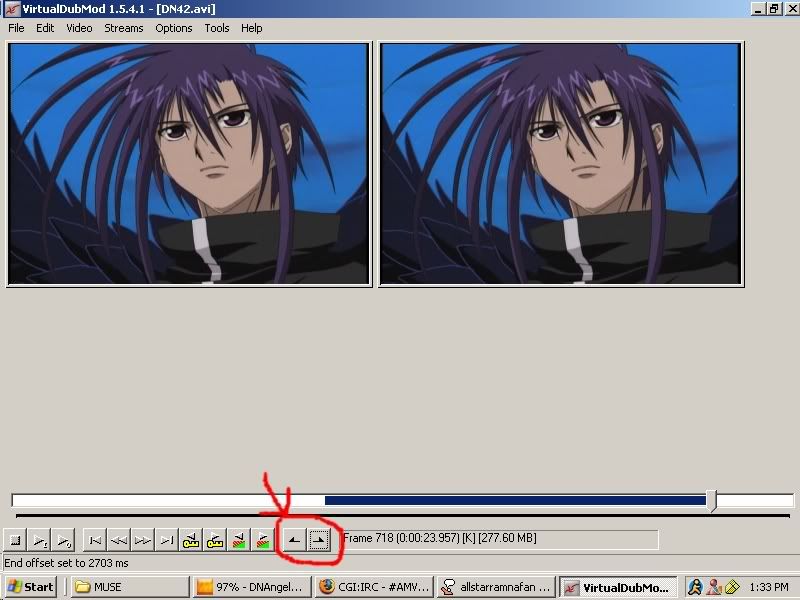
it's a bit of work...but it saves space, retains quality, and you'll end up making clips somewhere along the editing process anyway
I think this is the most quoted quote on the site...*finally bookmarks*


-
SyberiaWinx
- Joined: Thu Dec 02, 2004 8:39 am