So you are saying I should export them from vegas as a lagarith file and recompress it with virtualdub to lagarith?JaddziaDax wrote:take the fansubs and recompress them to lagarith clips (also kill the audio), and edit with those...
when you export from vegas export as a lagarith file, take the file clean it up with avisynth and compress with XVID or .h264 (or whatever the "new" codec is for the mp4 container...)
this is how i do it.
OPS, GET THEM WHILE THEY LAST
Moderator: Forum moderators
-
cycangfx

- Joined: Sat Dec 02, 2006 1:09 am
-
Scott Green

- Greenwhore
- Joined: Thu Mar 23, 2006 1:25 pm
- Status: The Dark Tower
- Location: Austria
-
cycangfx
- Joined: Sat Dec 02, 2006 1:09 am
But how do I recompress it?Scott Green wrote:No she meant
1. recompress your fansubs files to Lagarith wothout Audio...
2. Import them into Vegas,
3. make your Video stuff (cutting effects, etc.)
4. Then when you finished eyport your project as Lagarith and then
5. recompress as XviD AVI of H264 Mp4....
And why can´t you use any DVD???
-
JaddziaDax

- Crazy Cat Lady!
- Joined: Tue Mar 16, 2004 6:25 am
- Status: I live?
- Location: Somewhere I think O.o
- Contact:
DIVX footage doesnt work in Vegas so to make it useable you want to put it through Virtualdub Mod (from the AMVAPP) and recompress them to lagarith (which will make huge files, so you might want to clip the parts you want to use, and take out the audio while youre at it... not like you are going to use that audio anyways eh?)
then edit the video in Vegas
when you export from Vegas save as an AVI and go into the custom settings, choose stuff like "best" for visual quality, and Lagarith for the codec (this will also make a large file so be prepared for a 2-5GB file)
take that lagarith file, and use AVIsynth to clean up grains and solidify the colors and what not (different filters will do different things, so depending on your original footage you wont always use the same filter for each video you make)
after you clean up the video quality compress the file to XVID avi OR the mp4 format (whatever you like better)... if you wanna see the difference between the two dl both versions of my video "how to: impress a girl" there is both an mp4 AND and xvid...
to compress the XVID please see this link:
http://www.animemusicvideos.org/guides/avtech/xvid.html
ALL YOU HAVE TO DO IS FILL IN YOUR VIRTUALDUB MOD WITH THE SAME SETTINGS AS THE SCREENCAPS, AND BE SURE TO DO A SECOND PASS...
also you will want to compress your audio you can do that by following the layout for virtualdub mod in this guide:
http://www.animemusicvideos.org/guides/ ... audio.html
then edit the video in Vegas
when you export from Vegas save as an AVI and go into the custom settings, choose stuff like "best" for visual quality, and Lagarith for the codec (this will also make a large file so be prepared for a 2-5GB file)
take that lagarith file, and use AVIsynth to clean up grains and solidify the colors and what not (different filters will do different things, so depending on your original footage you wont always use the same filter for each video you make)
after you clean up the video quality compress the file to XVID avi OR the mp4 format (whatever you like better)... if you wanna see the difference between the two dl both versions of my video "how to: impress a girl" there is both an mp4 AND and xvid...
to compress the XVID please see this link:
http://www.animemusicvideos.org/guides/avtech/xvid.html
ALL YOU HAVE TO DO IS FILL IN YOUR VIRTUALDUB MOD WITH THE SAME SETTINGS AS THE SCREENCAPS, AND BE SURE TO DO A SECOND PASS...
also you will want to compress your audio you can do that by following the layout for virtualdub mod in this guide:
http://www.animemusicvideos.org/guides/ ... audio.html
Stalk me?
https://linktr.ee/jaddziadax
https://linktr.ee/jaddziadax
-
JaddziaDax
- Crazy Cat Lady!
- Joined: Tue Mar 16, 2004 6:25 am
- Status: I live?
- Location: Somewhere I think O.o
- Contact:
to set up virtualdub mod to "recompress to lagarith" all you have to do is open the xvid file in Virtualdub mod go to
Video -> compression _> lagarith
then go to audio -> streams list -> disable stream
then go to File -> save as...
Video -> compression _> lagarith
then go to audio -> streams list -> disable stream
then go to File -> save as...
Stalk me?
https://linktr.ee/jaddziadax
https://linktr.ee/jaddziadax
-
JaddziaDax
- Crazy Cat Lady!
- Joined: Tue Mar 16, 2004 6:25 am
- Status: I live?
- Location: Somewhere I think O.o
- Contact:
sorry for the triple post >.<
to select the parts you want in vdub use these buttons:
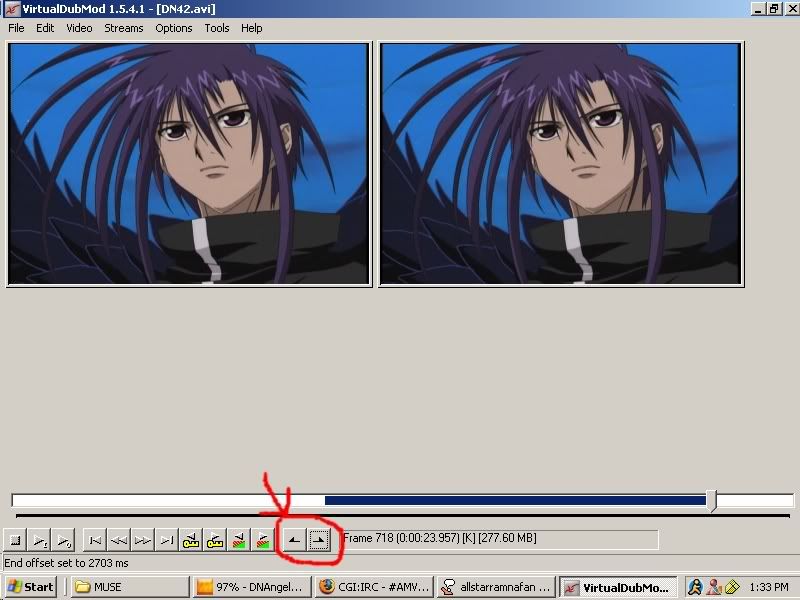
(if you want i can make more screencaps for the Vegas stuff but it should all be in here:
http://www.animemusicvideos.org/guides/ ... xport.html
heh)
to select the parts you want in vdub use these buttons:
(if you want i can make more screencaps for the Vegas stuff but it should all be in here:
http://www.animemusicvideos.org/guides/ ... xport.html
heh)
Stalk me?
https://linktr.ee/jaddziadax
https://linktr.ee/jaddziadax
-
cycangfx
- Joined: Sat Dec 02, 2006 1:09 am
To use the files in vegas I convert them to WMV and there is zero quailty damage, so do I still have to go through the virtualdub process?JaddziaDax wrote:DIVX footage doesnt work in Vegas so to make it useable you want to put it through Virtualdub Mod (from the AMVAPP) and recompress them to lagarith (which will make huge files, so you might want to clip the parts you want to use, and take out the audio while youre at it... not like you are going to use that audio anyways eh?)
then edit the video in Vegas
when you export from Vegas save as an AVI and go into the custom settings, choose stuff like "best" for visual quality, and Lagarith for the codec (this will also make a large file so be prepared for a 2-5GB file)
take that lagarith file, and use AVIsynth to clean up grains and solidify the colors and what not (different filters will do different things, so depending on your original footage you wont always use the same filter for each video you make)
after you clean up the video quality compress the file to XVID avi OR the mp4 format (whatever you like better)... if you wanna see the difference between the two dl both versions of my video "how to: impress a girl" there is both an mp4 AND and xvid...
to compress the XVID please see this link:
http://www.animemusicvideos.org/guides/avtech/xvid.html
ALL YOU HAVE TO DO IS FILL IN YOUR VIRTUALDUB MOD WITH THE SAME SETTINGS AS THE SCREENCAPS, AND BE SURE TO DO A SECOND PASS...
also you will want to compress your audio you can do that by following the layout for virtualdub mod in this guide:
http://www.animemusicvideos.org/guides/ ... audio.html
-
JaddziaDax
- Crazy Cat Lady!
- Joined: Tue Mar 16, 2004 6:25 am
- Status: I live?
- Location: Somewhere I think O.o
- Contact:
that is wrong wmv destroies quality
and that is more than likely one of the reasons you are loosing quality...
lagarith is a LOSSLESS codec so you shouldnt lose ANY quality...
from now on dont convert your clips to wmv... and switch to converting them to lagarith with no audio..
also wmv majorly lags in Vegas, if you want to edit better and easier lagarith doesnt lag nearley as much...
and that is more than likely one of the reasons you are loosing quality...
lagarith is a LOSSLESS codec so you shouldnt lose ANY quality...
from now on dont convert your clips to wmv... and switch to converting them to lagarith with no audio..
also wmv majorly lags in Vegas, if you want to edit better and easier lagarith doesnt lag nearley as much...
Stalk me?
https://linktr.ee/jaddziadax
https://linktr.ee/jaddziadax
-
cycangfx
- Joined: Sat Dec 02, 2006 1:09 am
But I use a convertor that loses's 0% quailty I checked it out myself....JaddziaDax wrote:that is wrong wmv destroies quality
and that is more than likely one of the reasons you are loosing quality...
lagarith is a LOSSLESS codec so you shouldnt lose ANY quality...
from now on dont convert your clips to wmv... and switch to converting them to lagarith with no audio..
also wmv majorly lags in Vegas, if you want to edit better and easier lagarith doesnt lag nearley as much...
-
JaddziaDax
- Crazy Cat Lady!
- Joined: Tue Mar 16, 2004 6:25 am
- Status: I live?
- Location: Somewhere I think O.o
- Contact:
fine argue with me... wmv is bad for source footage... but if you want to stick with it then its your deal
Stalk me?
https://linktr.ee/jaddziadax
https://linktr.ee/jaddziadax