The fact that it's the Year of the Shark pushed me to write all this.
Letterboxing on purpose
- Animated
- Drama Text Cop
- Joined: Thu Apr 24, 2008 4:43 am
- Status: Texty :3
- Location: Athens, Greece
Letterboxing on purpose
So, here's the deal... I'm planning on making an amv that's... more like a story, rather than a music video. So, to get a more cinematographic look, i plan on adding black borders. I know that letterboxing is a forced technique due to different aspect ratios between the screen and the movie itself, but hey... we grew up watching movies that way, and that's the feeling i want to give to my project. So... does it sound as a good idea or will it seem like a beginner's mistake?
The fact that it's the Year of the Shark pushed me to write all this.
- Enigma
- That jolly ol' bastid
- Joined: Sat Mar 07, 2009 3:55 pm
- Status: Free
- Location: California
Re: Letterboxing on purpose
do it.
- Castor Troy
- Ryan Molina, A.C.E
- Joined: Tue Jan 16, 2001 8:45 pm
- Status: Retired from AMVs
- Location: California
- Contact:
Re: Letterboxing on purpose
Enigma wrote:do it.
"You're ignoring everything, except what you want to hear.." - jbone
- Animated
- Drama Text Cop
- Joined: Thu Apr 24, 2008 4:43 am
- Status: Texty :3
- Location: Athens, Greece
Re: Letterboxing on purpose
Ok, i'm convinced. Now the fact is that i've tried numerous resolutions and aspect ratios and... none of them seem to work. What would you recommend for HD footages?
- Enigma
- That jolly ol' bastid
- Joined: Sat Mar 07, 2009 3:55 pm
- Status: Free
- Location: California
Re: Letterboxing on purpose
try using Addborders?
- Animated
- Drama Text Cop
- Joined: Thu Apr 24, 2008 4:43 am
- Status: Texty :3
- Location: Athens, Greece
- Phantasmagoriat
- Joined: Mon Feb 06, 2006 11:26 pm
- Status: ☁SteamPunked≈☂
- Contact:
Re: Letterboxing on purpose
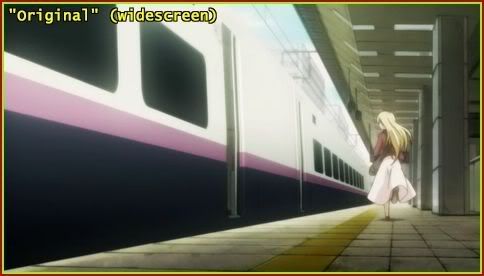
If this was your original:
Red = edge of monitor
Yellow-Green = edge of frame
0.)

= 848/480 = 1.766 ~ 16/9 = WideScreen
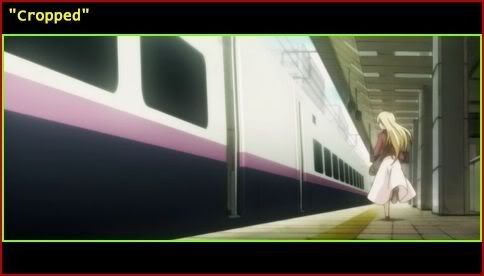
You've got 3 options:
1.)

crop(0,60,0,-60)
= 848/360 = 2.355 ~ 2.35/1 = CinemaScope (aka x-wide)
2.)

crop(0,60,0,-60)
addborders(0,60,0,60)
= 848/480 = 1.766 ~ 16/9 = WideScreen
(Although the picture is Scope, the frame itself is WideScreen so it fills the entire monitor)
3.)

addborders(0,78,0,78)
= 848/636 = 1.333 = 4/3 = FullScreen
(oh the irony of FullScreen videos on WideScreen monitors...)
There is a big difference between Borders and Letterboxes. Borders add black around the perimeter of your image. Letterboxes turn the edges of your image black. Assuming most people have widescreen monitors these days, if you simply add Borders to the top and bottom, you'll just end up with the appearance of a rectangle in the middle of the screen (like #3), and I'm not sure if that's the look you are after. However, Letterboxes effectively do the same thing as cropping then adding borders equal to what was cropped off (#2). While this does do what you are looking for, it is pointless since it looks the same as cropping, so you might as well just crop to CinemaScope (#1) which is about as cinematographic as it gets. I'm pretty sure that's what they were going for when they made The Animatrix (example)
But it's unlikely your footage is scope to begin with, so you'll have to crop to 2.35:1 or something close to it (like #1). That way the blank space looks like you've got black letterboxes (#2), without actually encoding them into your video. As an added bonus, your file sizes could be as much as 25% smaller. It might help if you edit at 16:9, but overlay letterboxes in your editor so you can see what parts will get cut off. You'll have more control this way. And if you want to actually use the letterboxes for something (like text), at least you'll have them. You can always crop them later.
Red = edge of monitor
Yellow-Green = edge of frame
0.)

= 848/480 = 1.766 ~ 16/9 = WideScreen
You've got 3 options:
1.)

crop(0,60,0,-60)
= 848/360 = 2.355 ~ 2.35/1 = CinemaScope (aka x-wide)
2.)

crop(0,60,0,-60)
addborders(0,60,0,60)
= 848/480 = 1.766 ~ 16/9 = WideScreen
(Although the picture is Scope, the frame itself is WideScreen so it fills the entire monitor)
3.)

addborders(0,78,0,78)
= 848/636 = 1.333 = 4/3 = FullScreen
(oh the irony of FullScreen videos on WideScreen monitors...)
There is a big difference between Borders and Letterboxes. Borders add black around the perimeter of your image. Letterboxes turn the edges of your image black. Assuming most people have widescreen monitors these days, if you simply add Borders to the top and bottom, you'll just end up with the appearance of a rectangle in the middle of the screen (like #3), and I'm not sure if that's the look you are after. However, Letterboxes effectively do the same thing as cropping then adding borders equal to what was cropped off (#2). While this does do what you are looking for, it is pointless since it looks the same as cropping, so you might as well just crop to CinemaScope (#1) which is about as cinematographic as it gets. I'm pretty sure that's what they were going for when they made The Animatrix (example)
But it's unlikely your footage is scope to begin with, so you'll have to crop to 2.35:1 or something close to it (like #1). That way the blank space looks like you've got black letterboxes (#2), without actually encoding them into your video. As an added bonus, your file sizes could be as much as 25% smaller. It might help if you edit at 16:9, but overlay letterboxes in your editor so you can see what parts will get cut off. You'll have more control this way. And if you want to actually use the letterboxes for something (like text), at least you'll have them. You can always crop them later.
PLAY FREEDOOM!! | Phan Picks! | THE424SHOW | YouTube | "Painkiller" | Vanilla MIDI's
"Effort to Understand; Effort to be Understood; to See through Different Eyes."
- godix
- a disturbed member
- Joined: Sat Aug 03, 2002 12:13 am
Re: Letterboxing on purpose
You know, if I watch an AMV in full screen, or it gets projected at a con, then it is automatically letterboxed without the letterboxing being hard encoded. I could see, perhaps, letterboxing to make the preview have letterboxing, but it seems to be a wasted effort with a distro version.
- EvaFan
- Joined: Sun Mar 21, 2004 10:25 pm
- Status: (*゚▽゚)o旦~ ー乾杯ー♪
- Location: Somerset, KY
Re: Letterboxing on purpose
You could achieve a cinematographic look through other means. If all you plan on doing is adding borders than I really don't see the point cause I doubt that alone would give me the "cinematographic" look your talking about, but thats just me.
If your story and editing is strong enough, it should achieve what your wanting it to regardless of adding borders. Assuming you use FX and whatnot that relates to cinematography. I for one don't know much about cinematography but I thought it related more to lighting, colors, and tone of the video more so than the borders.
I remember discussing on the old donators forum about how I hated the fact that movies kept changing their aspect ratios but someone, I think prodigy said something along the lines of the aspect ratio being chosen for movies suitably to major scenes to maximize their effect. So I guess what I'm getting at here is, if you plan on adding borders or changing the viewing portions, try to rationalize it to your major scene/story ideas instead of just throwing certain borders in there.
If your story and editing is strong enough, it should achieve what your wanting it to regardless of adding borders. Assuming you use FX and whatnot that relates to cinematography. I for one don't know much about cinematography but I thought it related more to lighting, colors, and tone of the video more so than the borders.
I remember discussing on the old donators forum about how I hated the fact that movies kept changing their aspect ratios but someone, I think prodigy said something along the lines of the aspect ratio being chosen for movies suitably to major scenes to maximize their effect. So I guess what I'm getting at here is, if you plan on adding borders or changing the viewing portions, try to rationalize it to your major scene/story ideas instead of just throwing certain borders in there.
"The people cannot be [...] always, well informed. The part which is wrong will be discontented, in proportion to [...] the facts they misconceive. If they remain quiet under such misconceptions, it is lethargy, the forerunner of death to public liberty. What country can preserve its liberties, if it's rulers are not warned [...] that this people preserve the spirit of resistance? The tree of liberty must be refreshed from time to time, with the blood of patriots and tyrants."-Thomas Jefferson
- Animated
- Drama Text Cop
- Joined: Thu Apr 24, 2008 4:43 am
- Status: Texty :3
- Location: Athens, Greece
Re: Letterboxing on purpose
Yes, this happened when i watched amvs in my old 4:3 screen... I guess you have a 4:3 one too?godix wrote:You know, if I watch an AMV in full screen, or it gets projected at a con, then it is automatically letterboxed without the letterboxing being hard encoded.
Thanks a lot for all this, totally helpful since i've been looking for avisynth tutorials (again) all night Most Helpful 2011?Phantasmagoriat wrote:Tons of advice![]()
I'm planning to use more than borders, such as altering the framerate, slow motions, colour corrections etc... I've already written down the storyline and other simple ideas, so...EvaFan wrote:You could achieve a cinematographic look through other means. If all you plan on doing is adding borders than I really don't see the point cause I doubt that alone would give me the "cinematographic" look your talking about, but thats just me.