Recently i've gotten myself to an issue where i have an .mkv file that i want to make an AMV out of. Thing is, Windows Movie Maker 2 wont accept .mkv files as usage - so I've been using VirtualDubMod, and MediaCoder to try and convert to an .avi or anything compatible to WMM2.
Problem is, neither program would allow me to convert the file successfully to an .avi - or anything else for that matter. Any suggestions?
Problems with .mkv to avi conversions



-
Willen

- Now in Hi-Def!
- Joined: Sun Jul 10, 2005 1:50 am
- Status: Melancholy
- Location: SOS-Dan HQ
Use mkvtoolnix (if you want a GUI, use MKVExtractGUI).
Having trouble playing back videos? I recommend: 
-
Willen
- Now in Hi-Def!
- Joined: Sun Jul 10, 2005 1:50 am
- Status: Melancholy
- Location: SOS-Dan HQ
If I try to open a MKV with H.264 video content, I get that message. Depending on the complexity of the MKV file (subs, VFR video, ASS subs, etc.), this may or not work: use an AviSynth script and open the video via DirectShowSource(). The quick and dirty way is to do it though VDubMod: select File > Open video file via AviSynth... Change Files of type: to All Files (*.*) and Template: to DirectShowSource. Then browse for your MKV, click Open and pray.Nevann wrote:it says this:moonie211 wrote:Nevann what does it say when you try to open the MKV file in virtualdub mod?
found a frame with only one (forward) ref, unhandled!
If that doesn't work, you'll have to demux the MKV via the tool(s) I linked above then try the AviSynth/VDubMod method again with the raw file.
ALSO, make sure that the MKVs play correctly in Windows Media Player 6.4 first to verify that DirectShow is handling the file properly.
Having trouble playing back videos? I recommend:
-
Nevann
- Joined: Sun Jan 07, 2007 10:02 pm
This is what shows up after using mkvtoolnix:Willen wrote:Use mkvtoolnix (if you want a GUI, use MKVExtractGUI).
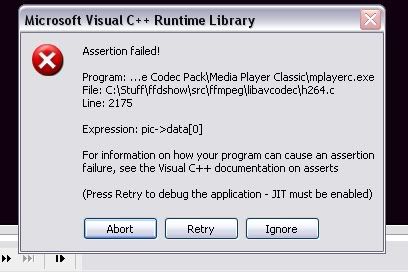
Thing is, mkvtoolnix wont let me use the extract option - just the other one.
that didn't work either.The quick and dirty way is to do it though VDubMod: select File > Open video file via AviSynth... Change Files of type: to All Files (*.*) and Template: to DirectShowSource. Then browse for your MKV, click Open and pray.
-
Purge

- Joined: Mon Oct 10, 2005 9:18 am
- Location: Under Aus

-
Nevann
- Joined: Sun Jan 07, 2007 10:02 pm

