Ok, so I'm a total newb when it comes to the ripping and capturing part of AMV editing, so forgive me if I'm horribly misunderstanding a concept. Until recently, I just relied on cheap software and friends to make XVid-encoded avi's to edit from. I pretty much got tired of video quality sucking ass and am trying to learn how to do it the way the pros do, and I've been studying the A&E tech guides like crazy. Finally I decided to take a dive and actually rip something. I'm at the stage of indexing videos with DGIndex, and I think I have a grasp on it, but I'm still trying to make sense of the Force FILM option.
So I've ripped some episodes from the Cowboy Bebop Remix box set, including the opening and closing credits (I know, I should have cut them out when ripping. I tried to do that, but cutting out the opening sometimes cut out footage following or preceding the opening, and I did try to cut the credits, but I accidentally only cut out the "next episode preview" and I really don't want to spend several hours reripping every episode.) Now, the A&E tech guide says that if the picture is <95% film then you should force film, but this is not a hard number, and if the final number can be as low as 90% and it will be fine as long as the only interlaced parts are the op/closing and bumpers. All indications point to that being the case, as when previewing, the number turns out to be around 96-9% FILM when on the parts of the actual show, but when it is on the studio bumpers/opening/credits, it drops to anywhere between 60 and 90%. Yet when it is done saving for the first time with Honor Pulldown Flags checked, the number displayed in the video type box is around 85-88%, well under 90 in any case.
My question is twofold:
1. Is the number displayed after the first save an average percentage or rather the percentage of the very last frame displayed?
2. Given the circumstances, would it still be acceptable to use Force FILM?
Need help with DGIndex
-
Davis 51

- Joined: Sun Feb 15, 2004 3:53 pm
- Status: Under The Box Productions
Need help with DGIndex
Under The Box Productions is my studio.
My youtube page is: http://www.youtube.com/user/UnderTheBoxProduct
My youtube page is: http://www.youtube.com/user/UnderTheBoxProduct
-
mirkosp

- The Absolute Mudman
- Joined: Mon Apr 24, 2006 6:24 am
- Status: (」・ワ・)」(⊃・ワ・)⊃
- Location: Gallarate (VA), Italy
- Contact:
Re: Need help with DGIndex
1. Yes, that number is an average.
2. My guess is that the episodes themselves were telecined, whereas the bumpers/opening/credits are actually full interlaced. This isn't an uncommon situation. What you should do, imho, is honor pulldown and IVTC in avisynth. Check for the opening and ending sequences (if you need them). My guess is that the text on them fades/scrolls at the full interlaced 29.97, but the animation itself is 23.976. This is a somewhat annoying situation for AMVs, as VFR in an NLE is close to impossible to successfully achieve, at least easily. Your best bet is probably set an ovr file for the opening/ending/bumpers so that you decimate the frames that only have the motion of the text. You'll want to keep the animation itself as smooth as possible. This can be a bit tricky/difficult if you're new to avisynth, but setting an override is actually pretty easy. However, I'm not entirely sure it's really worth it: if you're going to use the opening or ending sequences, chances are you're going to use the creditless versions that are probably somewhere in the extras, and I strongly believe that those are just telecined.
So to sum it up, you should probably IVTC in avisynth and if you need the op or ed just use the creditless version that are somewhere in the DVDs as extras.
If for some reasons the creditless OP/EDs aren't available, and you plan to use either, then you'll have to make an ovr file for the decimation.
If you don't have to use the ovr, then use this to IVTC:
(shamelessly stolen from Mister Hatt lol)
If you DO have to use the ovr, then:
You'll then have to make a txt file with a code that might be similar to this
These are just samples. Basically, an overrides file tells tdecimate which frames to keep and which to drop. You wanna keep all the frames with the actual animation and drop the ones which just have the scrolling text or whatever is full interlaced that you don't really care about.
The first line tells that frame 2753 should be dropped.
The second line says that from frame 3456 to frame 3745 there is a pattern in which in every group of five frames, the one to drop is the fourth. So between 3456, 3457, 3458, 3459, and 3460, the one that would get removed is 3459, and then it would continue with that pattern.
The third line says that frame 4826 should by all means be kept.
Using lines like these depending on your needs you'll be able to properly decimate even the op/ed/bumpers ─ if you don't do this, then chances are that the animation will be jerky, as tdecimate sees that something is moving in the frame even if it's just text, so a duplicate frame of the animation gets kept, and a unique frame that keeps the animation smooth gets dropped instead: this is something you'd want to avoid.
Again, I'll reiterate, you'll only need to use the override if you need to use the opening/ending/bumpers in your amv and you don't have creditless versions of those in your DVDs. If you have creditless versions, then just use the simple ivtc script on everything and you'll very likely be good to go.
Sorry, this post was a bit on the long side, but hopefully you didn't TL;DR it... >_>
2. My guess is that the episodes themselves were telecined, whereas the bumpers/opening/credits are actually full interlaced. This isn't an uncommon situation. What you should do, imho, is honor pulldown and IVTC in avisynth. Check for the opening and ending sequences (if you need them). My guess is that the text on them fades/scrolls at the full interlaced 29.97, but the animation itself is 23.976. This is a somewhat annoying situation for AMVs, as VFR in an NLE is close to impossible to successfully achieve, at least easily. Your best bet is probably set an ovr file for the opening/ending/bumpers so that you decimate the frames that only have the motion of the text. You'll want to keep the animation itself as smooth as possible. This can be a bit tricky/difficult if you're new to avisynth, but setting an override is actually pretty easy. However, I'm not entirely sure it's really worth it: if you're going to use the opening or ending sequences, chances are you're going to use the creditless versions that are probably somewhere in the extras, and I strongly believe that those are just telecined.
So to sum it up, you should probably IVTC in avisynth and if you need the op or ed just use the creditless version that are somewhere in the DVDs as extras.
If for some reasons the creditless OP/EDs aren't available, and you plan to use either, then you'll have to make an ovr file for the decimation.
If you don't have to use the ovr, then use this to IVTC:
Code: Select all
TFM(mode=1,pp=5,slow=2,micmatching=2,clip2=TDeint(mode=2,type=3))
TDecimate()If you DO have to use the ovr, then:
Code: Select all
TFM(mode=1,pp=5,slow=2,micmatching=2,clip2=TDeint(mode=2,type=3))
TDecimate(ovr="overrides.txt")Code: Select all
2753 -
3456,3745 +++-+
4826 +The first line tells that frame 2753 should be dropped.
The second line says that from frame 3456 to frame 3745 there is a pattern in which in every group of five frames, the one to drop is the fourth. So between 3456, 3457, 3458, 3459, and 3460, the one that would get removed is 3459, and then it would continue with that pattern.
The third line says that frame 4826 should by all means be kept.
Using lines like these depending on your needs you'll be able to properly decimate even the op/ed/bumpers ─ if you don't do this, then chances are that the animation will be jerky, as tdecimate sees that something is moving in the frame even if it's just text, so a duplicate frame of the animation gets kept, and a unique frame that keeps the animation smooth gets dropped instead: this is something you'd want to avoid.
Again, I'll reiterate, you'll only need to use the override if you need to use the opening/ending/bumpers in your amv and you don't have creditless versions of those in your DVDs. If you have creditless versions, then just use the simple ivtc script on everything and you'll very likely be good to go.
Sorry, this post was a bit on the long side, but hopefully you didn't TL;DR it... >_>

-
Davis 51
- Joined: Sun Feb 15, 2004 3:53 pm
- Status: Under The Box Productions
Re: Need help with DGIndex
First, thanks for the reply, and yes, I read the whole thing  . I should probably clear a few things up.
I only ripped the ending by accident, and I only ripped the opening because the chapter was sometimes attached to show footage (in almost all cases, the footage parts were around 97% FILM. I have no use for the actual opening and ending, nor do I have use for the bumpers. If I did, however, those are on one of the DVD extras and I can always go back and rip them, but it will certainly NOT be for a project like this (if you've seen Cowboy Bebop you'll know they're basically fancy sideshows).
Unfortunately, I have no idea what an ovr is (which is good because it sounds like I don't need it), and some of your acronyms are flying over my head. What is IVTC, and what's a VFR?. Like I said I'm really new at ripping things.
Lastly, if the majority of the video except for the opening is telecined, (again, my understanding of this is elementary, so correct me if I'm wrong), and I shouldn't use Force FILM on telecined footage, then when would I use Force FILM?
. I should probably clear a few things up.I only ripped the ending by accident, and I only ripped the opening because the chapter was sometimes attached to show footage (in almost all cases, the footage parts were around 97% FILM. I have no use for the actual opening and ending, nor do I have use for the bumpers. If I did, however, those are on one of the DVD extras and I can always go back and rip them, but it will certainly NOT be for a project like this (if you've seen Cowboy Bebop you'll know they're basically fancy sideshows).
Unfortunately, I have no idea what an ovr is (which is good because it sounds like I don't need it), and some of your acronyms are flying over my head. What is IVTC, and what's a VFR?. Like I said I'm really new at ripping things.
Lastly, if the majority of the video except for the opening is telecined, (again, my understanding of this is elementary, so correct me if I'm wrong), and I shouldn't use Force FILM on telecined footage, then when would I use Force FILM?
Under The Box Productions is my studio.
My youtube page is: http://www.youtube.com/user/UnderTheBoxProduct
My youtube page is: http://www.youtube.com/user/UnderTheBoxProduct
-
Davis 51
- Joined: Sun Feb 15, 2004 3:53 pm
- Status: Under The Box Productions
Re: Need help with DGIndex
Stupid me, I just read what IVTC stands for. It was right in front of me. 
Still puzzled about the rest of it. To clarify my last question, I guess what I'm also trying to ask is how you distinguish from Telecine and Progressive footage. My DVD's are Region 1 (NOT PAL) if it helps.
Still puzzled about the rest of it. To clarify my last question, I guess what I'm also trying to ask is how you distinguish from Telecine and Progressive footage. My DVD's are Region 1 (NOT PAL) if it helps.
Under The Box Productions is my studio.
My youtube page is: http://www.youtube.com/user/UnderTheBoxProduct
My youtube page is: http://www.youtube.com/user/UnderTheBoxProduct
-
Mister Hatt
- Joined: Tue Dec 25, 2007 8:26 am
- Status: better than you
Re: Need help with DGIndex
You can have both at the SAME TIME. Shock/horror/nowai. Telecined footage is most often coded interlaced but I have seen progressively coded telecine around the place. It is goddamn evil. Generally your source indexer will tell you which you have. If you want to actually know what individual frames are (in the event of mixed footage) then Info() can tell you, and AssumeFrameBased()/AssumeFieldBased() can let you force coding.
Force FILM should be used when you have SOFT telecine. The difference is that soft telecine uses RFF markers to tell your player itself to telecine one field with another, while hard telecine has the fully encoded fields in the stream. Force FILM will ignore the RFF markers and return 24-1% videos to that actual rate. It will however also force non 24-1% parts to be so as well, so use it carefully.
I would totally just use YATTA for handling VFR and friends, "mark c matches as vfr" is awesome. It has a really nice representation of how your fields are linked, but it's not very nub friendly.
Force FILM should be used when you have SOFT telecine. The difference is that soft telecine uses RFF markers to tell your player itself to telecine one field with another, while hard telecine has the fully encoded fields in the stream. Force FILM will ignore the RFF markers and return 24-1% videos to that actual rate. It will however also force non 24-1% parts to be so as well, so use it carefully.
I would totally just use YATTA for handling VFR and friends, "mark c matches as vfr" is awesome. It has a really nice representation of how your fields are linked, but it's not very nub friendly.
-
Davis 51
- Joined: Sun Feb 15, 2004 3:53 pm
- Status: Under The Box Productions
Re: Need help with DGIndex
I reiterate, your acronyms are flying over my head.
Ok, so here's a screenshot of the info box from a random episode, previewed with Honor Pulldown Flags selected.
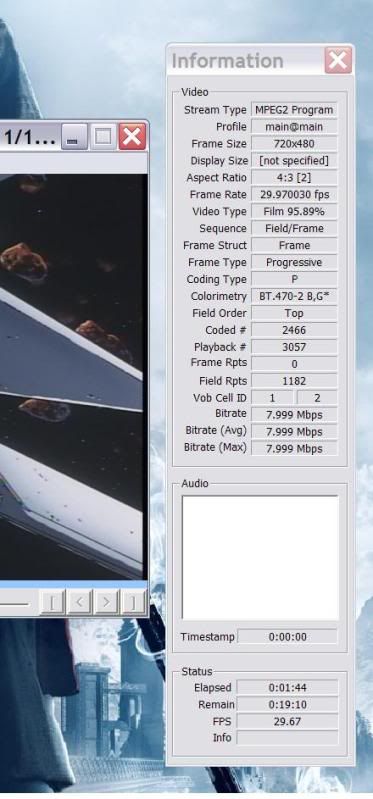
I just noticed that it lists frame type as progressive. Does that mean it is progressive?
Also, when I render it with Honor Flag Pulldown, using the info() thing, how do I read it? As in, what variable am I looking for to tell me if the footage is Progressive and thus can be force filmed?
Ok, so here's a screenshot of the info box from a random episode, previewed with Honor Pulldown Flags selected.
I just noticed that it lists frame type as progressive. Does that mean it is progressive?
Also, when I render it with Honor Flag Pulldown, using the info() thing, how do I read it? As in, what variable am I looking for to tell me if the footage is Progressive and thus can be force filmed?
Under The Box Productions is my studio.
My youtube page is: http://www.youtube.com/user/UnderTheBoxProduct
My youtube page is: http://www.youtube.com/user/UnderTheBoxProduct
-
Mister Hatt
- Joined: Tue Dec 25, 2007 8:26 am
- Status: better than you
Re: Need help with DGIndex
VFR is Variable Frame Rate. RFF is Repeat Field Flag; it tells the video decoder to repeat a field at a location, so as to do an on the fly telecine. 24-1% (and other variations) means 24fps with a 1% slowdown, so you can think of it like 24/1.001, or 24000/1001, which is 23.976. Is your whole video progressive as per that screenshot, or does it say interlaced at times? If it's entirely progressive, you just have VFR and possibly hard progressively coded telecine. VFR is easy to deal with while progressive telecine WILL make you want to kill yourself and/or the authoring house for your footage. If it's partially interlaced, then you probably have progressive FILM sections and interlaced credits, which is pretty common. You could also have something like Bakemonogatari where it is telecined mostly, with some progressive sections at both 24-1% and 30-1%, but given your percentage FILM there I don't think so. I'll take a guess that you have option 2 though, progressive main and interlaced credits. No telecine whatsoever. The best way to figure out which is to just watch it though.
-
Davis 51
- Joined: Sun Feb 15, 2004 3:53 pm
- Status: Under The Box Productions
Re: Need help with DGIndex
MotherFUCK!
So I rewatched the first episode, watching carefully the Frame Type Field, and there are sections where it visibly switches to interlaced. Like when a character looks up close at a TV screen (in show), and a scene inside a hypergate, or when there is a bunch of fancy montage-cutting (a signature trademark of the director Shinichiro Watanabe grrrrrrrrr) both are entirely interlaced.
I'm pretty sure at this point my footage is a hybrid source, using interlacing during scenes where CG has been added to enhance things, which is why the percentage on average kept falling just short of 90ish.
Fortunately, its very spacial, and when it does show up its smooshed in between large amounts of non-interlaced footage (labeled progressive), so I'm going to actually try and IVTC the thing.
So I rewatched the first episode, watching carefully the Frame Type Field, and there are sections where it visibly switches to interlaced. Like when a character looks up close at a TV screen (in show), and a scene inside a hypergate, or when there is a bunch of fancy montage-cutting (a signature trademark of the director Shinichiro Watanabe grrrrrrrrr) both are entirely interlaced.
I'm pretty sure at this point my footage is a hybrid source, using interlacing during scenes where CG has been added to enhance things, which is why the percentage on average kept falling just short of 90ish.
Fortunately, its very spacial, and when it does show up its smooshed in between large amounts of non-interlaced footage (labeled progressive), so I'm going to actually try and IVTC the thing.
You're damn right about that.progressive telecine WILL make you want to kill yourself and/or the authoring house for your footage
Under The Box Productions is my studio.
My youtube page is: http://www.youtube.com/user/UnderTheBoxProduct
My youtube page is: http://www.youtube.com/user/UnderTheBoxProduct
-
Mister Hatt
- Joined: Tue Dec 25, 2007 8:26 am
- Status: better than you
Re: Need help with DGIndex
You haven't confirmed that your material is telecined yet, don't do that. Take a look at the progressive bits. What framerate are they?
If this is Bebop, then you don't have progressive telecine, just hybrid. The question is "are the interlaced parts telecine or pure interlacing?" Answer that and it should become apparent what to do.
You've interested me. This doesn't happen often. Link me a clip of the vid with both progressive and interlaced bits in it so I can take a look. I think I know what you're dealing with though, but I'd like to check.
If this is Bebop, then you don't have progressive telecine, just hybrid. The question is "are the interlaced parts telecine or pure interlacing?" Answer that and it should become apparent what to do.
You've interested me. This doesn't happen often. Link me a clip of the vid with both progressive and interlaced bits in it so I can take a look. I think I know what you're dealing with though, but I'd like to check.
-
Davis 51
- Joined: Sun Feb 15, 2004 3:53 pm
- Status: Under The Box Productions
Re: Need help with DGIndex
It is Bebop, the new rerelease discs.
I'll make a video or something for you as soon as I get home tonight, and I'll probably send it to you over PM to protect my privacy (desktop has some filenames w/personal information on them). I've never had to take a video from my desktop, so would FRAPS be ok to use? I'll probably set up a private vid on youtube and grant you permission to see it.
A prime example would be the hypergate scene in the first episode (which is unfortunately, one of the keystone points in my vid). It's listed as interlaced up until they pass through the gate, where it switches back to progressive.
In the meantime I can tell you right now that when the word 'progressive' is shown when I'm honoring pulldown flags, the framerate is 29.97 as per my screenshot. Don't remember the framerate on the interlaced parts, but it'll be on that vid.
I'll make a video or something for you as soon as I get home tonight, and I'll probably send it to you over PM to protect my privacy (desktop has some filenames w/personal information on them). I've never had to take a video from my desktop, so would FRAPS be ok to use? I'll probably set up a private vid on youtube and grant you permission to see it.
A prime example would be the hypergate scene in the first episode (which is unfortunately, one of the keystone points in my vid). It's listed as interlaced up until they pass through the gate, where it switches back to progressive.
In the meantime I can tell you right now that when the word 'progressive' is shown when I'm honoring pulldown flags, the framerate is 29.97 as per my screenshot. Don't remember the framerate on the interlaced parts, but it'll be on that vid.
Under The Box Productions is my studio.
My youtube page is: http://www.youtube.com/user/UnderTheBoxProduct
My youtube page is: http://www.youtube.com/user/UnderTheBoxProduct