hey guys i'm new here and well i got a problem with my avi files in Sony Vegas
and sry if i post it into the wrong thread >.<
well anyway... i CAN open .avi files in Vegas (thanks to k-light) but my problem is ... if i go to Pan/Crop the whole stream is black... can somebody help me?
i dunno if it helps but i made a video with this
http://www.youtube.com/watch?v=DzFAZXmE2L8
i use
Window 7 Ultimate 64bit
i don't know if it's either a problem with Vegas or my codec problems... because well i already installed K-Light (which works perfectly sice i can open the avi files with it) and i also insatlled AMVApp ; CCCP; Xvid; DivX;
.avi files in Sony Vegas
-
Kariudo

- Twilight prince
- Joined: Fri Jul 15, 2005 11:08 pm
- Status: 1924 bots banned and counting!
- Location: Los taquitos unidos
- Contact:
Re: .avi files in Sony Vegas
First thing, you don't need all the codecs and packs that you installed. You can start to run into problems when you have more than one codec installed to read the same thing (or multiple versions of the same codec).
-I don't know which version of the amvapp you have installed, but it may have already come with ffdshow (one of the main components of CCCP).
-k-lite is bad, and should be uninstalled (it also contains ffdshow, along with about 3 copies of every other codec in its list)
-CCCP should be able to take care of the vast majority of files that you run into, including divx and xvid. It shouldn't hurt to leave divx and xvid installed though (might need to configure ffdshow if you run into problems, but we'll cross that bridge when/if you get there)
Now onto the video problem. Your .avi files are probably encoded with either divx or xvid.
You can get MediaInfo which will tell you (among other things) what codec your file was encoded with. GSpot should also work fine in this case (GSpot doesn't need to be installed like MediaInfo does, you just run the .exe)
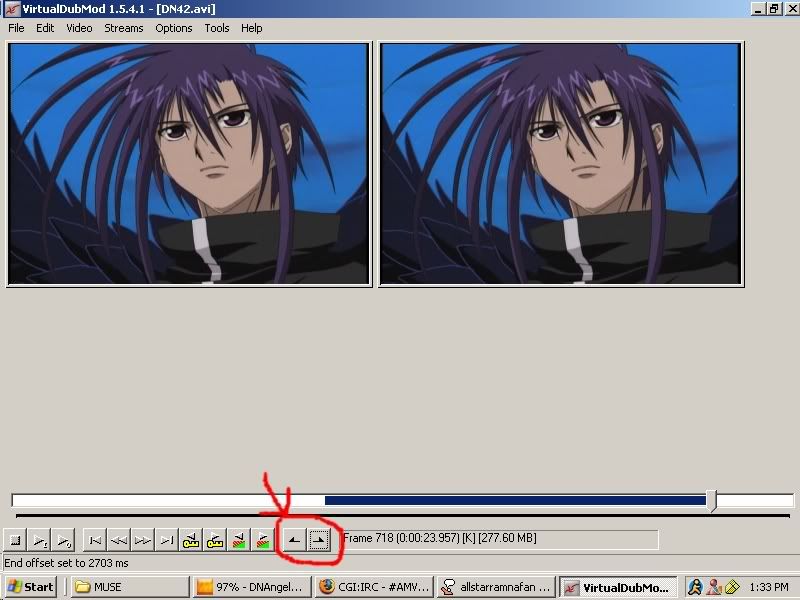
Without going into too much detail, xvid and divx are bad for editing and usually will mess things up at some point. Using lossless codecs like huffyuv or lagarith is preferred for editing. Lossless = big files, so unless you have tons of patience and hard drive space you should probably not re-encode entire episodes with a lossless codec. Instead, you can open your files with virtualdub and select the parts of the episode that you want to use and only re-encode those parts.
queue the famous quote (virtualdub and virtualdub mod are pretty similar, but you should get virtualdub if you don't already have it)
-I don't know which version of the amvapp you have installed, but it may have already come with ffdshow (one of the main components of CCCP).
-k-lite is bad, and should be uninstalled (it also contains ffdshow, along with about 3 copies of every other codec in its list)
-CCCP should be able to take care of the vast majority of files that you run into, including divx and xvid. It shouldn't hurt to leave divx and xvid installed though (might need to configure ffdshow if you run into problems, but we'll cross that bridge when/if you get there)
Now onto the video problem. Your .avi files are probably encoded with either divx or xvid.
You can get MediaInfo which will tell you (among other things) what codec your file was encoded with. GSpot should also work fine in this case (GSpot doesn't need to be installed like MediaInfo does, you just run the .exe)
Without going into too much detail, xvid and divx are bad for editing and usually will mess things up at some point. Using lossless codecs like huffyuv or lagarith is preferred for editing. Lossless = big files, so unless you have tons of patience and hard drive space you should probably not re-encode entire episodes with a lossless codec. Instead, you can open your files with virtualdub and select the parts of the episode that you want to use and only re-encode those parts.
queue the famous quote (virtualdub and virtualdub mod are pretty similar, but you should get virtualdub if you don't already have it)
JaddziaDax wrote:open the video file in virtualdub mod go to video->compression->Huffyuv
then go to file->save
use those to mark the beginning and the end of the "clips" you want so you can save room


-
HolyKami

- Joined: Wed Apr 14, 2010 11:02 am
Re: .avi files in Sony Vegas
first ...thank you so much for the information (=
i installed media info...and almost all avi.files are with xvid... and some are with divx or divx5...
now... well i re-installed Vegas and un-installed ALL codecs...
can you give me an advice for installing which codec...
i now know that k-light isn't that good... but well which version of AMVapp is the newest/ best for my operating system... ? i seacherd for it.. and i don't know ....but the 3.0 beta...is it the newest or are there any other versions ...
yeah i know the programm virtualdub but i WANT to edit with .avi ...and not recode several parts, which i have to save and so on... and i also don't want to convert all avi files into mp4... =.=
i installed media info...and almost all avi.files are with xvid... and some are with divx or divx5...
now... well i re-installed Vegas and un-installed ALL codecs...
can you give me an advice for installing which codec...
i now know that k-light isn't that good... but well which version of AMVapp is the newest/ best for my operating system... ? i seacherd for it.. and i don't know ....but the 3.0 beta...is it the newest or are there any other versions ...
yeah i know the programm virtualdub but i WANT to edit with .avi ...and not recode several parts, which i have to save and so on... and i also don't want to convert all avi files into mp4... =.=
-
Kariudo
- Twilight prince
- Joined: Fri Jul 15, 2005 11:08 pm
- Status: 1924 bots banned and counting!
- Location: Los taquitos unidos
- Contact:
Re: .avi files in Sony Vegas
Amvapp v3 is the current one (not the beta one). Other than that, I'd recommend CCCP for codecs, you shouldn't need anything more (CCCP, Xvid, Huffyuv, and Lagarith pretty much take care of the field)
Unfortunately, the easiest way to get everything working is to re-encode your stuff with Lagarith. Like I said before, divx and xvid are not meant for editing, so you're going to have to do some additional work. Using vdub to re-encode means your clips will still be in .avi (no idea where you got the idea that it would be .mp4)
Unfortunately, the easiest way to get everything working is to re-encode your stuff with Lagarith. Like I said before, divx and xvid are not meant for editing, so you're going to have to do some additional work. Using vdub to re-encode means your clips will still be in .avi (no idea where you got the idea that it would be .mp4)
-
HolyKami
- Joined: Wed Apr 14, 2010 11:02 am
Re: .avi files in Sony Vegas
thank youu *O*
well i now downloaded the .zip file... and which setup i have to run?... sry but i'm really helpless now
and nooo you got it wrong... sry for confusing you... i mean coverting my .avi into .mp4 files with a converter... not an encoder
... do you have to save the encoded part of the file if you use Virtualdub? @_@
well i now downloaded the .zip file... and which setup i have to run?... sry but i'm really helpless now
and nooo you got it wrong... sry for confusing you... i mean coverting my .avi into .mp4 files with a converter... not an encoder
... do you have to save the encoded part of the file if you use Virtualdub? @_@
-
Enigma

- That jolly ol' bastid
- Joined: Sat Mar 07, 2009 3:55 pm
- Status: Free
- Location: California
Re: .avi files in Sony Vegas
HolyKami wrote:thank youu *O*
well i now downloaded the .zip file... and which setup i have to run?... sry but i'm really helpless now
and nooo you got it wrong... sry for confusing you... i mean coverting my .avi into .mp4 files with a converter... not an encoder
... do you have to save the encoded part of the file if you use Virtualdub? @_@
Setup everything, You need to make clips/or save the whole movie then save/encode them...using virtual dub
-
Kariudo
- Twilight prince
- Joined: Fri Jul 15, 2005 11:08 pm
- Status: 1924 bots banned and counting!
- Location: Los taquitos unidos
- Contact:
Re: .avi files in Sony Vegas
Converting to .mp4 wouldn't help (and converting here would still be re-encoding), as x.264 is just as bad for editing as divx/xvid (unless you configure it properly).HolyKami wrote:and nooo you got it wrong... sry for confusing you... i mean coverting my .avi into .mp4 files with a converter... not an encoder
... do you have to save the encoded part of the file if you use Virtualdub? @_@
Encoding happens when you save clips with vdub, so I guess that would be a yes
-
HolyKami
- Joined: Wed Apr 14, 2010 11:02 am
Re: .avi files in Sony Vegas
hey guys!!
thanks sooooo much for your support ... really appreciate it
well since AMVapp and other stuff doesn't work for me... unfortunately... don't ask me why... i also don't know
i downloaded the Windows 7 codec pack ... and OMG O.O ... it works.... .avi in vegas AND Pan/Crop !!!
these days i asked myself some questions about it and well... 2 months ago i had Vista and on Vista the .avi files worked in Vegas... but since i upgraded to 7 it didn't ... but now thanks to the codec pack it works again
never the less: thank you guys !
thanks sooooo much for your support ... really appreciate it
well since AMVapp and other stuff doesn't work for me... unfortunately... don't ask me why... i also don't know
i downloaded the Windows 7 codec pack ... and OMG O.O ... it works.... .avi in vegas AND Pan/Crop !!!
these days i asked myself some questions about it and well... 2 months ago i had Vista and on Vista the .avi files worked in Vegas... but since i upgraded to 7 it didn't ... but now thanks to the codec pack it works again
never the less: thank you guys !
-
Kariudo
- Twilight prince
- Joined: Fri Jul 15, 2005 11:08 pm
- Status: 1924 bots banned and counting!
- Location: Los taquitos unidos
- Contact:
Re: .avi files in Sony Vegas
It's not .avi that's the problem
It's the codec it's encoded with (xvid in this case)
I'll say this again
DON'T EDIT WITH DIVX OR XVID
really, it's a bad idea. If you want me to get into the nitty gritty then I will, but for now suffice it to say that you will eventually run into black clips again and you may lose your entire project.
If you don't believe me, read through this thread
It's the codec it's encoded with (xvid in this case)
I'll say this again
DON'T EDIT WITH DIVX OR XVID
really, it's a bad idea. If you want me to get into the nitty gritty then I will, but for now suffice it to say that you will eventually run into black clips again and you may lose your entire project.
If you don't believe me, read through this thread
-
HolyKami
- Joined: Wed Apr 14, 2010 11:02 am
Re: .avi files in Sony Vegas
ok that thread was random XDD...
but i believe you ... no lies .. i really believe you that divx and xvid are bad to edit
but just for now i will still edit with it... if i have more overview about virtualdub and others i will encode the divx/xvid to huffyuv or lagarith and then work with the lossless files
but i believe you ... no lies .. i really believe you that divx and xvid are bad to edit
but just for now i will still edit with it... if i have more overview about virtualdub and others i will encode the divx/xvid to huffyuv or lagarith and then work with the lossless files