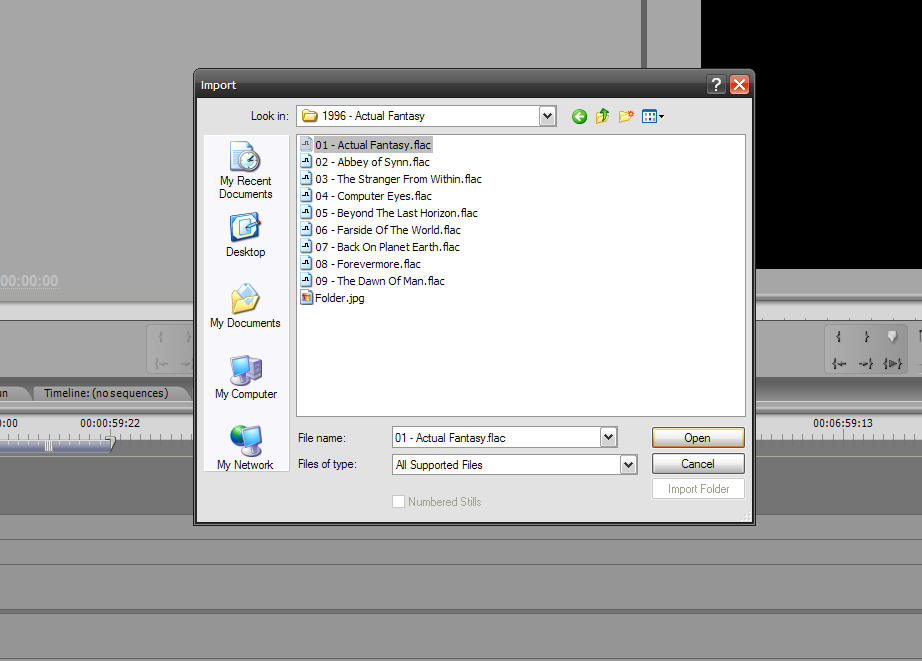
Crashes Premiere when I attempt to import a flac file.

Any suggestions/fixes?


PPNSteve wrote:Well It doesn't work in CS3 on WinXP
Crashes Premiere when I attempt to import a flac file.
Any suggestions/fixes?
Length: 105 secondsValion wrote:PPNSteve wrote:Well It doesn't work in CS3 on WinXP
Crashes Premiere when I attempt to import a flac file.
Any suggestions/fixes?
Can you tell me exactly what type of file you're opening (channels, bits, etc), and how it crashes? I'll try to find a computer with CS3 on it to test with.


It actually should work in CS2 (definately not anything ealier, though), but similar to CS3, I don't have any way to easily test it.Emotive wrote:Has anyone tried running this on Premiere Pro 2? I'm too kvlt to get the newer ones.
I'm referring to premiere pro 2, not CS2. Guess I'll try anyway..Valion wrote:I've uploaded a new installer with 1.1, which fixes the channel mapping problem and the 24-bit problem. I'm still looking for a place to debug the plugin on CS3.
It actually should work in CS2 (definately not anything ealier, though), but similar to CS3, I don't have any way to easily test it.Emotive wrote:Has anyone tried running this on Premiere Pro 2? I'm too kvlt to get the newer ones.
Sorry, meant Pro 2.0. Premiere CS2 doesn't actually exist.Emotive wrote:I'm referring to premiere pro 2, not CS2. Guess I'll try anyway..Valion wrote:I've uploaded a new installer with 1.1, which fixes the channel mapping problem and the 24-bit problem. I'm still looking for a place to debug the plugin on CS3.
It actually should work in CS2 (definately not anything ealier, though), but similar to CS3, I don't have any way to easily test it.Emotive wrote:Has anyone tried running this on Premiere Pro 2? I'm too kvlt to get the newer ones.