Basically this is a forum for all MY question I have to be posted and all attemtps of answer can be given to me. I deal with unusual video editing problems on a monthly bases it seems. So any time I have a Question I'll just post it here. If you have a suggestion or answers please put it the question in a quote box and then answer it.
I'll start off with two questions
QUESTION 1:
I have magix movie edit pro 12 installed on my newer laptop and now on my older pc. What I'm real confused about is that on my laptop some video files will load with out troubles while others (with the same settings) will slow the program up rendering it impossible to use them and some show up appearing corrupt or say the file is not supported. HOWEVER on the pc, the same exact files will load on the program with absolutely no problems, No slow downs, and even the files that had no problem play better in the program. I have the same avmapp installed on both the laptop and pc (I'm think).
So does anyone know what could be causing this on my laptop? I updated the heck out of the program but it hasn't solved any problems.
QUESTION 2
Why is it that when you take files that are supposed to be a certain frame rate (29.97) are put into my video program and then exported as an avi with the exact same frame rate and yet a little less than half way through the video the video is behind the auido at an increasing rate?
Osakaisthebombs question page
-
Osakaisthebomb

- Joined: Sat Jul 09, 2005 5:05 pm
- Status: 16 kib limit is a crime.
- Location: Florence,Alabama
- Contact:
-
Phantasmagoriat

- Joined: Mon Feb 06, 2006 11:26 pm
- Status: ☁SteamPunked≈☂
- Contact:
Re: Osakaisthebombs question page
I have a couple thoughts, but first, do you have the CCCP?Osakaisthebomb wrote:QUESTION 1:
I have magix movie edit pro 12 installed on my newer laptop and now on my older pc. What I'm real confused about is that on my laptop some video files will load with out troubles while others (with the same settings) will slow the program up rendering it impossible to use them and some show up appearing corrupt or say the file is not supported. HOWEVER on the pc, the same exact files will load on the program with absolutely no problems, No slow downs, and even the files that had no problem play better in the program. I have the same avmapp installed on both the laptop and pc (I'm think).
So does anyone know what could be causing this on my laptop? I updated the heck out of the program but it hasn't solved any problems.
If that doesn't help, I'll need to know what type of files they are:
-video (ex. HUFFYUV XviD)
-audio (ex. mp3 PCM ...might not have audio either...)
-container (ex. .avi .mp4)
If you can load them into virtualdub, it might tell you under File Information, or you could use a program like gspot
also, when you say 'slow the program' do you mean just when importing the files into Magix, or while you are editing?
If I had to guess, I would say it's a playback issue; hopefully the CCCP will fix that.Osakaisthebomb wrote:QUESTION 2
Why is it that when you take files that are supposed to be a certain frame rate (29.97) are put into my video program and then exported as an avi with the exact same frame rate and yet a little less than half way through the video the video is behind the auido at an increasing rate?
Also, I would need to know what settings you are exporting as [video codec; audio type; container is .avi]
PLAY FREEDOOM!! | Phan Picks! | THE424SHOW | YouTube | "Painkiller" | Vanilla MIDI's
"Effort to Understand; Effort to be Understood; to See through Different Eyes."
"Effort to Understand; Effort to be Understood; to See through Different Eyes."
-
Osakaisthebomb
- Joined: Sat Jul 09, 2005 5:05 pm
- Status: 16 kib limit is a crime.
- Location: Florence,Alabama
- Contact:
Re: Osakaisthebombs question page
I tried the thing you suggested to download but have no idea what it is or what it did. But it didn't seem to do anything. with the one file I tested it was really slow in "pre-loading" (as magix puts it) when I hit play, then at on point not to far in as is plays it suddenly freezes and I can't even minimize the program after a while it starts back but only to do it again seconds later. So to answer that last question it's kinda both but mostly in the play backs. Some files only load in part as well.Phantasmagoriat wrote: I have a couple thoughts, but first, do you have the CCCP?
If that doesn't help, I'll need to know what type of files they are:
-video (ex. HUFFYUV XviD)
-audio (ex. mp3 PCM ...might not have audio either...)
-container (ex. .avi .mp4)
If you can load them into virtualdub, it might tell you under File Information, or you could use a program like gspot
also, when you say 'slow the program' do you mean just when importing the files into Magix, or while you are editing?
the orders I gave to the editors was to send them export as a huffyuv but no direction on audio codec instructions. When I moved to the pc I had them re-send there files with the audio taken out. I haven't tried those files on my laptop yet. but I'm not expecting much. won't have a chance to do that in a while though.


-
Phantasmagoriat
- Joined: Mon Feb 06, 2006 11:26 pm
- Status: ☁SteamPunked≈☂
- Contact:
Re: Osakaisthebombs question page
The CCCP is a collection of codecs which are used to decode video files so that they can be used for things like playback and editing; So it won't seem like installing the cccp did anything, but it could make the difference between being able to use a video and not being able to use a video.
By the sounds of it, the video files you are trying to import into magix are not editing-friendly. Don't get me wrong, technically you can edit with them... but you are likely to encounter problems like slow seek times, and random crashes--> so it's usually not worth the hassle to edit with them, especially if you finish an entire amv, and something goes wrong
I can't say for sure if this is the case [since I don't know what type of files they are], but I'm just going to outline below some things you can do to ensure your files are editing-friendly:
[quote=""How to properly edit video; in a nutshell""]The only things you'll need: [no more no less]
-uninstall anything video-related that may conflict with each other; codecs etc...
-ccleaner might help clean your Registry after un-installations
-have the AMVapp installed
-install the CCCP
Video to use:
-only edit using big lossless .avi video sources; such as HUFFYUV.avi's
[but not Lagarith.avi's for WMM users. The necessary codecs come with the app]
--->your video sources can be created using VirtualDub [vdub comes with the app]
--->disable the audio stream under Streams>>Stream list
--->if vdub doesn't open the file Learn this
Audio to use:
-only use big lossless .wav audio sources in your editor
--->these can be created using Audacity [usually]
-use this guide as a reference [yes it is long]
if all the above is met... there aren't many reasons for errors.
[/quote]
There are some exceptions to this, such as editing using the Bait and Switch technique but for explanations of why you can and can't edit with certain files [such as DivX, WMV etc...] check out the following link:
http://www.aquilinestudios.org/DivX_Editing.html
One easy way out is to use VirtualDub to convert everything to .avi files encoded using the MidVid codec.
Hope this helps
By the sounds of it, the video files you are trying to import into magix are not editing-friendly. Don't get me wrong, technically you can edit with them... but you are likely to encounter problems like slow seek times, and random crashes--> so it's usually not worth the hassle to edit with them, especially if you finish an entire amv, and something goes wrong
I can't say for sure if this is the case [since I don't know what type of files they are], but I'm just going to outline below some things you can do to ensure your files are editing-friendly:
[quote=""How to properly edit video; in a nutshell""]The only things you'll need: [no more no less]
-uninstall anything video-related that may conflict with each other; codecs etc...
-ccleaner might help clean your Registry after un-installations
-have the AMVapp installed
-install the CCCP
Video to use:
-only edit using big lossless .avi video sources; such as HUFFYUV.avi's
[but not Lagarith.avi's for WMM users. The necessary codecs come with the app]
--->your video sources can be created using VirtualDub [vdub comes with the app]
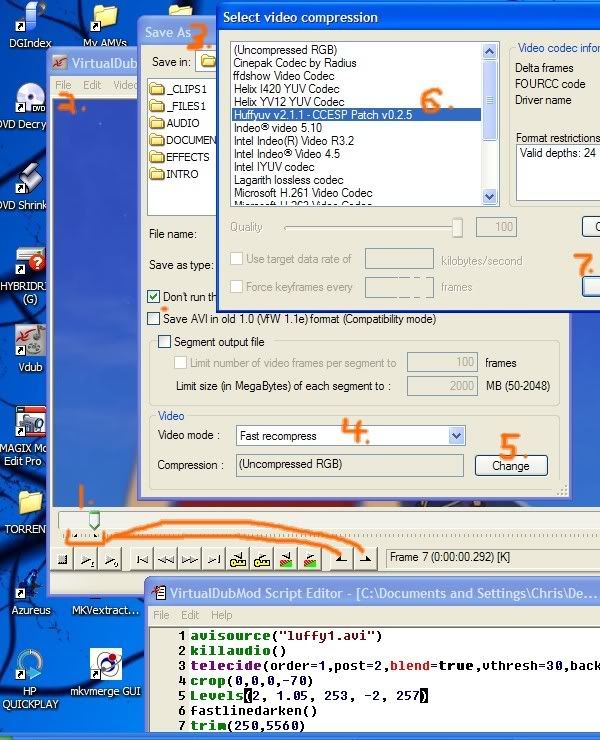
--->disable the audio stream under Streams>>Stream list
--->if vdub doesn't open the file Learn this
Audio to use:
-only use big lossless .wav audio sources in your editor
--->these can be created using Audacity [usually]
-use this guide as a reference [yes it is long]
if all the above is met... there aren't many reasons for errors.
[/quote]
There are some exceptions to this, such as editing using the Bait and Switch technique but for explanations of why you can and can't edit with certain files [such as DivX, WMV etc...] check out the following link:
http://www.aquilinestudios.org/DivX_Editing.html
One easy way out is to use VirtualDub to convert everything to .avi files encoded using the MidVid codec.
Hope this helps
PLAY FREEDOOM!! | Phan Picks! | THE424SHOW | YouTube | "Painkiller" | Vanilla MIDI's
"Effort to Understand; Effort to be Understood; to See through Different Eyes."
"Effort to Understand; Effort to be Understood; to See through Different Eyes."
-
Osakaisthebomb
- Joined: Sat Jul 09, 2005 5:05 pm
- Status: 16 kib limit is a crime.
- Location: Florence,Alabama
- Contact:
Re: Osakaisthebombs question page
I have trouble with this. I just don't know how to find everything and not loose important things. Are there anything specific you are referring to and what folder they may be under?Phantasmagoriat wrote:uninstall anything video-related that may conflict with each other; codecs etc..
-
Phantasmagoriat
- Joined: Mon Feb 06, 2006 11:26 pm
- Status: ☁SteamPunked≈☂
- Contact:
Re: Osakaisthebombs question page
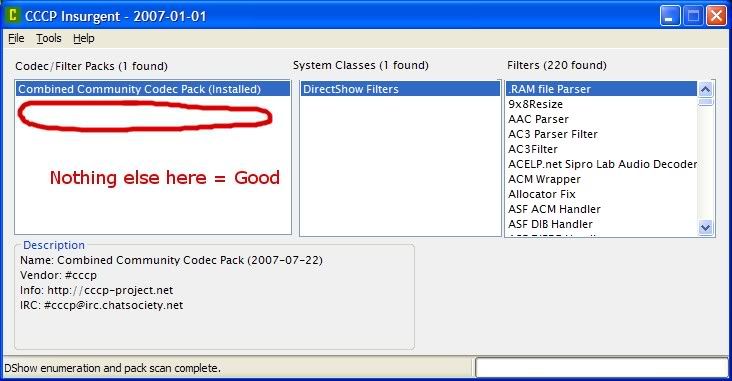
Yeah, that's always a difficult thing since a lot of people don't know what type of stuff they have installed on their computer. One thing that might help is the 'CCCP-Insurgent' [from the same site] which does a rough scan for extra codec packs you might have installed. If you find anything that's not grouped under the Combined Community Codec Pack, it gives you the filepath for you to find it and delete [or move somewhere else for safekeeping]. I'm not sure if this accounts for codecs installed in bizarre locations, but it's a good start. Another place you can look is the windows start menu that might show things like XviD or Haali Media splitter... or anything that sounds video-related. It might not be a bad idea to uninstall and reinstall both the AMVapp, and CCCP since default values may have been changed as well. One thing I should note however is that if you are in the middle of a project, this might make your project not work, so only do uninstalls and reinstalls before or after your projects are completed.Osakaisthebomb wrote:I have trouble with this. I just don't know how to find everything and not loose important things. Are there anything specific you are referring to and what folder they may be under?Phantasmagoriat wrote:uninstall anything video-related that may conflict with each other; codecs etc..
So I guess the take-home-message is try your best to provide a clean computer in order to avoid technical problems later on.
PLAY FREEDOOM!! | Phan Picks! | THE424SHOW | YouTube | "Painkiller" | Vanilla MIDI's
"Effort to Understand; Effort to be Understood; to See through Different Eyes."
"Effort to Understand; Effort to be Understood; to See through Different Eyes."
-
Krisqo

- Cooking Oil
- Joined: Mon Jul 07, 2003 1:22 pm
- Status: W.O.A (Waiting on Aion)
- Location: Moderating the Adobe Forums
Re: Osakaisthebombs question page
Just to toss my two cents in... I had a lot of trouble playing and editing videos when I had the CCCP installed. I forget what happened as it was the end of 2005 but I remember installing and uninstalling it several times. I've been using just the AMV App for 2 years and have had no problems except for a few stupid files but I know the problem with them already.
But the best thing to do is to start with a clean system. From then on, you can try adding new things and see if they work. If something messes up, uninstall and take note so not to do it again.
But the best thing to do is to start with a clean system. From then on, you can try adding new things and see if they work. If something messes up, uninstall and take note so not to do it again.

-
Osakaisthebomb
- Joined: Sat Jul 09, 2005 5:05 pm
- Status: 16 kib limit is a crime.
- Location: Florence,Alabama
- Contact:
Re: Osakaisthebombs question page
[quote="Phantasmagoriat"][/quote]
just delete and uninstalled amvapp and magix and anything else that I was comfortable delete. I didn't uninstall after effects because that was done by a guy who was also preparing my laptop along with installing it because it wouldn't install before. So I couldn't take the risk of it not installing again.
when I run CCCP Insurgent it has the packs classes and filters boxes. Filters shows 109 which is much less before I uninstalled everything. I tried looking up some of them and came up with a problem. one item was in a system 32 folder (or something like that) and it just seemed like something that I shouldn't even touch. When I tried looking up anything that began in avi it said "not found" and search came up empty.
Any suggestions? Or do I simply reinstall the same stuff I just deleted and uninstalled which was basically amvapp and magix? I don't see how that would make any difference if that is the case
just delete and uninstalled amvapp and magix and anything else that I was comfortable delete. I didn't uninstall after effects because that was done by a guy who was also preparing my laptop along with installing it because it wouldn't install before. So I couldn't take the risk of it not installing again.
when I run CCCP Insurgent it has the packs classes and filters boxes. Filters shows 109 which is much less before I uninstalled everything. I tried looking up some of them and came up with a problem. one item was in a system 32 folder (or something like that) and it just seemed like something that I shouldn't even touch. When I tried looking up anything that began in avi it said "not found" and search came up empty.
Any suggestions? Or do I simply reinstall the same stuff I just deleted and uninstalled which was basically amvapp and magix? I don't see how that would make any difference if that is the case
-
Phantasmagoriat
- Joined: Mon Feb 06, 2006 11:26 pm
- Status: ☁SteamPunked≈☂
- Contact:
Re: Osakaisthebombs question page
If you didn't find anything else, then you can run ccleaner,
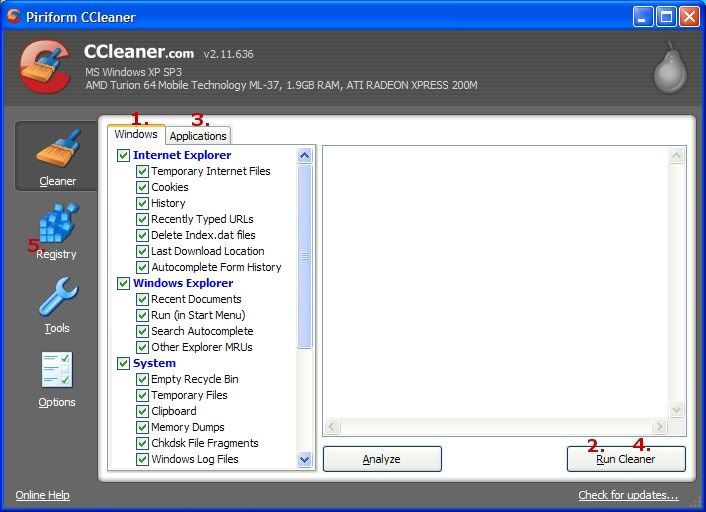
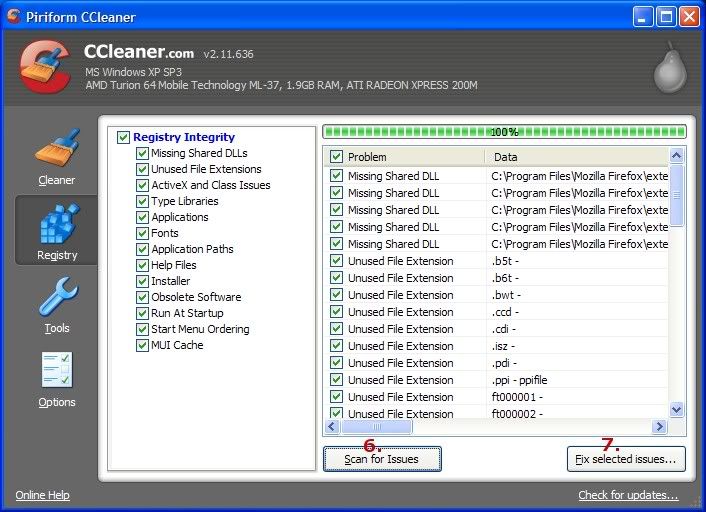
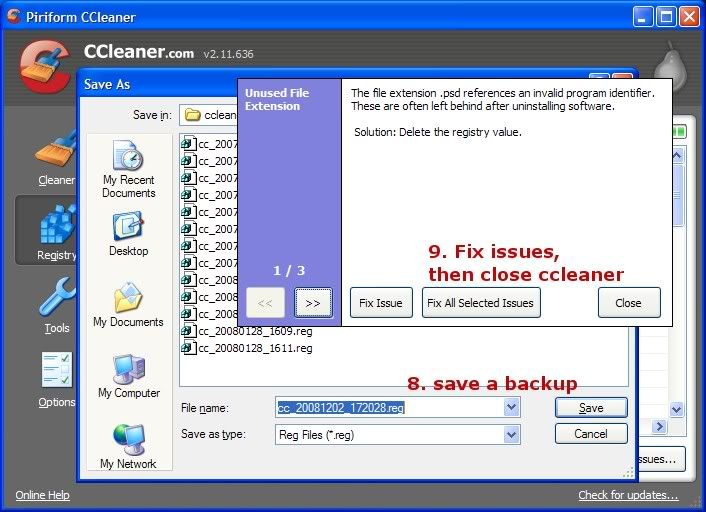
Hopefully you will have a cleaner computer now, maybe even run faster. [sometimes it helps, sometimes it doesn't...]
Then you can reinstall your programs. You can run ccleaner a second time after your software is installed too.
Once again, this might not be the issue, but it rules out the possibility that conflicting software are causing the problem.
PLAY FREEDOOM!! | Phan Picks! | THE424SHOW | YouTube | "Painkiller" | Vanilla MIDI's
"Effort to Understand; Effort to be Understood; to See through Different Eyes."
"Effort to Understand; Effort to be Understood; to See through Different Eyes."
-
Phantasmagoriat
- Joined: Mon Feb 06, 2006 11:26 pm
- Status: ☁SteamPunked≈☂
- Contact:
Re: Osakaisthebombs question page
Forgot to mention, when reinstalling, try to do it in the following order:
-your Editor [Magix]
-the AMVapp
-CCCP
-your Editor [Magix]
-the AMVapp
-CCCP
PLAY FREEDOOM!! | Phan Picks! | THE424SHOW | YouTube | "Painkiller" | Vanilla MIDI's
"Effort to Understand; Effort to be Understood; to See through Different Eyes."
"Effort to Understand; Effort to be Understood; to See through Different Eyes."