Artifacts in Anime/Toon Footage

This forum is for questions and discussion of all the aspects of handling your footage. If you have questions about capturing/ripping footage, AviSynth, or compression/encoding/converting, look here.

Artifacts in Anime/Toon Footage

Postby Anno-san » Wed Sep 15, 2010 11:34 am

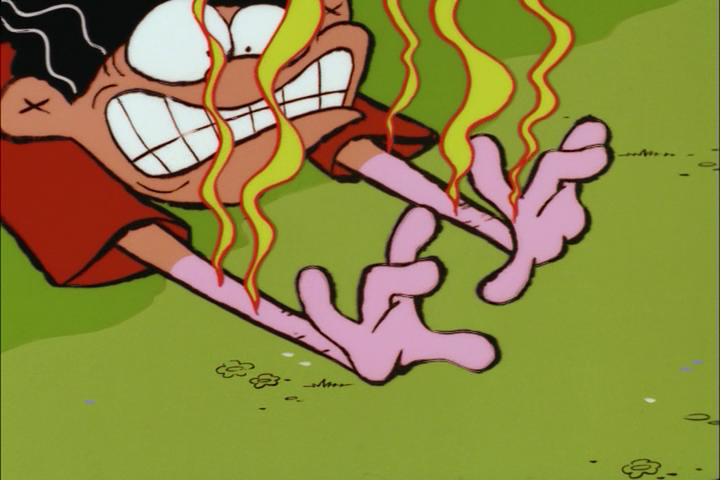
After several months of ripping anime and cartoon footage from R1 DVD and attempting to encode them, I have noticed several recurring artifacts in the source VOB files:

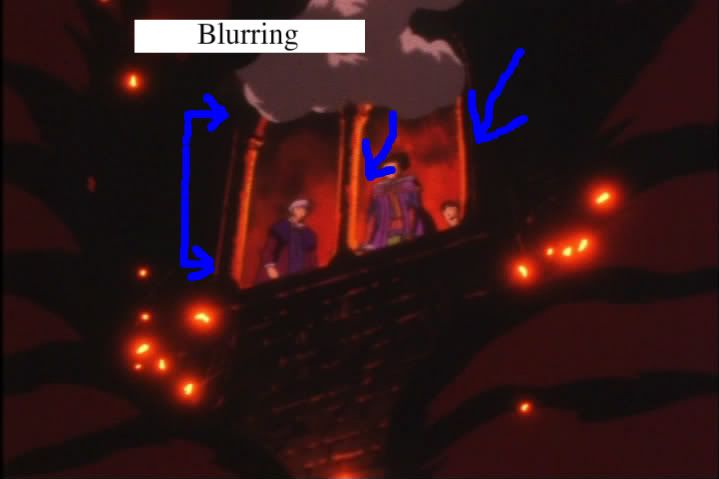
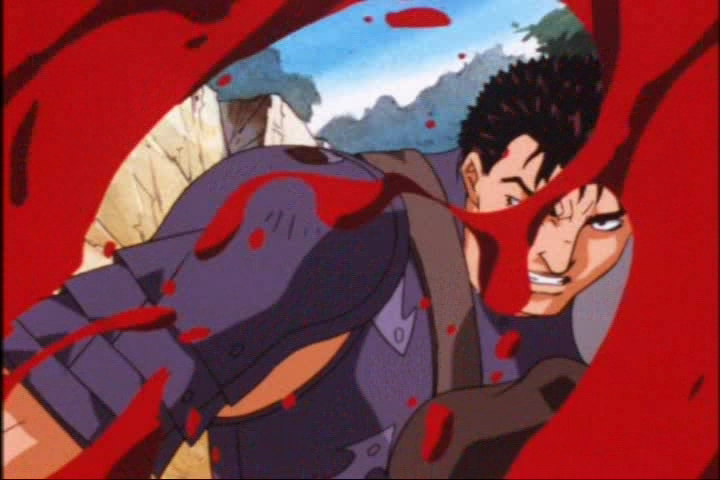
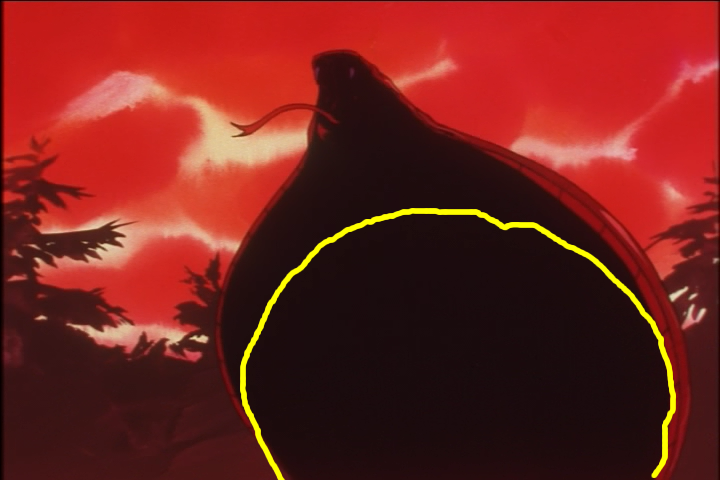
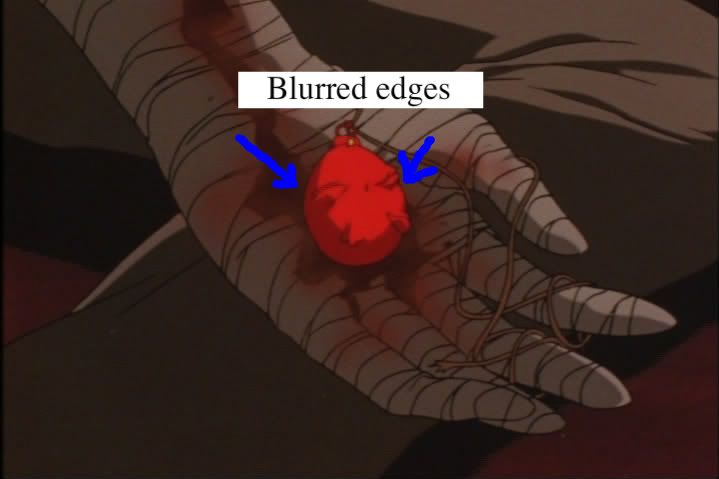
1. Blocking/Blurring on Edges

Some backgroung threads HERE.

evident here
Image

here on the redish edges
Image

here
Image

and here on the red areas
Image

I tried using Deblock. It didn't help.

I tried using Dehalo_alpha. I recieved the error: "there is no function named expand".

I tried using Edgecleaner and awrpsharp. It gave the error: "there is no function named awarpsharp" for both commands, even though awarpsharp.dll WAS in my plugins folder.

I tried using LSFmod. That script ran but made little to no difference.


2. Heavy noise and grain

I used temporaldegrain() and that worked well in some cases. Other times it caused large patches of fuzzed discolorations on colors in the background.

Anyway, doom9 is comprehensive but for whatever reason, I guess they randomly ignore certain users for no adequately explored reason whenever they feel like it. So I haven't received much help at all there.

Some questions to conclude:

1. Why does footage from DVD look so horrible when viewing the .vob's on a computer? (the quality is clearly quite high when they are just watched on a DVD player connected to a TV set).
- Is this the case for all DVDs or does it depend on the quality of the release, thus making it the company's fault?
- Does the video quality appear so poor because HD video cards show artifacts in SD video more clearly than older graphics cards would, like how HD TVs show artifacts from DVDs?

2. Can anyone help/give advice on how to remove these artifacts and with which avisynth filters?

3. Do any fansub group staff visit this site? I'm sure fixing these issues are immensely simple to them.
User avatar
Anno-san
 
Joined: 24 Dec 2009

Re: Artifacts in Anime/Toon Footage

Postby HalOfBorg » Wed Sep 15, 2010 11:39 am

If you use Sony Vegas for editing, there is a plugin called Smart Smoother. Might do it.
Help HalOfBorg fight his cancer - http://www.gofundme.com/21ygdk

ImageImageImage
ImageImageImage
User avatar
HalOfBorg
 
Joined: 14 May 2008

Re: Artifacts in Anime/Toon Footage

Postby Anno-san » Wed Sep 15, 2010 12:20 pm

HalOfBorg wrote:If you use Sony Vegas for editing, there is a plugin called Smart Smoother. Might do it.


I do not use Sony Vegas and I do not intend to. If you know any AviSynth plugins for smoothing however, that would be helpful.
User avatar
Anno-san
 
Joined: 24 Dec 2009

Re: Artifacts in Anime/Toon Footage

Postby post-it » Wed Sep 15, 2010 12:55 pm

@ Anno-san

. I see three issues with your pictures:
1) needs de-interlaced properly.
2) images looked "pulled" from a Divx/Xvid file.
3) an x/h264 process was not used.

. I don't see anything here which could not be corrected by simple de-interlacing.
Image
Image
. the 45° red mis-alignment and the double-imaging are both products of slop-artist alignment.
please de-interlace properly.
. as for the over-driven Red Boxes and blurriness, that's a problem sometimes called "shimmering."

please get with Quu -or- Scintilla on this issue for this is an issue with AVISynth. 8-)
User avatar
post-it
 
Joined: 17 Jul 2002
Status: Audio: bass remains; if else, 3D

Re: Artifacts in Anime/Toon Footage

Postby Kariudo » Wed Sep 15, 2010 4:11 pm

uhh...post-it...
that's not interlacing, and you should've read the background thread on doom9.

Anno-san: You might just have to live with the blurring. It might be bad chroma upsampling, but that's not something I'm really knowledgeable in...so it may be best to wait for another member to confirm.

If I recall, expand is a function in masktools (the 1.x.x version). If something isn't autoloading, the next step is to try manually loading it (loadplugin() for dll files). warpsharp.dll can break autoloading if memory serves.

You didn't get ignored on doom9. They didn't see any artifacts on the edges, and I don't really see any either. Red on <dark color here> just naturally seems to stick out.

For your other questions:
1) Because there's differences between TVs and PC screens, and dvd players process the image before sending it to your tv.

Quality of the release can definitely be a factor (I'm looking at you Fumoffu R1), but you'll generally see a difference between watching it on a TV through a dvd player and watching it on your computer.

Graphics cards don't come in HD and SD flavors per se*, and to the best of my knowledge don't affect playback quality at all. The graphics card may be decoding the vob, but that's about it.

*newer graphics cards may include hardware for decoding blu-ray to take the stress off of the cpu, but an old Radeon x800 will put out 1920x1080 just as well as an HD5870...provided HDCP over HDMI isn't an issue

2) Like I, and others, have said before...it doesn't look like there are any artifacts (besides noise, which I think you know how to deal with)

3) only one I know of is mirkosp
ImageImage
Image
User avatar
Kariudo
Twilight prince
 
Joined: 15 Jul 2005
Location: Los taquitos unidos
Status: 1924 bots banned and counting!

Re: Artifacts in Anime/Toon Footage

Postby post-it » Wed Sep 15, 2010 5:05 pm

Kariudo wrote:uhh...post-it...
that's not interlacing, and you should've read the background thread on doom9.


(Doom9) Didée wrote:When you let DGIndex "preview" this source, the Information window states "Video Type: Film" and the "Frame Type:" is constantly at "progressive".

On a clip with standard hard pulldown, the "Video Type" will typically show "Film xx%" (with xx usually a high 90-ish number), and "Frame Type" will very rapidly switch between "interlaced" and "progressive".

1) I'm looking at Anno's pic's and I'm looking at
my own stuff which was "encoded like this" and
I'm seeing the same things wrong with both!
2) (Doom9) "message #8" has the key to his error clearly displayed.

I'm not denying that it looks like "artifacts on the edges"
but I've only seen "that problem" with Divx 4.11 ( year 199x )

A: your right, I never read what the problem was, nor did I download
a mis-labeled 20 meg file which was just the show's opening and
did not find a very useful removegrain version. I answered it totally blind!

by the way, Eagle (Hung Cuong Nguyen, 2007 model) [ I prefer the one in front of the lamp :P ]

Kariudo wrote:uhh...post-it...
that's not interlacing, and you should've read the background thread on doom9.
User avatar
post-it
 
Joined: 17 Jul 2002
Status: Audio: bass remains; if else, 3D

Re: Artifacts in Anime/Toon Footage

Postby mirkosp » Wed Sep 15, 2010 5:08 pm

Anno-san wrote:Some questions to conclude:

1. Why does footage from DVD look so horrible when viewing the .vob's on a computer? (the quality is clearly quite high when they are just watched on a DVD player connected to a TV set).
- Is this the case for all DVDs or does it depend on the quality of the release, thus making it the company's fault?
- Does the video quality appear so poor because HD video cards show artifacts in SD video more clearly than older graphics cards would, like how HD TVs show artifacts from DVDs?

It's just that normal TVs and CRT monitors don't show quite the same range of colours that an LCD monitor can. So on a PC you can notice artifacts easier and also because of the closer viewing distance, which does "help" noticing more issues.

2. Can anyone help/give advice on how to remove these artifacts and with which avisynth filters?

Most of that red chroma issue is blocking, and you can deal with that with Deblock_QED or, failing that, some proper settings with FFT3DFilter. Mister Hatt is better than me at filtering (and not just that) so it's better to wait him for some proper parameters, I think.
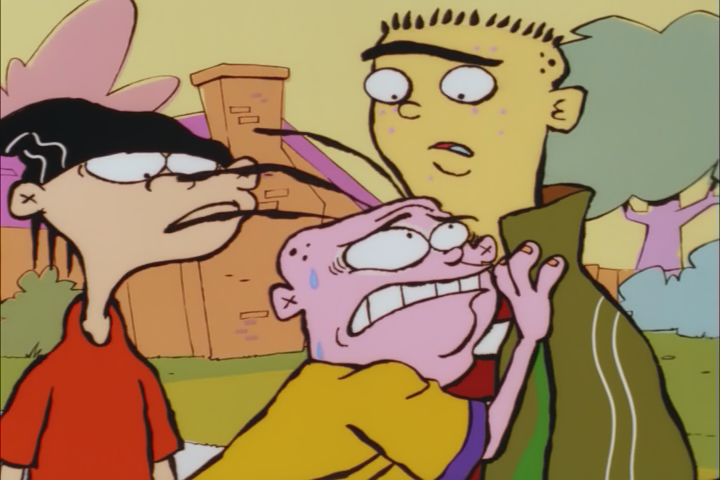
One of the screenshots, however (specifically the second image you posted, the Ed, Edd & Eddy one) is bad chroma upsampling. That is due to how the YUV -> RGB conversion is handled when you took the screenshot. You'll notice that if you try to add a converttorgb32() to your script and take the screenshot again, the chroma issue will likely go away (that is not how you solve the issue though, that's just to check if it really was a bad YUV->RGB conversion in the chance that I'm wrong about this). Anyway, simply you "deal" with this issue, by making sure you properly keep the colorspace as YV12 all the way through, and just set a better renderer when you playback the final encode (the Haali Renderer is quite good at this, imho).

3. Do any fansub group staff visit this site? I'm sure fixing these issues are immensely simple to them.


Well... not necessarily simple, because in the end the "GIGO" rule is true for everybody, fansubbers are no exception (and some fansubbers aren't all that good at encoding, e.g. think about all the 1080p and 720p upscales...). But either way, me and Mister Hatt do encode for fansub groups (I encode a lot but I'm just about average, he's good but too lazy to actually encode much :P ). I think that there are other users (I know that TheRyuu made an account), but they prolly aren't all that active.

@post-it: I'm positive that the Berserk footage comes from a DVD because of this thread: http://www.animemusicvideos.org/forum/viewtopic.php?f=45&t=101406
Image
User avatar
mirkosp
MODkip
 
Joined: 24 Apr 2006
Location: Gallarate (VA), Italy
Status: (」・ワ・)」(⊃・ワ・)⊃

Re: Artifacts in Anime/Toon Footage

Postby Anno-san » Wed Sep 15, 2010 8:57 pm

Anyway, simply you "deal" with this issue, by making sure you properly keep the colorspace as YV12 all the way through, and just set a better renderer when you playback the final encode (the Haali Renderer is quite good at this, imho).


I have the renderer set at madVR, which only outputs to YV12 IIRC. Does the Haali renderer need to be downloaded or does should it already be an option in MPC?

Deblock_QED
[codeDgdecode_mpeg2source("C:\Users\?\dvd rip\Ed, Edd n Eddy\Ed Edd n Eddy Episode 1.d2v", cpu=4,idct=7,info=3)
TemporalDegrain()
Deblock_QED()][/code]

result:
Image


ConvertToRGB32
Code: Select all
Dgdecode_mpeg2source("C:\Users\?\dvd rip\Ed, Edd n Eddy\Ed Edd n Eddy Episode 1.d2v", info=3)
TemporalDegrain()
converttorgb32()

result
Image

I think that did it.

BTW Is there any way I can configure the settings for PNG compression to make it lossless? When I export a screenshot to .png in MPC-HC, the compression apparently reduces the quality so that artifacts from the video are not accurately displayed. The only "accurate" enough format is BMP but the file size is ridiculous.

Would the ConvertToRGB32() work in the Berserk clips as well? And what about madVR? I have it selected in the MPC-HC settings, why doesn't that fix the chroma issue without me having to use ConvertToRGB32()? Do I have to set madVR as the renderer for all of windows and if so how?
User avatar
Anno-san
 
Joined: 24 Dec 2009

Re: Artifacts in Anime/Toon Footage

Postby Mister Hatt » Thu Sep 16, 2010 12:48 am

BAWAWAH YOU'RE ALL WRONG.

Anno-san, what you're experiencing is usually called "lol MPEG-2". It's what happens when your MPEG-2 encoder doesn't lowpass enough but doesn't allocate enough bitrate either. It's especially common on R1 DVDs and MPEG2-TS footage. The other problem with the red jaggies/blocking on line edges is due to terrible chroma subsampling. The chroma issue can be fixed with EdgeCleaner I guess, although contrasharpening might be a better option. The blocking you need to find the golden settings of whatever your favourite deblocker is but I would consider dfttest masking or highly tweaked FFT3D as another option; I ended up using a dfttest mask on Cobra which had similar issues and it turned out pretty sugoi.

As far as fansubbers here go, from what I know of there are three as mirko said. TheRyuu and I encode around the place and mirko is in a bunch of Italian groups. You'll find that the better an encoder is though, the lazier they get.
Mister Hatt
 
Joined: 25 Dec 2007
Status: better than you

Re: Artifacts in Anime/Toon Footage

Postby Anno-san » Thu Sep 16, 2010 8:34 am

What is the discoloration in the circled area?

Image
User avatar
Anno-san
 
Joined: 24 Dec 2009

Re: Artifacts in Anime/Toon Footage

Postby Anno-san » Thu Sep 16, 2010 9:54 am

@mister hatt

Code: Select all
Dgdecode_mpeg2source("C:\Users\?\dvd rip\Ed, Edd n Eddy\Ed Edd n Eddy Episode 1.d2v", info=3)
TemporalDegrain()
dfttest(ftype=1, tmode=0)

Image

This doesn't seem to work. Can you post the script you used for the cobra video?


@mirkosp
using ConVertToRGB32() seemed to remove the jagged parts on red edges. The only problem is, when I open the script and try to queue the job in MeGUI it says that ConvertToYV12() should be used at the end of the script. Is ConvertToYV12() really necessary to encode the video in meGUI? What would happen if I encoded it with ConvertToRGB32() at the end of the script?
User avatar
Anno-san
 
Joined: 24 Dec 2009

Re: Artifacts in Anime/Toon Footage

Postby mirkosp » Thu Sep 16, 2010 9:57 am

Like I said... the converttorgb32 was just a proof that the issue wasn't with the video itself, but rather with how the yuv -> rgb conversion was handled. You should NOT have the converttorgb32 line in the script, but should leave the video as yv12 (the input already is) and should just have a better renderer in MPC-HC when playing back your video (if you installed the CCCP, possibly the latest beta, but any version would go, you should have haali renderer already).
Image
User avatar
mirkosp
MODkip
 
Joined: 24 Apr 2006
Location: Gallarate (VA), Italy
Status: (」・ワ・)」(⊃・ワ・)⊃

Re: Artifacts in Anime/Toon Footage

Postby Mister Hatt » Thu Sep 16, 2010 10:36 am

I actually can't post the script due to it being customised for each individual episode, and the fact that it's about 4000 lines long. I can however suggest on how to make a mask. You can use IsCombed() by Tritical (or any other comb/jaggy/edge detection filter really) to create a separate clip, then process that with dfttest on appropriate settings, then merge with the original clip. That's assuming you're dealing with the subsampling issue at least. As for the blocking, I would advise a tweaked FFT3D filter for that. FFT3D uses various sigma's to define a particular frequency. You need to find what frequency your blocks are at and then smooth them with the appropriate strength. Read the manual for info (I'm too tired to explain further - mirko, go say stuff なう) and you should figure it out well enough. Finally, as mirko said, the odd colour changes were due to a poor colourimetry conversion which should never have been done in the first place. Get on IRC in about 8 hours maybe if you want to get something resembling example code out of me.
Mister Hatt
 
Joined: 25 Dec 2007
Status: better than you

Re: Artifacts in Anime/Toon Footage

Postby Anno-san » Thu Sep 16, 2010 11:36 am

@mirkosp

I have already said, I heard that madVR handles the chroma upsampling very well so I used that renderer.

MPC-HC using Haali renderer
Code: Select all
Dgdecode_mpeg2source("C:\Users\?\dvd rip\Ed, Edd n Eddy\Ed Edd n Eddy Episode 1.d2v", info=3)
TemporalDegrain()


Image


I don't see that that makes much difference.

I don't mean to be rude but it seems that, like in doom9, everyone keeps posting contradictory advice. I have been trying to fix this problem (which may or may not be chroma upsampling error) for days, even weeks if you count doom9. What IS the problem? I just want to restore the video and encode it but unless I want to encode poor quality footage, I can't until someone gets to the root of the problem. The whole point of using DVD footage is to restore the video to as high quality as possible. I tried looking through A&E's guide but so far nothing worked.
User avatar
Anno-san
 
Joined: 24 Dec 2009

Re: Artifacts in Anime/Toon Footage

Postby mirkosp » Thu Sep 16, 2010 11:53 am

Well yes, I heard good things about madVR myself, but if you happen to have the bad upsampling during playback with it, then clearly you should try something else. By the way, it doesn't matter if you end up having the upsampling in the screenshots, but just if you have it or not during playback, that's what matters. If you *do* have the bad upsampling during playback too, both with madVR and Haali, then I'm not quite sure what is at fault here...
Image
User avatar
mirkosp
MODkip
 
Joined: 24 Apr 2006
Location: Gallarate (VA), Italy
Status: (」・ワ・)」(⊃・ワ・)⊃

Next

Return to Footage Help

Who is online

Users browsing this forum: No registered users and 1 guest