A Newbie's Guide To Adobe Premiere

Discussion and help related to Adobe video software goes here. e.x. Premiere, After Effects, Photoshop, etc.
Locked
Up In Flamez
Joined: Sun Apr 30, 2006 6:52 pm
Location: Los Angeles
Org Profile

Post by Up In Flamez » Sat Nov 04, 2006 3:59 pm

Miscellaneous

this section's purpose is for correcting some mistakes i made in my other sections. And i might throw in that 'Masking tutorial'

Rendering :

Here are some stupid mistakes i made

If you are in 6.5 and have 'Real Time Preview' enabled, just press 'Enter' to preview. If you don't have it enabled or if you are in 6.0 pressing enter will render it for you.

That is one way to render, but for those who have 'Real Time Preview' or the other 6.0 settings, go to Timeline > Render Work Area
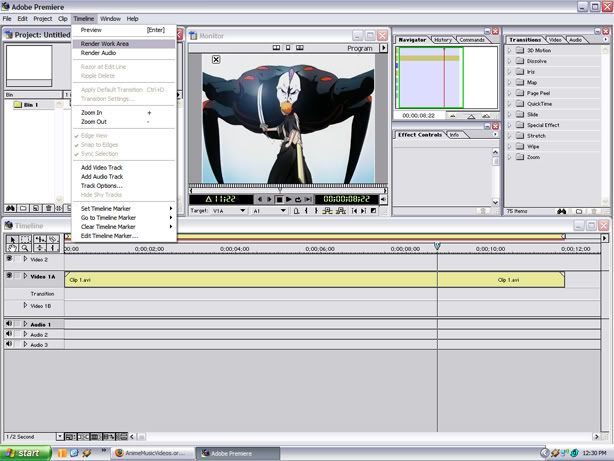
Image

(TIP : ONLY RENDER AREAS WHERE IT IS RED, ALSO DOUBLE CLICK ON THE WORK AREA MARKER AND IT WILL AUTOMATICALLY FILL IN THE SPACE OF YOUR CURRENT TIMELINE) if you still don't know what i mean, look at the pictures.
Notice that the work area marker, isn't around the area i want it to render.
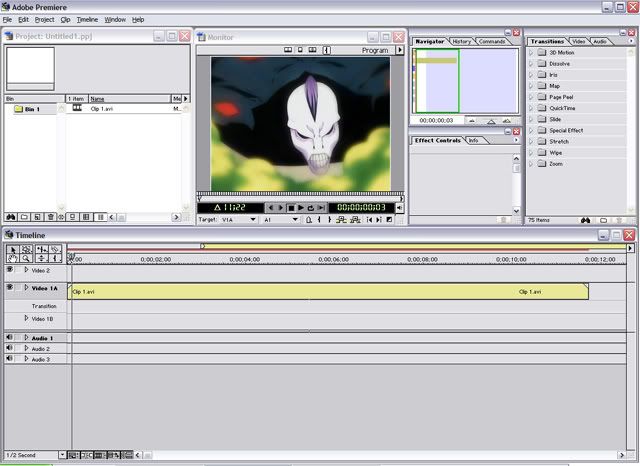
Image

Here i double-clicked on the work area marker, and it automatically fitted it self in the timeline
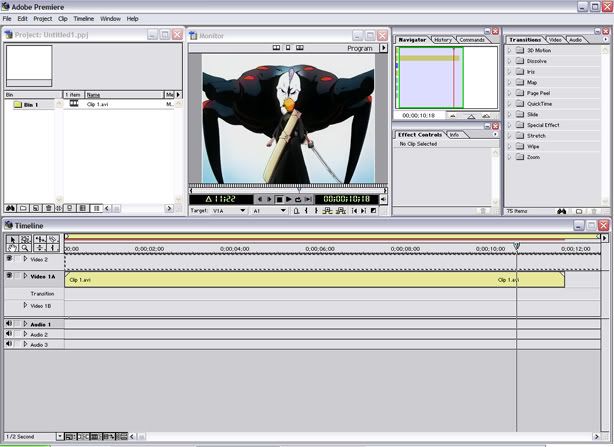
Image

also you can grab the edges and drag it until it is the size you want. (like trimming a clip)

Fading :
Also i said you can make a simple fade with 'Cross Dissolve'. you are probably confused on how make something fade out and then fade back in or vice versa with only one 'Cross Dissolve'.

This can only be done in A/B editing.

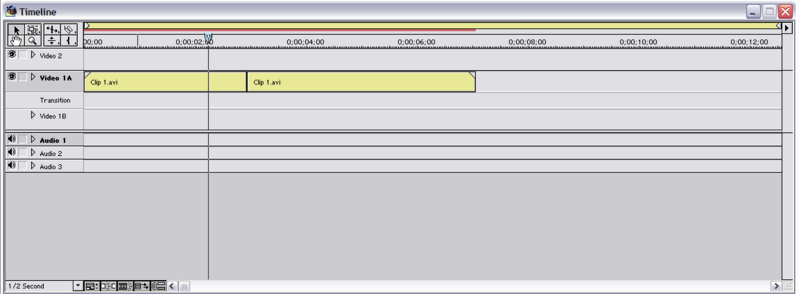
First drag your clip that you want to fade out, then grab the clip that you want it to fade into.

Place them side by in Video Track 1A like here :
Image

then grab the 'Cross Dissolve' transition in your transitions folder

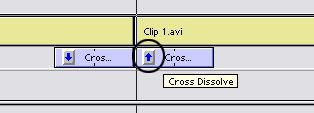
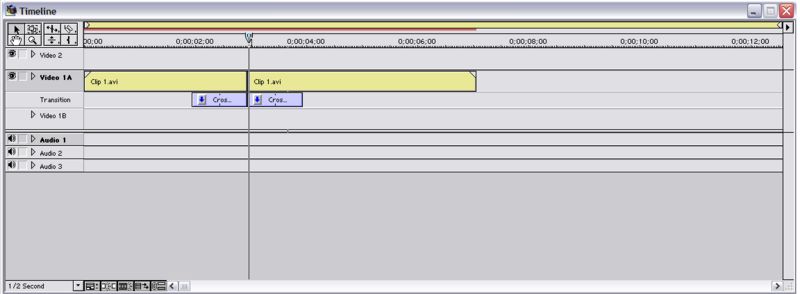
Grab one and place it on the transition track anywhere you want then grab another 'Cross Dissolve' transition and place it on the transition track.

The place them together to match the video.
Image

if you alt + scrub that, you will see the video fade out and then show your second clip and then fade out again. This isn't what we wanted, We want it to fade out then fade in. To do this, press the little arrow on the transition.Image
This will reverse the transition making it fade in not out. So now if you alt + scrub, it should fade out then fade back in.

NOTE : THAT USING RUBBERBANDS ARE HIGHLY RECOMMENDED, THEY ARE MUCH BETTER THAN USING CROSS DISSOLVES'

That's the end of this part, if i have the time i will do that 'Masking' tutorial

Up In Flamez
Joined: Sun Apr 30, 2006 6:52 pm
Location: Los Angeles
Org Profile

Post by Up In Flamez » Sat Nov 04, 2006 4:00 pm

Leo#87 wrote:Can someone tell me where the opacity editing stuff is in premiere pro?
in premiere pro, that would be in the 'Effects Controls' and expand the 'Opacity' part

User avatar
Gepetto
Mr. Poopy Pants
Joined: Thu Jun 10, 2004 10:11 pm
Status: Bored to tears
Location: The Tokyo Settlement
Contact:
Org Profile

Post by Gepetto » Sat Nov 04, 2006 6:46 pm

Leo#87 wrote:Can someone tell me where the opacity editing stuff is in premiere pro?
Every video clip or image has an opacity control lready applied when you put it in the timeline. Go to the "Effect Controls" tab and it should be right under "Motion".
And God spoke unto the Chicken, and He said: "Thou shalt crosseth the road", and the Chicken did cross the road, and there was much rejoicing.
My DeviantART profile

User avatar
Orzmella
Joined: Wed Aug 24, 2005 12:58 pm
Location: City of rain - Lithuania
Org Profile

Post by Orzmella » Mon Nov 20, 2006 2:43 pm

uP|iN|fLaM3z thx fo tuts , im starting to learn premiere 6.5 and will try some of your tuts =)

User avatar
Taruto!
Joined: Sat Apr 24, 2004 1:45 pm
Location: England
Contact:
Org Profile

Post by Taruto! » Wed Nov 22, 2006 9:36 am

Wow. I actually learned stuff from this! Shows how noobish I am with Premiere.. I'm a little disappointed in myself o_ō

At least now I don't have to make multiple overlays and then link those in... :lol: Thanks for the info!
Maybe now I'll be able to make videos faster, haha :P

User avatar
Gepetto
Mr. Poopy Pants
Joined: Thu Jun 10, 2004 10:11 pm
Status: Bored to tears
Location: The Tokyo Settlement
Contact:
Org Profile

Post by Gepetto » Wed Nov 22, 2006 10:08 am

Who's going to compile this when it's done?
And God spoke unto the Chicken, and He said: "Thou shalt crosseth the road", and the Chicken did cross the road, and there was much rejoicing.
My DeviantART profile

Up In Flamez
Joined: Sun Apr 30, 2006 6:52 pm
Location: Los Angeles
Org Profile

Post by Up In Flamez » Sat Nov 25, 2006 2:24 am

AHHH!! i exceeded my bandwith on my photobucket account so you cant see the pictures, i just have to wait till like Decemeber 7 or something then everyone can see it again. I AM VERY SORRY ABOUT THIS

also Gepetto im thinking of making a website to put this tutorial on.

User avatar
Scintilla
(for EXTREME)
Joined: Mon Mar 31, 2003 8:47 pm
Status: Quo
Location: New Jersey
Contact:
Org Profile

Post by Scintilla » Sat Nov 25, 2006 10:15 am

uP|iN|fLaM3z wrote:also Gepetto im thinking of making a website to put this tutorial on.
Remember that you can submit it for inclusion in the Org's Guides section, according to the instructions found <a href="http://www.animemusicvideos.org/guides/">here</a>.
ImageImage
:pizza: :pizza: Image :pizza: :pizza:

User avatar
sweetdeily
Joined: Fri Dec 16, 2005 1:45 am
Location: Oz
Contact:
Org Profile

Post by sweetdeily » Wed Dec 06, 2006 1:56 am

Gepetto wrote:Who's going to compile this when it's done?
Dear Up-san,
Autraya lead me to this topic, since she's hot to trot on tutorials at the moment for anything on Prem. *sweatdrop- since she can hear Aut screaming 40ks away at the program* ^_^;
As a HTML (css, DHTML, etc...) freak, I can offer to make you up a little webpage (on geocities or something...) to compile your tutorials. It'd take me all of ten minutes to do, if you wanted it done. Then you can post away, and I can upload onto site as per your pleasure.
I'm also a grammar nazi, so you can write it however you want, and I can fix it for the other nazis like me, upon uploading. ^_^
Just let me know, and I'll be happy to help. (This helps me by reducing background noise *Aut's still screaming.... -_-;*)

~Sweets.
ImageImage
Lockstock: " i gots the power!"
Sweetdeily: "you know he-man was a gay icon, right?"
*SILENCE*

Up In Flamez
Joined: Sun Apr 30, 2006 6:52 pm
Location: Los Angeles
Org Profile

Post by Up In Flamez » Sun Dec 10, 2006 2:14 am

Dear Up-san,
Autraya lead me to this topic, since she's hot to trot on tutorials at the moment for anything on Prem. *sweatdrop- since she can hear Aut screaming 40ks away at the program* ^_^;
As a HTML (css, DHTML, etc...) freak, I can offer to make you up a little webpage (on geocities or something...) to compile your tutorials. It'd take me all of ten minutes to do, if you wanted it done. Then you can post away, and I can upload onto site as per your pleasure.
I'm also a grammar nazi, so you can write it however you want, and I can fix it for the other nazis like me, upon uploading. ^_^
Just let me know, and I'll be happy to help. (This helps me by reducing background noise *Aut's still screaming.... -_-;*)

~Sweets.[/quote]

that is very kind, but for now i am working on my own website

also my bandwidth is cleared so all my images are back!! :D

Locked

Return to “Adobe Software”