On my previous video (Ice and Snow) I had jagged lines around the lines of the characters. Autraya was very kind to give me some of the codes to help get rid of that....so I used it and tried on my new AMV (which is not posted yet, but still has lines too) and it didnt work... I wonder if I'm doing anything wrong or something?
Here's what I used:
TIsophote()
Crop(8,0,-8,-0)
LanczosResize(640,480)
The lines just won't seem to go away... if anyone wanta a screenshot, I'll provide one. Thanks in advance.
I wanna make sure everything is nice and smooth with the video before posting it.
Getting rid of jagged lines? :/
-
Kazemon15
- Joined: Fri May 09, 2003 9:28 pm
- Status: Reborn! Fanatic
- Location: AMV Freak, California
- Contact:
-
JaddziaDax

- Crazy Cat Lady!
- Joined: Tue Mar 16, 2004 6:25 am
- Status: I live?
- Location: Somewhere I think O.o
- Contact:
post a screencap of the image and people might be able to help more
Stalk me?
https://linktr.ee/jaddziadax
https://linktr.ee/jaddziadax
-
Kazemon15
- Joined: Fri May 09, 2003 9:28 pm
- Status: Reborn! Fanatic
- Location: AMV Freak, California
- Contact:
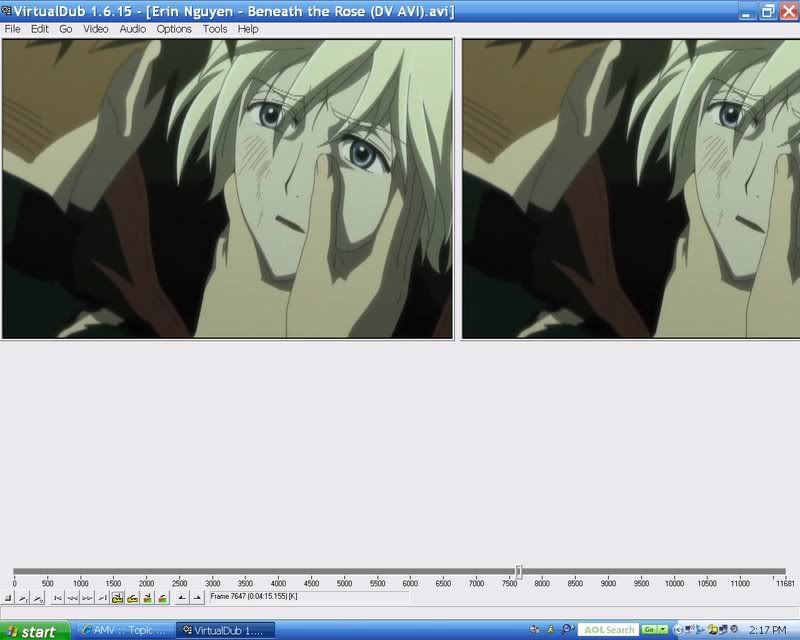
I don't know how to resize the picture, but I hope this helps. Thanks for letting me know.JaddziaDax wrote:post a screencap of the image and people might be able to help more
http://i27.photobucket.com/albums/c159/ ... eencap.jpg
-
Zarxrax

- Joined: Sun Apr 01, 2001 6:37 pm
- Contact:
That's from deinterlacing.
If its in your source, the sangnom() filter might be able to help some.
If its in your source, the sangnom() filter might be able to help some.
Sammie-Roto - Free rotoscoping tool
-
Phantasmagoriat

- Joined: Mon Feb 06, 2006 11:26 pm
- Status: ☁SteamPunked≈☂
- Contact:
-you could try chaining the TIsophote() filter on more than one line. You will lose quality, but it should improve the jagged lines though.
-you could also try blur(0,1) to blur in the vertical direction; the maximum value is 1.58. Again, you will lose quality, but it will improve the jagged lines.
I usually end up doing one of these two, because sometimes finding the perfect filter combination can be a little cumbersome.
~Phan
-you could also try blur(0,1) to blur in the vertical direction; the maximum value is 1.58. Again, you will lose quality, but it will improve the jagged lines.
I usually end up doing one of these two, because sometimes finding the perfect filter combination can be a little cumbersome.
~Phan
PLAY FREEDOOM!! | Phan Picks! | THE424SHOW | YouTube | "Painkiller" | Vanilla MIDI's
"Effort to Understand; Effort to be Understood; to See through Different Eyes."
"Effort to Understand; Effort to be Understood; to See through Different Eyes."
-
Kazemon15
- Joined: Fri May 09, 2003 9:28 pm
- Status: Reborn! Fanatic
- Location: AMV Freak, California
- Contact:
-
Kazemon15
- Joined: Fri May 09, 2003 9:28 pm
- Status: Reborn! Fanatic
- Location: AMV Freak, California
- Contact: