Many people hate to see that wonderful little DivX watermark on AMVs, and yet they want you to compress your movies using DivX because it's "so good" - but if you export using DivX, you're going to get the DivX logo.
How do you get rid of that bloody thing?! It drives me bonkers sometimes. I'd like to sort this problem out once and for all.
Ah, DivX Logos
-
CrackTheSky

- has trust issues
- Joined: Sun Aug 27, 2006 11:01 pm
- Status: Maybe editing?
- Location: Chicago

-
JaddziaDax

- Crazy Cat Lady!
- Joined: Tue Mar 16, 2004 6:25 am
- Status: I live?
- Location: Somewhere I think O.o
- Contact:
dont use DIVX files in your video program... use another codec...
go into your DIVX program and turn off the logo so it doesnt get hard encoded into your wmv file or your (insert other type of file here) file..
and read this
go into your DIVX program and turn off the logo so it doesnt get hard encoded into your wmv file or your (insert other type of file here) file..
and read this
Stalk me?
https://linktr.ee/jaddziadax
https://linktr.ee/jaddziadax
-
Scintilla

- (for EXTREME)
- Joined: Mon Mar 31, 2003 8:47 pm
- Status: Quo
- Location: New Jersey
- Contact:
Re: Ah, DivX Logos
1) No, they want you to compress your movies using XviD because it's better.niji tsuki wrote:Many people hate to see that wonderful little DivX watermark on AMVs, and yet they want you to compress your movies using DivX because it's "so good" - but if you export using DivX, you're going to get the DivX logo.

2) If the DivX logo shows up when you play a video, it's there for one of two reasons:<ul><li><b>It has been hardcoded into the video</b>, because someone was using DivX as <i>source footage</i> in something like Windows Movie Maker and didn't have the logo turned off <b>on their machine</b>. If this is the case, then the video can be in any format -- MPEG-1, WMV, AVI -- and it will still have the DivX logo, and there's nothing you as the viewer can do about it.<li><b>You're using the DivX codec to watch the video</b> in whatever media player you use, and you don't have the logo turned off <b>on your machine</b>. In this case, you can solve the problem simply by going to the DivX decoder options and disabling the logo (I believe the option is on the second tab), or by ditching DivX and getting some other codec to handle DivX streams (like XviD or ffdshow).</ul>Let us be very clear on this point: compressing or exporting your video with the DivX codec, in and of itself, will not hardcode the DivX logo into your video -- only using DivX-encoded <i>source footage</i> does that.
See above.niji tsuki wrote:How do you get rid of that bloody thing?! It drives me bonkers sometimes. I'd like to sort this problem out once and for all.




-
Minion

- Joined: Sat May 22, 2004 10:16 pm
- Location: orlando
- Contact:
-
JaddziaDax
- Crazy Cat Lady!
- Joined: Tue Mar 16, 2004 6:25 am
- Status: I live?
- Location: Somewhere I think O.o
- Contact:
-
Willen

- Now in Hi-Def!
- Joined: Sun Jul 10, 2005 1:50 am
- Status: Melancholy
- Location: SOS-Dan HQ

-
niji tsuki
- Joined: Sun Jul 04, 2004 9:39 am
Thanks for your help everybody (I've been making videos for years, but sometimes I feel like such a n00b). Well, my sister and I finally figured it out and (hopefully) if anyone's looking at this thread for the answer we have it now.
I'm not sure what version of DivX we have, but we know it's an updated version.
Go to the Start Menu and go to DivX, then DivX Codec, and click Decoder Configuration Utility.
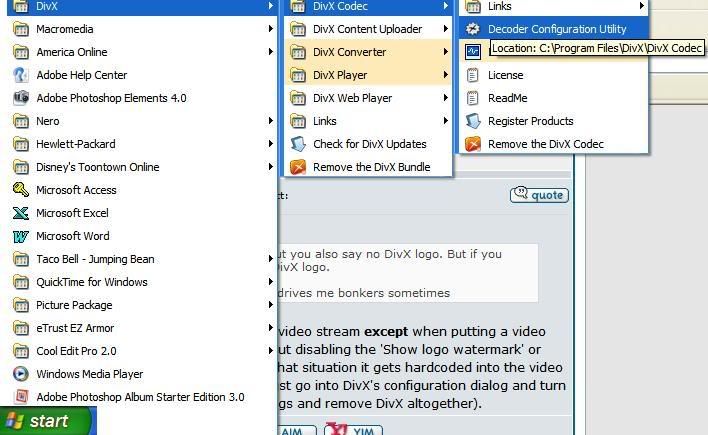
Then click the tab that says "Toolbar" and at the bottom of the window you'll see "Show DivX logo watermark" UNCHECK IT
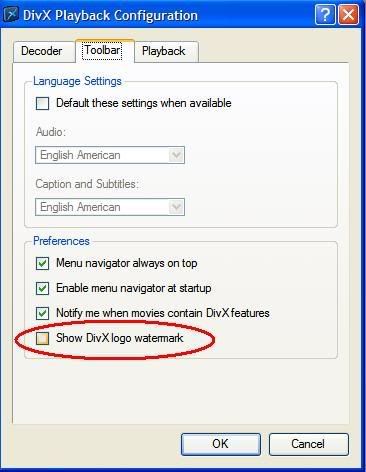
And you're on your way to making better (appreciated) videos! *thumbs up!*
I'm not sure what version of DivX we have, but we know it's an updated version.
Go to the Start Menu and go to DivX, then DivX Codec, and click Decoder Configuration Utility.
Then click the tab that says "Toolbar" and at the bottom of the window you'll see "Show DivX logo watermark" UNCHECK IT
And you're on your way to making better (appreciated) videos! *thumbs up!*
-
BasharOfTheAges

- Just zis guy, you know?
- Joined: Tue Sep 14, 2004 11:32 pm
- Status: Breathing
- Location: Merrimack, NH