The Idiots Guide to Vegas
-
FullmetalBG

- Joined: Sat May 13, 2006 11:34 am
-
amvwizard

- Joined: Sat Jul 30, 2005 8:13 pm
- Location: North Carolina

-
Ladymercury

- Joined: Fri Oct 12, 2001 11:19 pm
- Location: That, is what is called, Florida
Yes, the process isnt' 'painstakingly long', its doing each set, screen capping, pasting it in photoshop, resizing, saving, uploading on to photobucket, posted the images on here, write out a whole tutorial and then have some idiot ask the same question in another thread.


" Gray? You mean GLAY?! I like Jiro! "
The Idiot's Guide To Vegas - A Tutorial for Vegas Video
Lights and Sounds, now up on utoob.
-
amvwizard
- Joined: Sat Jul 30, 2005 8:13 pm
- Location: North Carolina
that must piss you off too... i know it would me... BUT THATS WHY ITS STIKIED!! so that when people ask those questions we can do thisLadymercury wrote:Yes, the process isnt' 'painstakingly long', its doing each set, screen capping, pasting it in photoshop, resizing, saving, uploading on to photobucket, posted the images on here, write out a whole tutorial and then have some idiot ask the same question in another thread.
Here Noob
-
Anime Addict DBZ

- Joined: Wed Dec 28, 2005 1:58 pm
-
Ladymercury
- Joined: Fri Oct 12, 2001 11:19 pm
- Location: That, is what is called, Florida
... you're welcome (?)Anime Addict DBZ wrote:grrrrrrrrrrrrrrrrrrr! i like your totorial it was very informitable and p2njJJ didn't explain it 20 times!!!!!!!!!!!! anyway thanks for making this
oh and 2 must now DIE
!!!!!!!!!!!!!!!!!!!!!!MUHAHAHAHAHAHA!!!!!!!!!!
Section IX: Double The Footage = Double the Fun
So now I'm gonna teach you more special tricks... this is how to perform double footage, aka, having two different scenes playing at the same time.
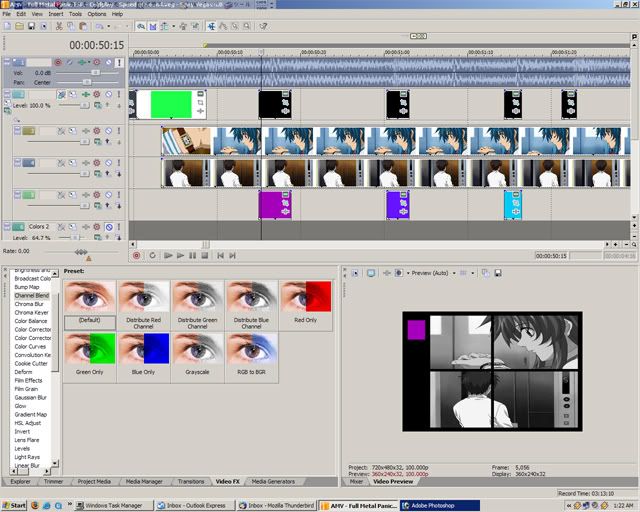
As you can see, I have some double footage, screenage, w/e. Let's see how I did that...
First, layer the footage you're using. What I did is that I had the footage I'm using for the 'top' on the first layer and the bottom footage on the second. It doesn't make a difference but I do it for 'that's bottom and that's top so it's easier to remember' sake.
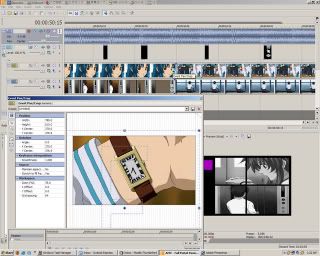
This is another pan/crop deal so open your pan crop options in your first footage
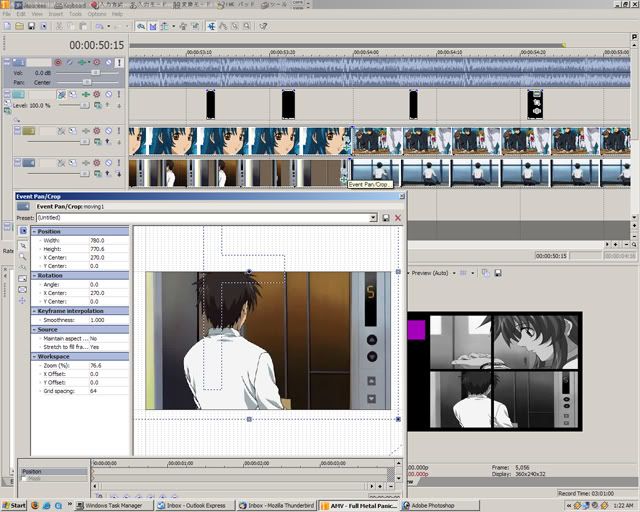
and second
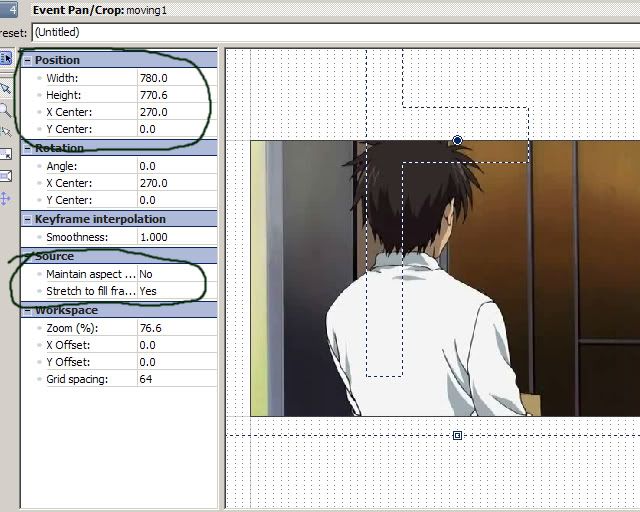
Then you go in and you mess with the settings I circled. X and Y axis is its position on the video.
THE SOURCE MUST BE THE WAY THAT I HAVE IT or it will NOT WORK.
" Gray? You mean GLAY?! I like Jiro! "
The Idiot's Guide To Vegas - A Tutorial for Vegas Video
Lights and Sounds, now up on utoob.
-
chronicdevil

- Joined: Sun May 08, 2005 5:16 pm
Thanks for this great guide, I've learnt a lot from it. But I have a question: How do you know if a file is a divx/xvid file? And if it is, how and what do you encode it to?Ladymercury wrote:
Section VIII: READ
DO NOT USE XVID/DIVX FILES IN VEGAS VIDEO OR ANY VIDEO EDITING PROGRAM.
You will, in a 99.9% chance, HAVE A PLAYBACK ISSUE. So, instead, either re-encode the file in something over that xvid/divx or NOT USE THE FILE AT ALL.
-
Ladymercury
- Joined: Fri Oct 12, 2001 11:19 pm
- Location: That, is what is called, Florida
You're very welcomechronicdevil wrote:Thanks for this great guide, I've learnt a lot from it. But I have a question: How do you know if a file is a divx/xvid file? And if it is, how and what do you encode it to?Ladymercury wrote:
Section VIII: READ
DO NOT USE XVID/DIVX FILES IN VEGAS VIDEO OR ANY VIDEO EDITING PROGRAM.
You will, in a 99.9% chance, HAVE A PLAYBACK ISSUE. So, instead, either re-encode the file in something over that xvid/divx or NOT USE THE FILE AT ALL.
Actually, in your media pool tab, in the top right hand corner it lists the video's codec. It'll say " video codec: divx/audio codec: mp4 " etc. I know in Vegas 4 it says that. Usually, though, you can find out a codec by the way the program responds to the footage. Almost instantanously Vegas will fag out the footage by making blocky if its divx/xvid. You can also find out the codec if you play it in like winamp and load the properties.
" Gray? You mean GLAY?! I like Jiro! "
The Idiot's Guide To Vegas - A Tutorial for Vegas Video
Lights and Sounds, now up on utoob.
-
chronicdevil
- Joined: Sun May 08, 2005 5:16 pm
Thanks, I was wondering why one of my AMVs had blocky parts in it. Is there a quick and easy way to change a file from divx to something that works in Vegas?Ladymercury wrote:You're very welcome
Actually, in your media pool tab, in the top right hand corner it lists the video's codec. It'll say " video codec: divx/audio codec: mp4 " etc. I know in Vegas 4 it says that. Usually, though, you can find out a codec by the way the program responds to the footage. Almost instantanously Vegas will fag out the footage by making blocky if its divx/xvid. You can also find out the codec if you play it in like winamp and load the properties.