The Idiots Guide to Vegas
-
Minion

- Joined: Sat May 22, 2004 10:16 pm
- Location: orlando
- Contact:
-
xxx999

- Joined: Mon May 02, 2005 10:35 pm
- Location: in the shadows always watching waiting for the right time to strike
- Contact:
I know I PM'd and told you when you started, but this definately needs to be a guide. If you have the time and/or patience to compleate it. I hope you do.
Is it already 4am?....just 15 more minutes, then I'll sleep.
last amv uploaded:
http://www.animemusicvideos.org/members ... p?v=116612
last amv uploaded:
http://www.animemusicvideos.org/members ... p?v=116612
-
Ladymercury

- Joined: Fri Oct 12, 2001 11:19 pm
- Location: That, is what is called, Florida
^_^ Thanks. I'm gonna update it tomorrow now that its a weekendxxx999 wrote:I know I PM'd and told you when you started, but this definately needs to be a guide. If you have the time and/or patience to compleate it. I hope you do.

Hopefully it will be, I guess, with enough nominations?shinodude wrote:ya this needes to be a guide
ThanksMinion wrote:best vegas guide evar. i vote for a sticky



" Gray? You mean GLAY?! I like Jiro! "
The Idiot's Guide To Vegas - A Tutorial for Vegas Video
Lights and Sounds, now up on utoob.
-
xxx999
- Joined: Mon May 02, 2005 10:35 pm
- Location: in the shadows always watching waiting for the right time to strike
- Contact:
I'm glad your finding time to work on it. I can't wait till you finish.
Is it already 4am?....just 15 more minutes, then I'll sleep.
last amv uploaded:
http://www.animemusicvideos.org/members ... p?v=116612
last amv uploaded:
http://www.animemusicvideos.org/members ... p?v=116612
-
Ladymercury
- Joined: Fri Oct 12, 2001 11:19 pm
- Location: That, is what is called, Florida
Section VI: Different Ways to Transition
This section is easy. The process of transitions is much like Premiere, if you have used it before... I believe, I haven't used Premiere in 4 years.
1. Go to your transitions by clicking on Transitions tab located at the bottom.
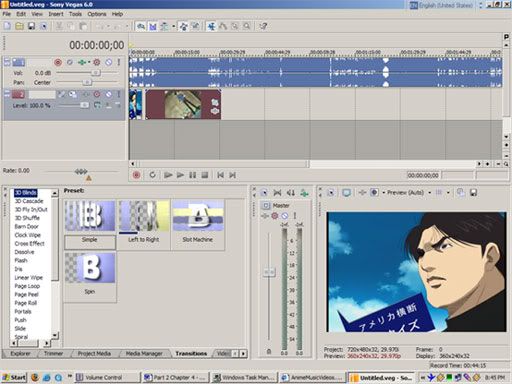
You have several transitions that have previews. Select which one you like...
2. Click and drag it onto your clip, preferably clip A. THE EDGE OF THE CLIP, NOT ON THE CLIP.
(NO PICTURE FOR THIS EXAMPLE BECAUSE YOU DON'T NEED ONE FOR A CLICK AND DRAG)
A little setting window pops up depending on the clip. I am not explaining this because its different for each transition.
3. Merge Clip A into Clip B
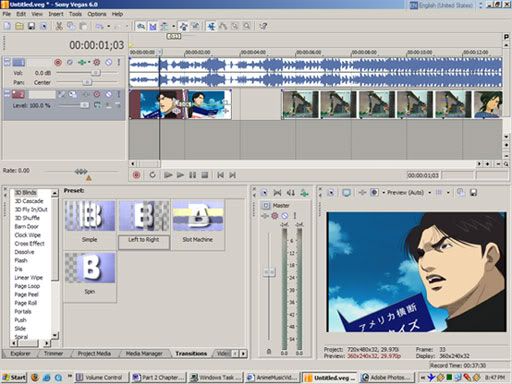
And then you press spacebar to preview it. Good thing about Vegas is that it doesn't need to render footage and take up space to preview an effect. The more powerful your computer the higher the quality of your preview.
Next Section: The masking all you fools keep asking for. FOR VEGAS 5 AND 6 ONLY.
This section is easy. The process of transitions is much like Premiere, if you have used it before... I believe, I haven't used Premiere in 4 years.
1. Go to your transitions by clicking on Transitions tab located at the bottom.
You have several transitions that have previews. Select which one you like...
2. Click and drag it onto your clip, preferably clip A. THE EDGE OF THE CLIP, NOT ON THE CLIP.
(NO PICTURE FOR THIS EXAMPLE BECAUSE YOU DON'T NEED ONE FOR A CLICK AND DRAG)
A little setting window pops up depending on the clip. I am not explaining this because its different for each transition.
3. Merge Clip A into Clip B
And then you press spacebar to preview it. Good thing about Vegas is that it doesn't need to render footage and take up space to preview an effect. The more powerful your computer the higher the quality of your preview.
Next Section: The masking all you fools keep asking for. FOR VEGAS 5 AND 6 ONLY.
" Gray? You mean GLAY?! I like Jiro! "
The Idiot's Guide To Vegas - A Tutorial for Vegas Video
Lights and Sounds, now up on utoob.

-
Ladymercury
- Joined: Fri Oct 12, 2001 11:19 pm
- Location: That, is what is called, Florida
Thanksamvwizard wrote:damn dude this is a really good tutorial. I use vegas. I know every thing you have said so far, but by no means do I know everything about it. I'm looking forward to your part on masking. Good Job!!
The masking tutorial is er, on its way... I'm busy right now and my computer is shitting out on me because I maxed out my HD again. God, I can't wait for that 250gig to come so I can bring some life back to this old relic.
" Gray? You mean GLAY?! I like Jiro! "
The Idiot's Guide To Vegas - A Tutorial for Vegas Video
Lights and Sounds, now up on utoob.
-
Ladymercury
- Joined: Fri Oct 12, 2001 11:19 pm
- Location: That, is what is called, Florida
Okay, for the remaining portions of this tutorial I will actually make an AMV. This AMV will incorporate everything I've taught you here plus more. Please look forward to it this weekend.
" Gray? You mean GLAY?! I like Jiro! "
The Idiot's Guide To Vegas - A Tutorial for Vegas Video
Lights and Sounds, now up on utoob.
-
Ladymercury
- Joined: Fri Oct 12, 2001 11:19 pm
- Location: That, is what is called, Florida
Section VII: Bringing It All Together part 1
So you've learned the basics to Vegas and you can make a standard AMV of sliced clips to music that probably doesn't relate to one another, but that's a lesson of an entirely different matter
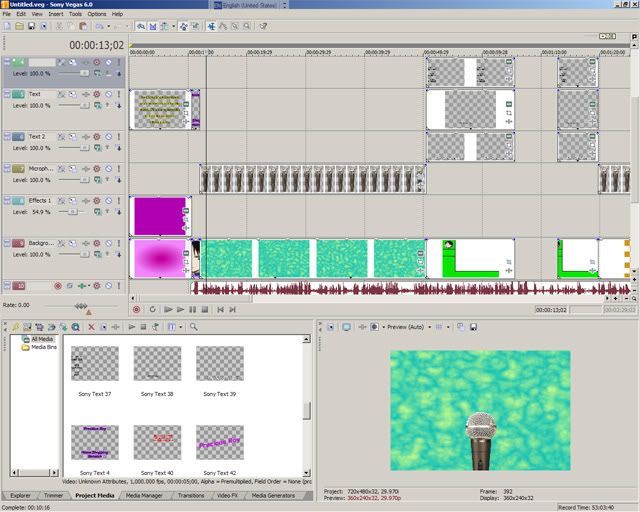
The following is a project I'm working on for AFO 7 (a 2:20 AMV), a FMA amv simply because the music I'm using for the AMV fit it more, than lets say, Samurai Champloo (which was my original choice). Anyway, as you can see I have a LOT of layers. These layers are annoying yet crucial for 'added effects'. All those layers are effects, I haven't even begun editing video yet... nor ripped the dvds and selected scenes, all I have done is simply lay down all the effects.
For this project, I've decided to do effects first because with the song I'm using, it would seem logical for me to do so. If you can't see I have used in program generated medias as well as custom made medias that I've grabbed off of the internets and edited in photoshop.
KEY: Having an image editor, like Photoshop, can really help TREMENDOUSLY when doing effects such as lip syncing.
Don't be afraid though, you may have a different style of editing. Me, I'm a layer whore (when working on projects in photoshop, I have like 10+ layers) so I must have multiple layers for each item. Some may combine items into one video track while others will split it.
The next part to section 7 will discuss more on effects and this time, I will do masking
So you've learned the basics to Vegas and you can make a standard AMV of sliced clips to music that probably doesn't relate to one another, but that's a lesson of an entirely different matter
The following is a project I'm working on for AFO 7 (a 2:20 AMV), a FMA amv simply because the music I'm using for the AMV fit it more, than lets say, Samurai Champloo (which was my original choice). Anyway, as you can see I have a LOT of layers. These layers are annoying yet crucial for 'added effects'. All those layers are effects, I haven't even begun editing video yet... nor ripped the dvds and selected scenes, all I have done is simply lay down all the effects.
For this project, I've decided to do effects first because with the song I'm using, it would seem logical for me to do so. If you can't see I have used in program generated medias as well as custom made medias that I've grabbed off of the internets and edited in photoshop.
KEY: Having an image editor, like Photoshop, can really help TREMENDOUSLY when doing effects such as lip syncing.
Don't be afraid though, you may have a different style of editing. Me, I'm a layer whore (when working on projects in photoshop, I have like 10+ layers) so I must have multiple layers for each item. Some may combine items into one video track while others will split it.
The next part to section 7 will discuss more on effects and this time, I will do masking
" Gray? You mean GLAY?! I like Jiro! "
The Idiot's Guide To Vegas - A Tutorial for Vegas Video
Lights and Sounds, now up on utoob.