Okay, this is a problem that I've had ever since I started making AMVs, but I have no idea how to fix it.
Whenever I create a video in Vegas and then render it, the render always comes out with black bars on either side, like what you get when you watch a fullscreen movie on a widescreen TV. Does anyone know how to get rid of this 'Fullscreen Border'?
A question about Sony Vegas
-
ZhaneX
- Joined: Thu Feb 26, 2009 1:34 am
- Location: Edmonton, Alberta, Canada
-
Vax
- Sexy black guy
- Joined: Sat Oct 11, 2008 11:14 am
- Status: Chayin
- Location: New York
Re: A question about Sony Vegas
Make sure you set your video to 1.0 square pixels, and if you still have black bars..
When you're done with your video.
Right click on the first clip>Select Events to end>Right click first clip again>Mantain Aspect Ratio
There is something before mantain aspect ratio, though it will only take 2-4 seconds to look for it.
When you're done with your video.
Right click on the first clip>Select Events to end>Right click first clip again>Mantain Aspect Ratio
There is something before mantain aspect ratio, though it will only take 2-4 seconds to look for it.
-
JaddziaDax

- Crazy Cat Lady!
- Joined: Tue Mar 16, 2004 6:25 am
- Status: I live?
- Location: Somewhere I think O.o
- Contact:
Re: A question about Sony Vegas
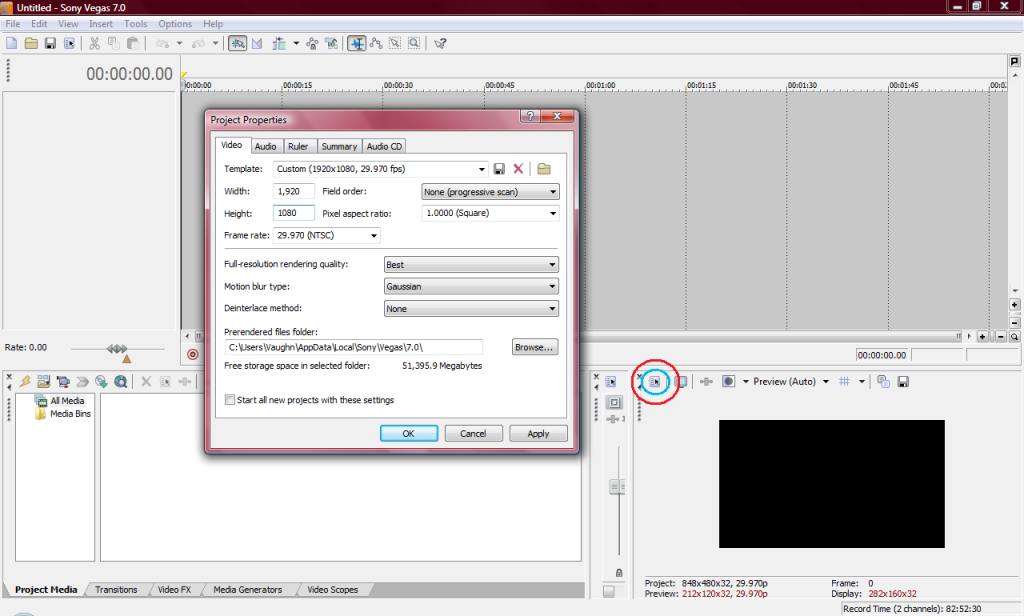
set the pixel aspect ratio to 1.0000
and make sure that the height and width match your source files
and make sure that the height and width match your source files
Stalk me?
https://linktr.ee/jaddziadax
https://linktr.ee/jaddziadax
-
ZhaneX
- Joined: Thu Feb 26, 2009 1:34 am
- Location: Edmonton, Alberta, Canada
Re: A question about Sony Vegas
Okay, how do I set the aspect ratio to 1.0000 exactly?
-
SenTrix

- Joined: Mon Jun 23, 2008 8:25 am
- Status: Editing
- Location: South East England


-
ZhaneX
- Joined: Thu Feb 26, 2009 1:34 am
- Location: Edmonton, Alberta, Canada
Re: A question about Sony Vegas
Okay, I did that. But I'm having a slight problem. When I go to adjust the height and width to the amounts described in your screen shot, they automatically switch back to 800x600 as soon as I click something else.
-
AaronAMV
- eating that e. coli spinach
- Joined: Tue Jan 22, 2008 7:54 pm
- Status: (◔ ◡ ◔ )
- Location: (◔ ◡ ◔ )
Re: A question about Sony Vegas
You don't want to adjust to that resolution, per se, you want to make it the size of your clips, so you get no borders or anything. And press Apply? 

-
AniMaya

- Joined: Thu May 07, 2009 8:22 am
Re: A question about Sony Vegas
I used to have that problem, when you are rendering, near the bottom, there will be some selections like Save Project in Rendered path or whatever. You wanna have Strech Video to fill output frame size check/selected/whatever. If that doesn't work, then re-adjust the video size, like what everybody else says...
-
Vivaldi

- Polemic Apologist
- Joined: Sat Sep 29, 2007 9:39 am
- Location: Petting mah cat..
Re: A question about Sony Vegas
That's a bad Idea, It will ruin the aspect ratio.AniMaya wrote:I used to have that problem, when you are rendering, near the bottom, there will be some selections like Save Project in Rendered path or whatever. You wanna have Strech Video to fill output frame size check/selected/whatever. If that doesn't work, then re-adjust the video size, like what everybody else says...


<Kenzichu> HAHAHA!!
<Kenzichu> everyone died!
-
AniMaya
- Joined: Thu May 07, 2009 8:22 am
Re: A question about Sony Vegas
Vivaldi wrote:That's a bad Idea, It will ruin the aspect ratio.AniMaya wrote:I used to have that problem, when you are rendering, near the bottom, there will be some selections like Save Project in Rendered path or whatever. You wanna have Strech Video to fill output frame size check/selected/whatever. If that doesn't work, then re-adjust the video size, like what everybody else says...
Really? I've never had a problem with it... O.O I never knew!
