Hi, I just started using Vegas and I wanted to test out a section of what I had done to see how it looks.
I noticed that there was some flickering, and noticeable video corruption (the video has little 'checkered' areas of corruption) when there's a simple fade-in effect between two clips.
I'm encoding as Windows Media Video V9, 6 Mbps HD 720-30p Video, rendering quality set at Best. Didn't fiddle with the other settings much (although I tested between CBR and VBR).
Source file was .mov, if that's a problem. Original resolution was HD 1280x720 (not sure of the exact quality of the HD, the source file was labelled that way).
The whole thing plays fine, except for the noticeable problems during transitions.
Sony Vegas Render Problem - Video Corruption in Transitions
-
Byakko
- Joined: Wed May 21, 2003 11:44 am
- Location: Singapore
- Contact:
-
MusoukaProductions

- Joined: Sun Feb 17, 2008 11:08 am
- Location: Korakuen Hall...
-
JaddziaDax

- Crazy Cat Lady!
- Joined: Tue Mar 16, 2004 6:25 am
- Status: I live?
- Location: Somewhere I think O.o
- Contact:
or a custom template with a lossless codec.
what kind of monitor do you have?
what kind of monitor do you have?
Stalk me?
https://linktr.ee/jaddziadax
https://linktr.ee/jaddziadax
-
DoomDragon6

- Joined: Thu Aug 03, 2006 2:06 am
I this exact same problem and it is killing me. I can't be making AMVs with random color checkers everywhere!
I'll try to elaborate on my problem and maybe it'll help the OP as well.
I'm working on my 4th AMV. My first 2 AMVs didn't have the problem, and my 3rd did. I figured the 3rd AMV's source footage might've had some kind of bad encoding or something, so I let it go.
However, now, making my 4th AMV, the problem arises again. I'm using some of the same source video that I used from my 2nd AMV (which had no problems), so I figure it can't be the footage.
I've tried rendering with several different codecs, and the problem is the same. The pixelies are randomly thrown in where there is significant movement, and vary in severity per render. If you want to see my 3rd AMV to see the pixelies, look here: <a href="http://www.animemusicvideos.org/video/156066">Maybe I'm Crazy</a>
I haven't been able to find any solution to the problem, and it's an AMV killer.
Any help is appreciated! Thanks!
I'll try to elaborate on my problem and maybe it'll help the OP as well.
I'm working on my 4th AMV. My first 2 AMVs didn't have the problem, and my 3rd did. I figured the 3rd AMV's source footage might've had some kind of bad encoding or something, so I let it go.
However, now, making my 4th AMV, the problem arises again. I'm using some of the same source video that I used from my 2nd AMV (which had no problems), so I figure it can't be the footage.
I've tried rendering with several different codecs, and the problem is the same. The pixelies are randomly thrown in where there is significant movement, and vary in severity per render. If you want to see my 3rd AMV to see the pixelies, look here: <a href="http://www.animemusicvideos.org/video/156066">Maybe I'm Crazy</a>
I haven't been able to find any solution to the problem, and it's an AMV killer.
Any help is appreciated! Thanks!
blabbler wrote:DoomDragon6 wrote:I'm going to keep bumping... a rat's duke-hole... so I can grow. If I wanted... felatio I'd go to...YOU...
-
JaddziaDax
- Crazy Cat Lady!
- Joined: Tue Mar 16, 2004 6:25 am
- Status: I live?
- Location: Somewhere I think O.o
- Contact:
-
DoomDragon6
- Joined: Thu Aug 03, 2006 2:06 am
I used the AMVApp pack to do all my ripping, so I used the DivX 4.12 codec at the recommended settings. I feel like this oughtn't matter, since my other video sources worked before, and even this exact same source worked before.JaddziaDax wrote:what compression is your source video?
See, if it did this from the beginning it'd make more sense, but it hasn't, and I don't feel like anything's changed.
Since the pixelies also appear in the vegas preview window, I feel like it must be something inside Vegas, but I have no idea what.
blabbler wrote:DoomDragon6 wrote:I'm going to keep bumping... a rat's duke-hole... so I can grow. If I wanted... felatio I'd go to...YOU...
-
JaddziaDax
- Crazy Cat Lady!
- Joined: Tue Mar 16, 2004 6:25 am
- Status: I live?
- Location: Somewhere I think O.o
- Contact:

I'ma guess that it looks like that, and yes codec does matter... it's DIVX causing you that problem, use Lagarith or Huffyuv instead, they were made for editing, DIVX was not made for editing.

Stalk me?
https://linktr.ee/jaddziadax
https://linktr.ee/jaddziadax
-
DoomDragon6
- Joined: Thu Aug 03, 2006 2:06 am
Hmm, well the pixelies are actually less structured than that, and don't contain other parts of the picture, they're just random colors.
It looks exactly like this:
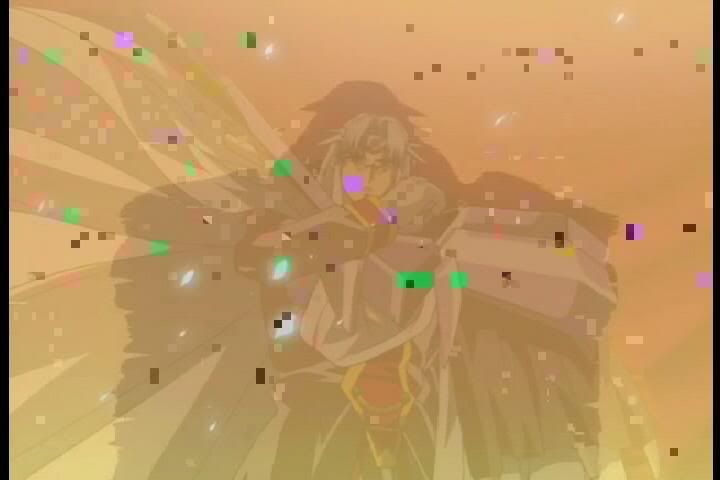
That's taken from the AMV I mentioned.
Well, if you're absolutely sure, I'll believe you, but if DivX is terrible to use, then why does the AMVApp encourage using it?
Also, that doesn't explain why it was fine in the past but now it isn't.
Sorry if I'm going on, but I want to make sure it's DivX. Because if it is, that means I have to go re-rip all my DVDs with a different codec.
It looks exactly like this:
That's taken from the AMV I mentioned.
Well, if you're absolutely sure, I'll believe you, but if DivX is terrible to use, then why does the AMVApp encourage using it?
Also, that doesn't explain why it was fine in the past but now it isn't.
Sorry if I'm going on, but I want to make sure it's DivX. Because if it is, that means I have to go re-rip all my DVDs with a different codec.
blabbler wrote:DoomDragon6 wrote:I'm going to keep bumping... a rat's duke-hole... so I can grow. If I wanted... felatio I'd go to...YOU...
-
LivingFlame

- Joined: Sat May 28, 2005 4:41 pm
- Location: Closer than you think...
-
DoomDragon6
- Joined: Thu Aug 03, 2006 2:06 am