Another sony vegas question

For help and discussion concerning the Sony Vegas software.

Another sony vegas question

Postby InusLonelySoul » Sun Apr 15, 2007 5:49 pm

Could someone be kind enough to tell me what file types are accepted by Sony Vegas? I can't seem to get any of mine to work. Thank you in advance. :)
Supernewb!
User avatar
InusLonelySoul
 
Joined: 05 May 2005

Postby WC Annihilus » Sun Apr 15, 2007 6:00 pm

Just about all media formats, except maybe .rmvb's. What format are you trying to import? If they are .avi's, what codec were they encoded with. DivX and Xvid don't play very nice with any editing software.
User avatar
WC Annihilus
 
Joined: 17 Jan 2007

Postby InusLonelySoul » Sun Apr 15, 2007 6:03 pm

They are .avis but I am not sure what they're encoded with. It must be Divx or Xvid though if I can't get them to work. :(
User avatar
InusLonelySoul
 
Joined: 05 May 2005

Postby WC Annihilus » Sun Apr 15, 2007 6:08 pm

Most likely. If you want to make sure, you can download GSpot and open them with it to make sure. Worst comes to worst, you'll just have to encode them in a lossless codec such as Lagarith or HuffyUV using VDM
User avatar
WC Annihilus
 
Joined: 17 Jan 2007

Postby InusLonelySoul » Sun Apr 15, 2007 6:10 pm

I know what VDM is, but I'm not sure how to re encode them... any tips on that by any chance? :)
User avatar
InusLonelySoul
 
Joined: 05 May 2005

Postby WC Annihilus » Sun Apr 15, 2007 6:16 pm

WC Annihilus wrote:
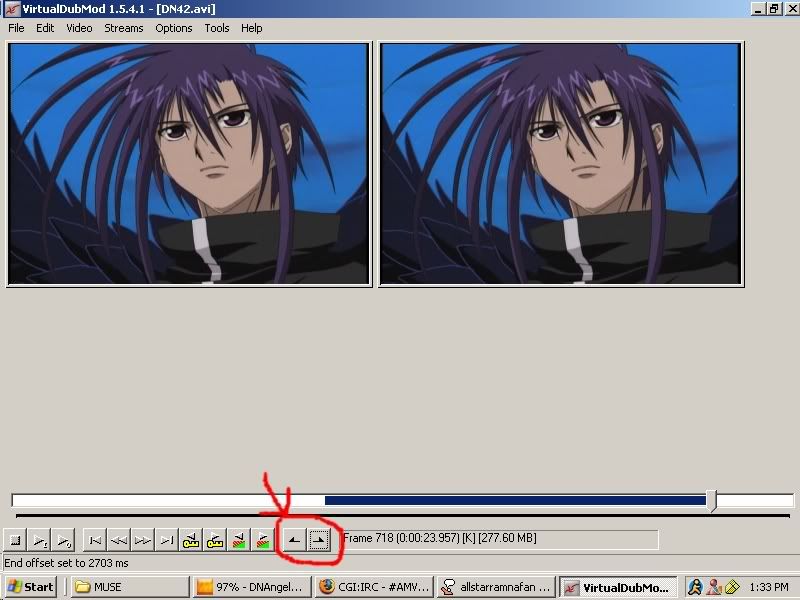
JaddziaDax wrote:open the video file in virtualdub mod go to video->compression->Huffyuv

then go to file->save

Image
use those to mark the beginning and the end of the "clips" you want so you can save room

This also does a good job explaining... well, everything: http://www.animemusicvideos.org/guides/avtechbeta/
User avatar
WC Annihilus
 
Joined: 17 Jan 2007

Postby Nunchuck » Sun Apr 15, 2007 6:16 pm

you should just try to encode it with virtual dub or SUPER to a comman codec. Than it should work :wink:
Image
User avatar
Nunchuck
 
Joined: 14 Feb 2007

Postby InusLonelySoul » Sun Apr 15, 2007 6:19 pm

Hmm, mine doesn't seem to have that option under the compression section. Do I need to download that somewhere?
User avatar
InusLonelySoul
 
Joined: 05 May 2005

Postby InusLonelySoul » Sun Apr 15, 2007 6:19 pm

Nunchuck wrote:you should just try to encode it with virtual dub or SUPER to a comman codec. Than it should work :wink:


The only problem is, I don't know how to do that stuff. >.<
User avatar
InusLonelySoul
 
Joined: 05 May 2005

Postby WC Annihilus » Sun Apr 15, 2007 6:20 pm

User avatar
WC Annihilus
 
Joined: 17 Jan 2007

Postby JaddziaDax » Sun Apr 15, 2007 7:43 pm

uase lagarath.. Vegas loves it and it makes smaller files, also disable the audio O:
User avatar
JaddziaDax
Crazy Cat Lady!
 
Joined: 16 Mar 2004
Location: somewhere i think O.o
Status: I has a TRU Arceus

Postby InusLonelySoul » Sun Apr 15, 2007 9:34 pm

JaddziaDax wrote:uase lagarath.. Vegas loves it and it makes smaller files, also disable the audio O:


Where might I find that?
User avatar
InusLonelySoul
 
Joined: 05 May 2005

Postby JaddziaDax » Sun Apr 15, 2007 9:40 pm

User avatar
JaddziaDax
Crazy Cat Lady!
 
Joined: 16 Mar 2004
Location: somewhere i think O.o
Status: I has a TRU Arceus

Postby JaddziaDax » Sun Apr 15, 2007 9:42 pm

also be sure that when you install it be sure to not install the things you already have...

AND

for FFDShow dont let it associate to any codecs you might already have...
(or be like me and dont install it at all)
User avatar
JaddziaDax
Crazy Cat Lady!
 
Joined: 16 Mar 2004
Location: somewhere i think O.o
Status: I has a TRU Arceus

Postby InusLonelySoul » Sun Apr 15, 2007 9:55 pm

Boy, this gets more and more confusing! lol
User avatar
InusLonelySoul
 
Joined: 05 May 2005

Next

Return to Sony Vegas

Who is online

Users browsing this forum: No registered users and 1 guest