Hey guys =)
I've got a strange problem here. I'm using Vegas to make an AMV, but the problem is, when I load my clips into the timeline, it doesn't show up in the preview panel! I can hear the audio and everything, but no video. I don't know if it has anything to do with the encoding settings, as I loaded up an AMV I had on my comp and it previewed fine.
So yeah. Does anybody know about this problem?
Preview Problems (Vegas 6.0)
-
lynit

- Joined: Thu Oct 21, 2004 12:59 pm
- Location: Edmonton, Alberta
Preview Problems (Vegas 6.0)
<Stirspeare> Otohiko: You guys sure love dongs.
-
Minion

- Joined: Sat May 22, 2004 10:16 pm
- Location: orlando
- Contact:
-
Minion
- Joined: Sat May 22, 2004 10:16 pm
- Location: orlando
- Contact:
-
Willen

- Now in Hi-Def!
- Joined: Sun Jul 10, 2005 1:50 am
- Status: Melancholy
- Location: SOS-Dan HQ

-
lynit
- Joined: Thu Oct 21, 2004 12:59 pm
- Location: Edmonton, Alberta
Actually, that's another question I had. I know if I use clips instead of full episodes, there'll be less strain on my HD (so little space! >.<). But my question is; how do I make them as clips? How do I cut certain parts out and stuff?It's possible to edit with XviD files by modifying them, but I don't recommend doing so. Converting them as clips (instead of converting whole videos) in VirtualDub(Mod) to Lagarith or Huffyuv is the preferred method.
<Stirspeare> Otohiko: You guys sure love dongs.
-
JaddziaDax

- Crazy Cat Lady!
- Joined: Tue Mar 16, 2004 6:25 am
- Status: I live?
- Location: Somewhere I think O.o
- Contact:
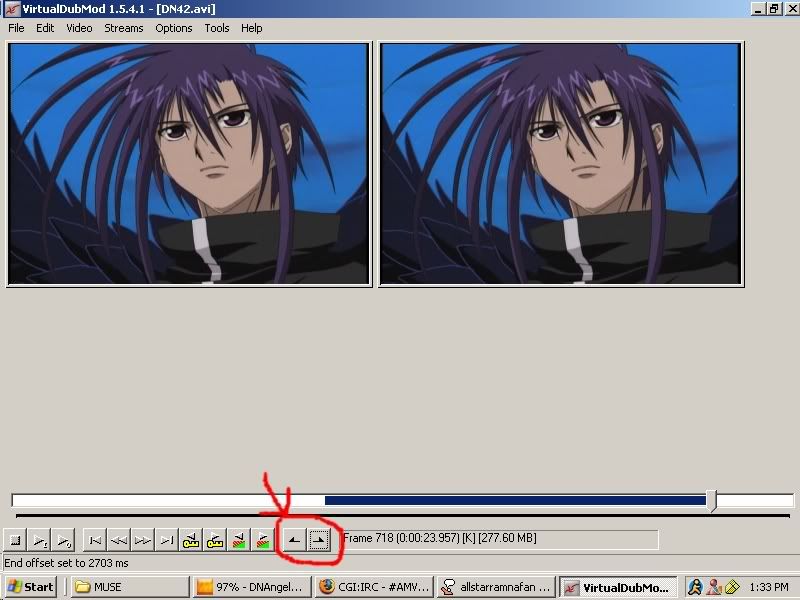
use these buttons to mark off the beginning and the end of your clip
also go to "audio"->"stream"->"stream list"->"Disable stream" and that will cut off the audio so you can save more room that way
Stalk me?
https://linktr.ee/jaddziadax
https://linktr.ee/jaddziadax