The Idiots Guide to Vegas

For help and discussion concerning Magix's (formerly Sony's) Movie Studio and Vegas Pro editing software.
Post Reply
User avatar
AimoAio
Being elegantly...lazy
Joined: Sun Mar 16, 2008 12:19 pm
Location: Somewhere
Contact:
Org Profile

Post by AimoAio » Thu Apr 10, 2008 6:31 pm

mueller7792 wrote:i got the white bar thing, but can i get a movie clip into those bars? or 2 white skinny bars?
are you talking about using real clips instead of white bars as "piano keys"?

if it's not give me a screenie and I'll see if I can help you

User avatar
mueller7792
Joined: Sat Apr 05, 2008 8:08 pm
Location: Illinois
Org Profile

Post by mueller7792 » Thu Apr 10, 2008 6:41 pm

yea i want to use real clips as seperate bars.

User avatar
AimoAio
Being elegantly...lazy
Joined: Sun Mar 16, 2008 12:19 pm
Location: Somewhere
Contact:
Org Profile

Post by AimoAio » Thu Apr 10, 2008 6:49 pm

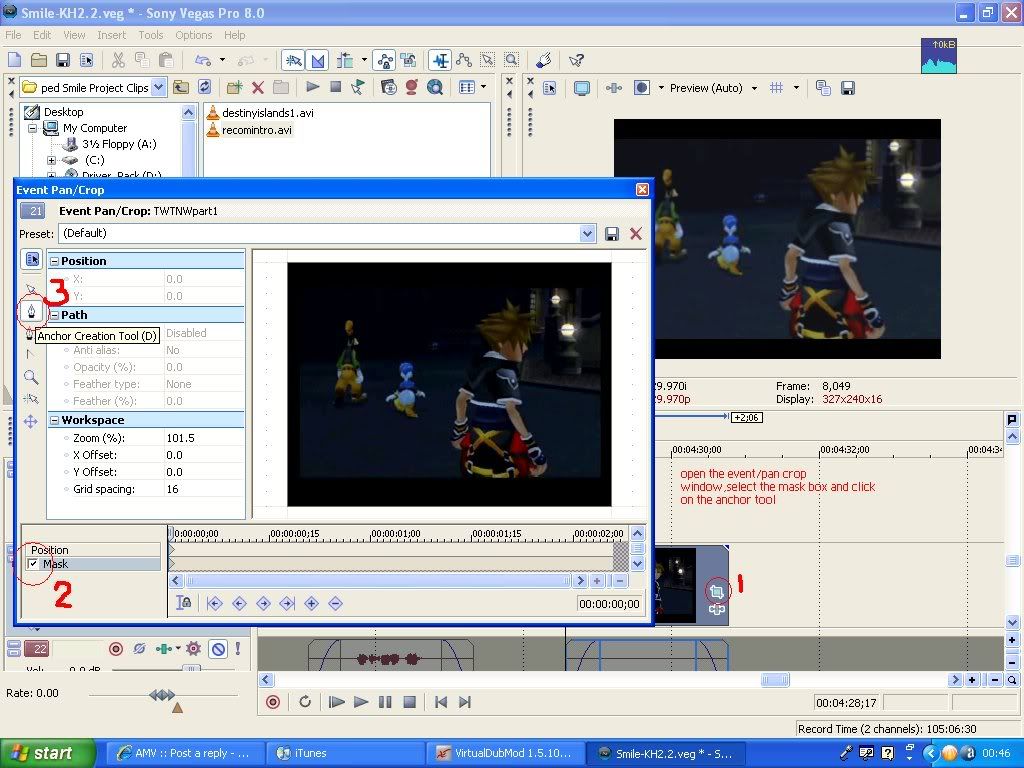
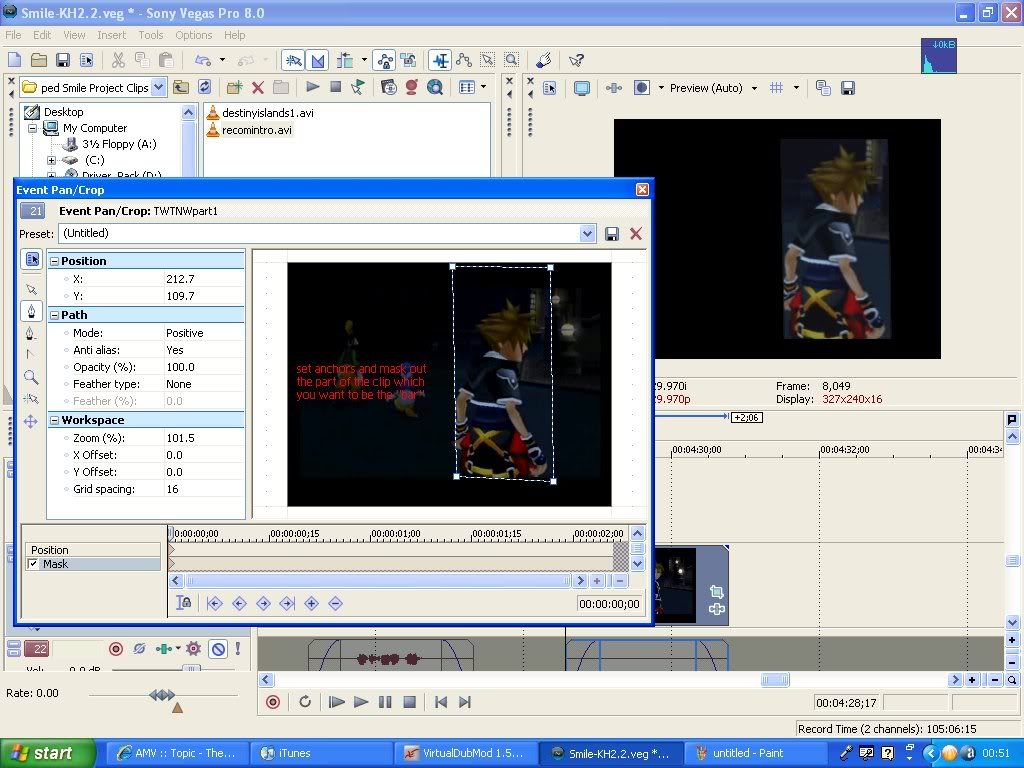
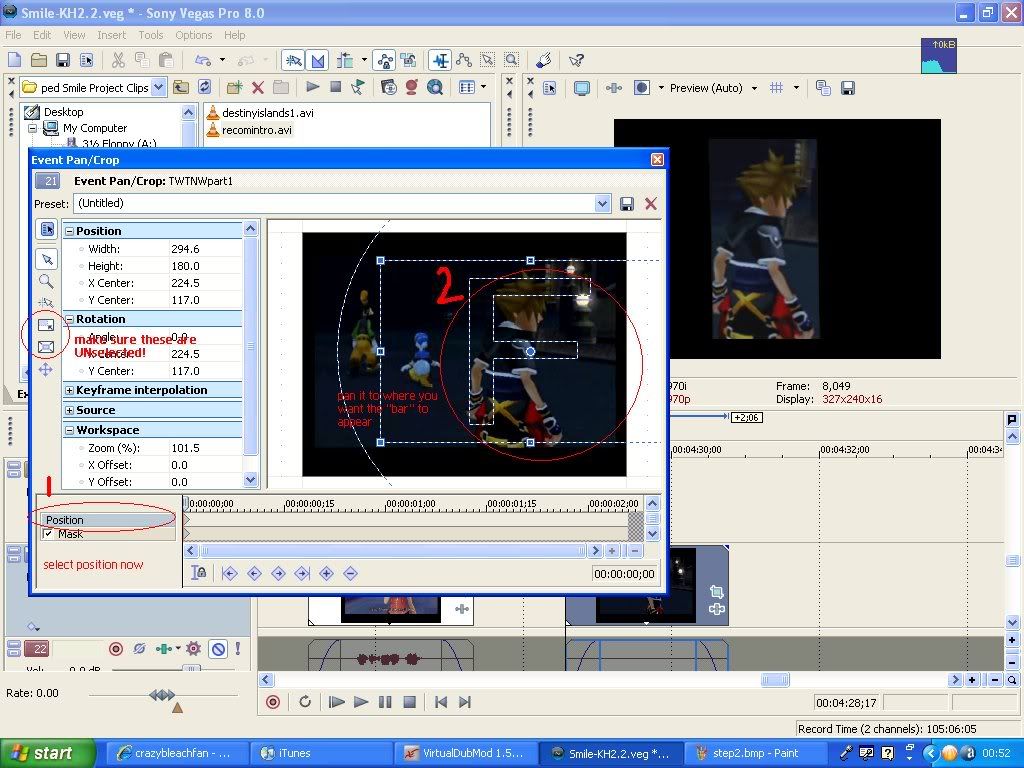
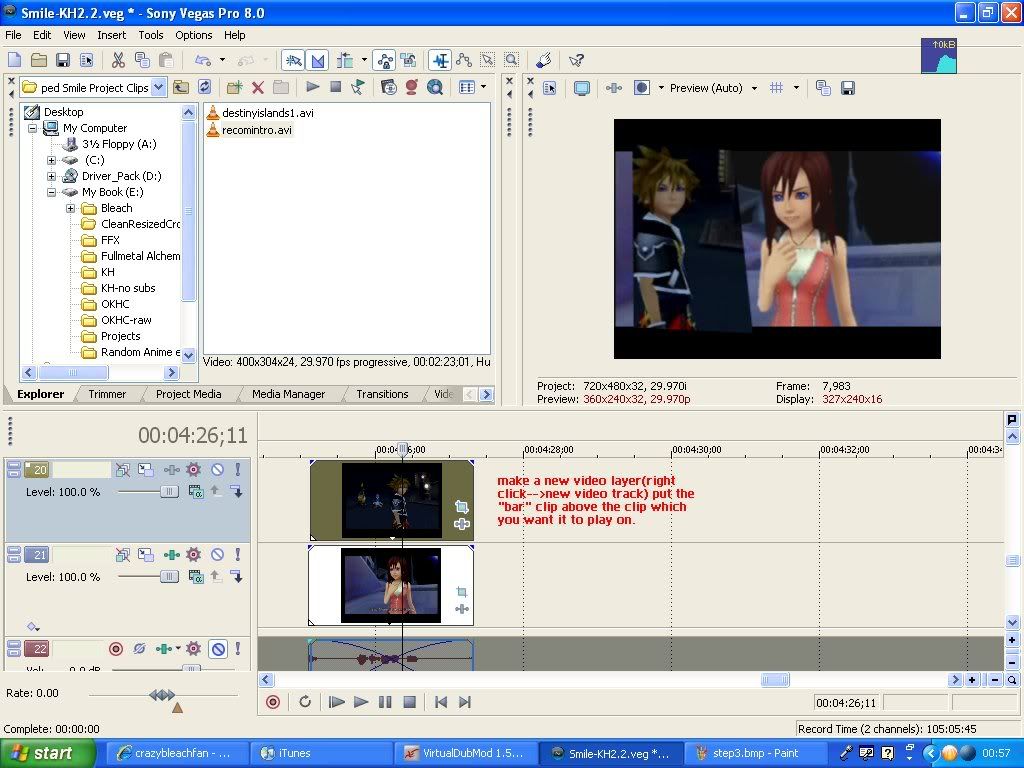
ah ok hold on,I'll upload some screenies to make it easier to explain

User avatar
AimoAio
Being elegantly...lazy
Joined: Sun Mar 16, 2008 12:19 pm
Location: Somewhere
Contact:
Org Profile

Post by AimoAio » Thu Apr 10, 2008 7:01 pm

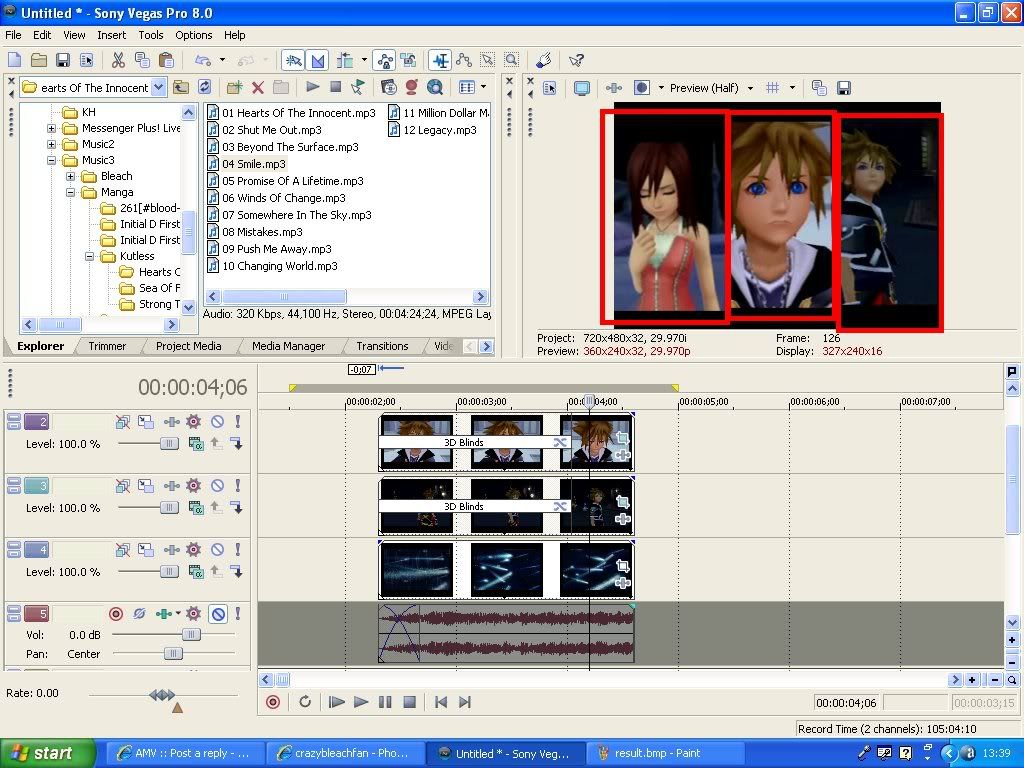
I apologize for the shape of the bar.I'm not very good at making it straight and the correct size all the time :\ but it kind of shows the idea of how to do it anyway.I hope.

Image

Image

Image

Image

User avatar
JaddziaDax
Crazy Cat Lady!
Joined: Tue Mar 16, 2004 6:25 am
Status: I live?
Location: Somewhere I think O.o
Contact:
Org Profile

Post by JaddziaDax » Thu Apr 10, 2008 7:08 pm

in other words its the same exact thing cept put the masking/cookie cutter on the clip

User avatar
JaddziaDax
Crazy Cat Lady!
Joined: Tue Mar 16, 2004 6:25 am
Status: I live?
Location: Somewhere I think O.o
Contact:
Org Profile

Post by JaddziaDax » Thu Apr 10, 2008 7:36 pm

Now for that three panel thinger you were asking for:

I'm putting it on you<b></b>tube I hope it's not that hard to see what I'm talking about. link here (and yes it will go to the correct page)

anyways this was the easiest way I could think of to do this without having to export and import like mad O.o

User avatar
LivingFlame
Joined: Sat May 28, 2005 4:41 pm
Location: Closer than you think...
Org Profile

Post by LivingFlame » Thu Apr 10, 2008 8:08 pm

JaddziaDax wrote:Now for that three panel thinger you were asking for:

I'm putting it on you<b></b>tube I hope it's not that hard to see what I'm talking about. link here (and yes it will go to the correct page)

anyways this was the easiest way I could think of to do this without having to export and import like mad O.o
Sweet music, lol. And nice job pixelating the little chat window or whatever it was. XD

(Translation: nice tutorial.) :)
... yea ...

User avatar
JaddziaDax
Crazy Cat Lady!
Joined: Tue Mar 16, 2004 6:25 am
Status: I live?
Location: Somewhere I think O.o
Contact:
Org Profile

Post by JaddziaDax » Thu Apr 10, 2008 8:11 pm

yea my video capture thing, won't capture aim or gmail, but it always picks up msnm, it was someone signing on or off i donno i don't pay attention to it anymore... I'm gathering all of my video tutorials on that account... but I usually only make them if someone asks me a question that I can't answer with simple screencaps... (it's easier to just record it anyways)

the whole process actually took about 14 minutes.... I just edited out a lot of the pointless parts, and got to the main points

User avatar
AimoAio
Being elegantly...lazy
Joined: Sun Mar 16, 2008 12:19 pm
Location: Somewhere
Contact:
Org Profile

Post by AimoAio » Fri Apr 11, 2008 7:50 am

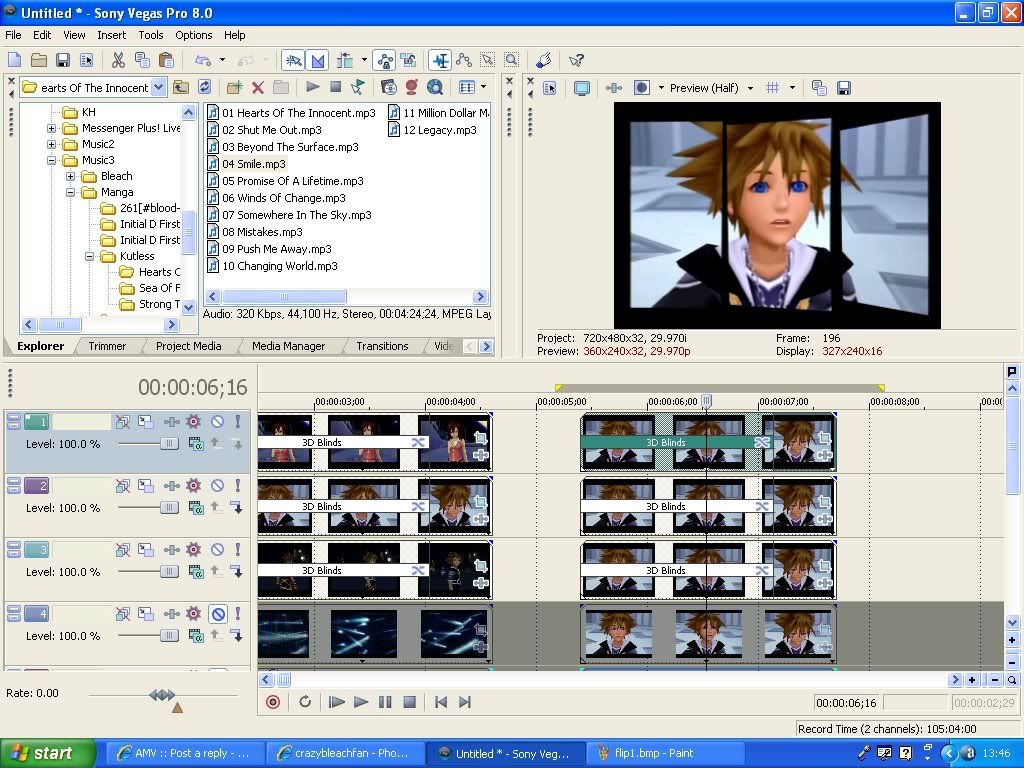
Thanks for the tutorial,it really helps but is there any way I could change the speed at which the bars flip?Like making it flip to the music instead of just flipping like normal speed.And also is there a way to make the flipped clips flip AGAIN to show another 3 bars to piece together a new image?I don't want them all flipping at the same time,I want to be able to change the time/speed at which the "bars" flip at.Any way of doing that?

This is what I mean by flipping the clips

These 3 to start with

Image

Flipped to this

Image

User avatar
JaddziaDax
Crazy Cat Lady!
Joined: Tue Mar 16, 2004 6:25 am
Status: I live?
Location: Somewhere I think O.o
Contact:
Org Profile

Post by JaddziaDax » Fri Apr 11, 2008 8:26 am

yea just transition the next group right after,

and as for timing, Im sure that there is a setting to change the number of extra flips per pannel, also the time for them to flip also depends on how long you make the crossfade/transition... if you make the crossfade shorter, they will flip faster, if you make it longer they will flip slower... it will be difficult but if you are using the transition that will be the "easiest" way...


or the "hard way"
you could set up each clip individually (using the single panel transition) then export them each, then import the new clips you made, pan them into place, then mask out the flipping panel frame by frame...

That's the only other way I can think to do it, but you might lose quality that way.

Post Reply

Return to “Movie Studio & Vegas Pro”