WTF IS GOING ON!? D<

For help and discussion about specific video editing systems like Adobe software, Windows Movie Maker, Magix, Sony Vegas, etc. Please note the subforums.

WTF IS GOING ON!? D<

Postby lingchou » Wed Apr 16, 2008 9:04 pm

Hehe. :]
Okay so I'm doing this AMV
and theres a scene of Haruhi dacing MASKED over a card captor sakura scene.
its a perfect mask in the sony vegas, and ive played it without lag in the vegas, there is NO problems with it, and yet when i play it on Windows Media Player..
that ONE scene of masking, as opposed to all the other masked scenes, looks a bit like this:

Image

and in the vegas it looks good :
Image

why is it like that??? D<
[size=75]Yurrh.
User avatar
lingchou
 
Joined: 18 Aug 2007

Postby JaddziaDax » Wed Apr 16, 2008 11:13 pm

looks like you are masking around blended frames... re check every single frame to make sure its right.

and be sure to check the framerates of your export and the frame rate of your project to make sure they match perfectly
User avatar
JaddziaDax
Crazy Cat Lady!
 
Joined: 16 Mar 2004
Location: somewhere i think O.o
Status: I has a TRU Arceus

Postby lingchou » Thu Apr 17, 2008 3:08 pm

i'm sort of confused..
i checked the masking
each frame is right
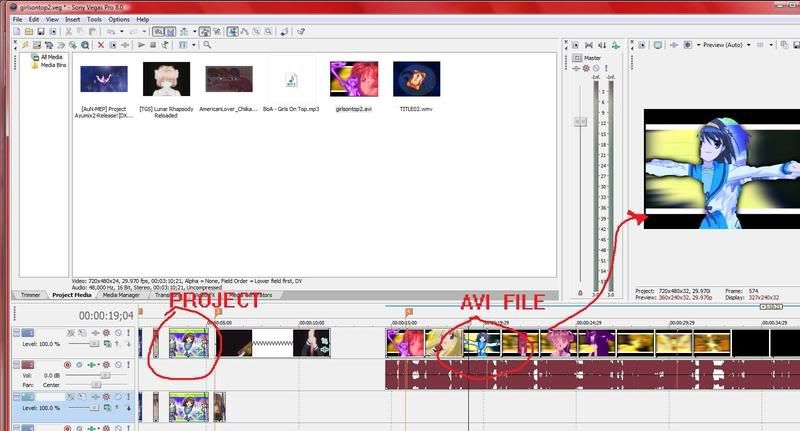
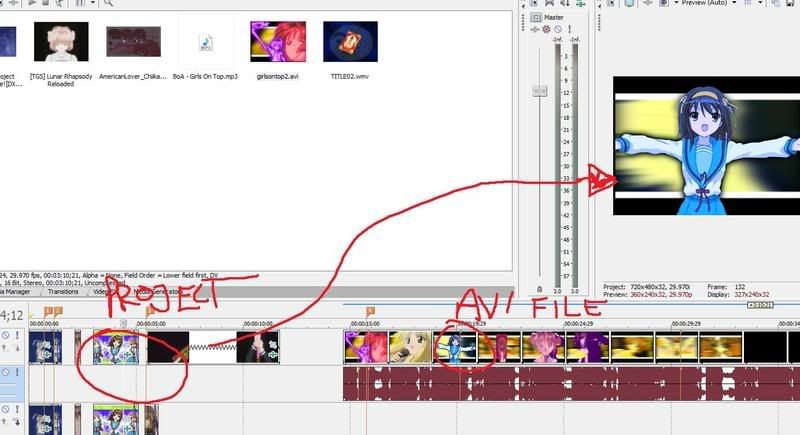
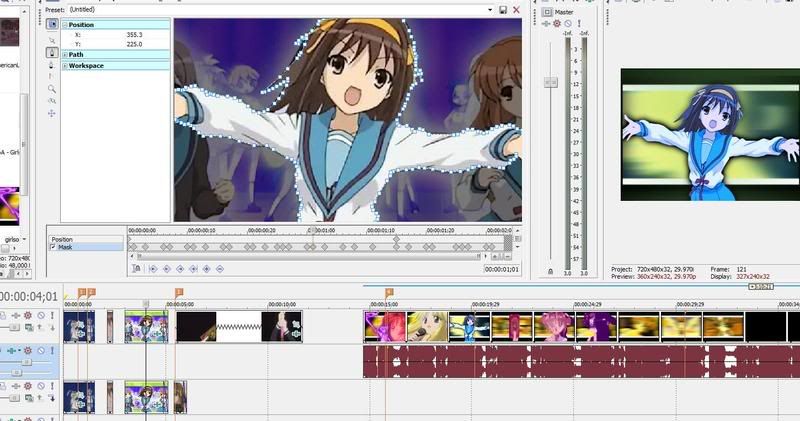
i took some screenshots to maybe help widen the understanding

Image
thats how the AVI file looks, inside begas

Image
thats the project in vegas

Image
and thats the masking of each frame, as you can see the frames in teh project are fine.. o3o
[size=75]Yurrh.
User avatar
lingchou
 
Joined: 18 Aug 2007

Postby LivingFlame » Thu Apr 17, 2008 6:21 pm

When you exported as an AVI, did it export as a different frame rate? That's all I can think of off hand.
... yea ...
User avatar
LivingFlame
 
Joined: 28 May 2005
Location: Closer than you think...

Postby lingchou » Thu Apr 17, 2008 7:40 pm

WELL..i dont know
i'm not really educated on all the frame rate stuff yet
i dont THINK so coz the rest of the AVI file was fine when i played it... o.o
it was like..only that ONE scene.
and ive saved it a couple times and rendered it as a couple different files
plus taking of some effects from that scene to see if it was causing a problem

*sniff*
[size=75]Yurrh.
User avatar
lingchou
 
Joined: 18 Aug 2007

Postby LivingFlame » Thu Apr 17, 2008 7:48 pm

Unless that Haruhi clip is the only clip with a different frame rate from the export, I don't think it would be that since it would mess with the mask timing in the entire final render. If you wanna check though, right click the Haruhi clip and click on "Properties." One of the tabs in that window should say the frame rate. Then do the same thing for that final video file.

(You can also look at the project's overall frame rate setting if you go to File > Project Properties.)
... yea ...
User avatar
LivingFlame
 
Joined: 28 May 2005
Location: Closer than you think...

Postby CrackTheSky » Thu Apr 17, 2008 7:53 pm

I've had this problem before with Vegas. The problem is that Vegas isn't frame-accurate, so even though it may LOOK like each mask changes when each frame changes in the Pan/Crop window, there's no way to be definitively positive and it's incredibly difficult to do rotoscoping this way.

My suggestion (which you probably won't like) is to ditch Vegas for rotoscoping and use Photoshop, or something similar. You'll have to go through frame-by-frame, take a screenshot on each frame, paste it into Photoshop, do your masking and import that image back into Vegas. This ensures you won't get screwy output like what you currently have.

It's a bitch to do, but it's the only way to do it perfectly.
User avatar
CrackTheSky
 
Joined: 27 Aug 2006
Location: Chicago
Status: Probably not editing.

Postby LivingFlame » Thu Apr 17, 2008 7:57 pm

Vegas isn't frame accurate? o_O
Well dang...I didn't know that...


*is now glad he is currently learning After Effects*
... yea ...
User avatar
LivingFlame
 
Joined: 28 May 2005
Location: Closer than you think...

Postby CrackTheSky » Thu Apr 17, 2008 8:03 pm

LivingFlame wrote:Vegas isn't frame accurate? o_O
Well dang...I didn't know that...

In the sense that when you scrub through footage, the scrubber doesn't snap to each frame (there's an option to enable this, but it never seems to work for me).

It's dumb.
User avatar
CrackTheSky
 
Joined: 27 Aug 2006
Location: Chicago
Status: Probably not editing.

Postby lingchou » Thu Apr 17, 2008 8:11 pm

i'm sorry but that is not an option.
my dad just came to the agreement of buying me sony vegas 8 for 500 dollars.
we're not rich, you know.
and i only got it 2 days ago.
i got it
for the MASKING.
so THAT ASIDE.
what should i do?
can't i.. u know.. go to the playback rate and slow it down or speeden it or w/e it needs?
[size=75]Yurrh.
User avatar
lingchou
 
Joined: 18 Aug 2007

Postby LivingFlame » Thu Apr 17, 2008 8:11 pm

Oh, the Quantize to Frame option? I always keep it on unless I'm editing audio anyway. I guess I work in a frame accurate manner, then? :o
... yea ...
User avatar
LivingFlame
 
Joined: 28 May 2005
Location: Closer than you think...

Postby CrackTheSky » Thu Apr 17, 2008 8:14 pm

It's not like Photoshop is the only image editing software out there. Some legitimately free ones include:

The GIMP
Paint.NET

And I'm sure you can find several others using Google.
User avatar
CrackTheSky
 
Joined: 27 Aug 2006
Location: Chicago
Status: Probably not editing.

Postby lingchou » Thu Apr 17, 2008 8:16 pm

oh i forgot to mention
that specific scene
well
since i havent gotten Haruhi series on DVD yet
Its not on ym computer so for that particular scene i took
Chiikaboom's Attack of The Otaku
and just masking out the haruhi dance scene
so maybe
her frame rate was
...idk..
[size=75]Yurrh.
User avatar
lingchou
 
Joined: 18 Aug 2007

Postby JaddziaDax » Thu Apr 17, 2008 11:13 pm

uh you shouldn't be using other people's amvs for source footage :/ that is an easy way to piss people off and make enemies.

you could just get the original scene and chroma it like she did.

as for "screen capping each frame" like crackers said.... there's a nifty tool in Virtualdub Mod where you can export an image sequence (it saves TONS of time crackers) just select the part of the video you want and choose that image sequence option - its under "file"
User avatar
JaddziaDax
Crazy Cat Lady!
 
Joined: 16 Mar 2004
Location: somewhere i think O.o
Status: I has a TRU Arceus

Postby CrackTheSky » Thu Apr 17, 2008 11:25 pm

JaddziaDax wrote:uh you shouldn't be using other people's amvs for source footage :/ that is an easy way to piss people off and make enemies.

you could just get the original scene and chroma it like she did.

as for "screen capping each frame" like crackers said.... there's a nifty tool in Virtualdub Mod where you can export an image sequence (it saves TONS of time crackers) just select the part of the video you want and choose that image sequence option - its under "file"

Yeah, I know about that. The thing is exporting an image sequence makes EVERY FRAME into a separate .bmp, and not every frame in a video changes, meaning there are lots of duplicates.
User avatar
CrackTheSky
 
Joined: 27 Aug 2006
Location: Chicago
Status: Probably not editing.

Next

Return to Video Editing Software

Who is online

Users browsing this forum: No registered users and 1 guest