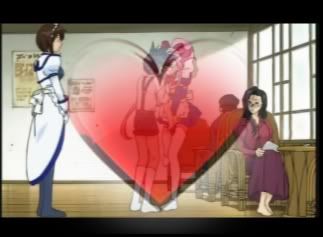
Transparent Overlapping Heart Beat..WTF

For help and discussion about specific video editing systems like Adobe software, Windows Movie Maker, Magix, Sony Vegas, etc. Please note the subforums.

Transparent Overlapping Heart Beat..WTF

Postby lingchou » Tue Oct 23, 2007 4:27 pm

Hey!~
Well I am making a new AMV and for a part of it, I want a transparent picture of a red heart to flash on beat with the music, overlapping the video in the background..
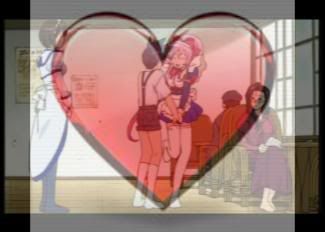
So I got a picture of a heart off Photo-Bucket but whenever I try to overlap it, the white part of the image shows up too:
Image

How do I get it to show ONLY the 'heart' part of the heart picture on the video WITHOUT the 'white/blank' part..?
IF there even is a way...D:

[size=75]Yurrh.
User avatar
lingchou
 
Joined: 18 Aug 2007

Postby Scintilla » Tue Oct 23, 2007 4:29 pm

Depends on your video editor. See if it has "multiply" and "screen" transparency effects, or "luma key" (key out a specific brightness, in this case completely white), or who knows what else.
ImageImage
:pizza: :pizza: Image :pizza: :pizza:
User avatar
Scintilla
(for EXTREME)
 
Joined: 31 Mar 2003
Location: New Jersey
Status: Quo

Postby lingchou » Tue Oct 23, 2007 4:30 pm

OH I'M AN IDIOT
I forgot to say I'm using SONY VEGAS PRO 8.0
[size=75]Yurrh.
User avatar
lingchou
 
Joined: 18 Aug 2007

Postby lingchou » Tue Oct 23, 2007 4:34 pm

Ohh...I found out that I can go to 'Cookie Clutter' and use some fading and feathering techniques, then use pan/crop to move it into place! It works too..not quite what I was planning on it looking like, but prety darn close. xD

Turned out:
Image
[size=75]Yurrh.
User avatar
lingchou
 
Joined: 18 Aug 2007

Postby JaddziaDax » Tue Oct 23, 2007 6:06 pm

actually go into "video effects" and choose chroma key and use the dropper to choose the white background color and that should give you the transparency you need...

it will be a lot easier than trying to line up cookie cutters or even the masking tool
User avatar
JaddziaDax
Crazy Cat Lady!
 
Joined: 16 Mar 2004
Location: somewhere i think O.o
Status: I has a TRU Arceus

Postby prYzm » Tue Oct 23, 2007 8:50 pm

the other option (tho jaddziaDax has the best option for THIS circumstance) when importing images to put in the background, assuming ur using photoshop. since ur image will have a transparent background in photoshop save it as a .png file to keep the transparency effect. as apposed to a jpg or bmp which will default to white. just for future refrence. in this case jaddziadax's option of of the chroma key is better. the one i stated is mostly for if ur masking images through photoshop
Image
User avatar
prYzm
 
Joined: 02 Feb 2006
Location: 'Stralia

Postby JaddziaDax » Tue Oct 23, 2007 9:22 pm

if youre going to "mask the image" in photoshop (or THE GIMP - free photoshop-like program) the best format imo to save in is .PSD because they are much easier to work with in Vegas than .gif (lower quality) and .png

but that's my opinion O.o
User avatar
JaddziaDax
Crazy Cat Lady!
 
Joined: 16 Mar 2004
Location: somewhere i think O.o
Status: I has a TRU Arceus

Postby prYzm » Wed Oct 24, 2007 12:49 am

i stand (or rather sit) corrected. heh ill bear that in mind myself =D ima need a lot of it in the project im starting in a few weeks (after exams)
Image
User avatar
prYzm
 
Joined: 02 Feb 2006
Location: 'Stralia

Postby CrackTheSky » Thu Oct 25, 2007 8:39 pm

JaddziaDax wrote:if youre going to "mask the image" in photoshop (or THE GIMP - free photoshop-like program) the best format imo to save in is .PSD because they are much easier to work with in Vegas than .gif (lower quality) and .png

but that's my opinion O.o

Eh...there's no real noticeable difference between a .png and a .psd, and .psd's tend to take up more space, especially when you add in lots of layers.
User avatar
CrackTheSky
 
Joined: 27 Aug 2006
Location: Chicago
Status: Probably not editing.

Postby Minion » Fri Oct 26, 2007 12:36 am

protip: when they think they've found the "answer", they don't return
KioAtWork: I'm so bored. I don't have class again for another half hour.
Minion: masturbate into someones desk and giggle about it for the remaining 28 minutes
User avatar
Minion
 
Joined: 22 May 2004
Location: orlando


Return to Video Editing Software

Who is online

Users browsing this forum: No registered users and 1 guest