tried looking for a forum like this but could. If you have questions or answers on using Magix Movie Edit Pro to it's fullest, then this is the place for you.
I'll start with question. It's been getting to the point where I have trouble watching the preview window to see if I edited something right. This happens most often when I cut between clips real fast. I was wondering if some setting on Magix will help the preview video to play smoother and without skipping or delaying. Is this possible or does it just mean I need to look for a new video card soon? ( I hope not).
Magix movie edit pro 2004 questions and answers
-
Osakaisthebomb

- Joined: Sat Jul 09, 2005 5:05 pm
- Status: 16 kib limit is a crime.
- Location: Florence,Alabama
- Contact:
-
Koopiskeva

- |:
- Joined: Sun Mar 17, 2002 7:31 pm
- Status: O:
- Location: Out There Occupation: Fondling Private Areas ..of the Nation.
- Contact:

-
Osakaisthebomb
- Joined: Sat Jul 09, 2005 5:05 pm
- Status: 16 kib limit is a crime.
- Location: Florence,Alabama
- Contact:

-
Osakaisthebomb
- Joined: Sat Jul 09, 2005 5:05 pm
- Status: 16 kib limit is a crime.
- Location: Florence,Alabama
- Contact:


-
Phantasmagoriat

- Joined: Mon Feb 06, 2006 11:26 pm
- Status: ☁SteamPunked≈☂
- Contact:
could also convert your source to a fast codec... like some sort of MJPEG.
...Lately I've been using the trial version from PICVIDEO, and just cropped off the watermarks... which is great if you plan to make your amv widescreen anyways Its so fast I can fill all 16 tracks in Magix MEP10 @50%opacity, and it still plays smoothly...
...Lately I've been using the trial version from PICVIDEO, and just cropped off the watermarks... which is great if you plan to make your amv widescreen anyways
Its so fast I can fill all 16 tracks in Magix MEP10 @50%opacity, and it still plays smoothly...PLAY FREEDOOM!! | Phan Picks! | THE424SHOW | YouTube | "Painkiller" | Vanilla MIDI's
"Effort to Understand; Effort to be Understood; to See through Different Eyes."
"Effort to Understand; Effort to be Understood; to See through Different Eyes."
-
Osakaisthebomb
- Joined: Sat Jul 09, 2005 5:05 pm
- Status: 16 kib limit is a crime.
- Location: Florence,Alabama
- Contact:
So let me get this straight. what are watermarks?Phantasmagoriat wrote:could also convert your source to a fast codec... like some sort of MJPEG.
...Lately I've been using the trial version from PICVIDEO, and just cropped off the watermarks... which is great if you plan to make your amv widescreen anyways
And exactly how do you use PICVIDEO?


-
Phantasmagoriat
- Joined: Mon Feb 06, 2006 11:26 pm
- Status: ☁SteamPunked≈☂
- Contact:
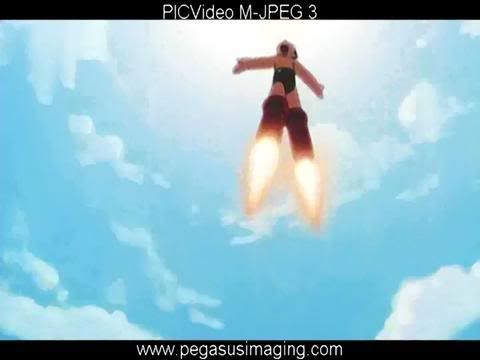
What I am referring to is a codec, precisely-- the <a href="http://www.pegasusimaging.com/picvideo.htm">PICVideo M-JPEG Codec</a>
What I do is load my source into vdub, and re-save/re-compress it as the MJPEG mentioned. Throw that into magix, and it will be really fast... and the filesizes are pretty reasonable too depending on the quality you set. As shown above, the codec imprints stuff/watermarks at the top and bottom of the frame [this is the ONLY limitation of the trail]... but I want widescreen, so I don't care... and I've already added borders because I'm not going to use that part anyways-->in fact, if you really wanted to rip off pegasusimaging... just add borders to the whole thing, and the watermarks will only appear on those borders.
[like shown above]PLAY FREEDOOM!! | Phan Picks! | THE424SHOW | YouTube | "Painkiller" | Vanilla MIDI's
"Effort to Understand; Effort to be Understood; to See through Different Eyes."
"Effort to Understand; Effort to be Understood; to See through Different Eyes."
-
shinji13

- Joined: Sat Mar 29, 2003 4:40 pm
- Location: Seattle, WA
- Contact:
I got a noob question for Magix, how do you take a screenshot in magix?
Nothing seems to be obvious with Magix video editor ._. I hope it isnt this difficult for me to figure out how to edit my video when I get started or I am gonna be spending 10 hours trying to make two scenes go smooth. Thanks to whoever answers.
Beep...Beep...Beep...Beep...
Nothing seems to be obvious with Magix video editor ._. I hope it isnt this difficult for me to figure out how to edit my video when I get started or I am gonna be spending 10 hours trying to make two scenes go smooth. Thanks to whoever answers.
Beep...Beep...Beep...Beep...
"The secret to creativity is knowing how to hide your sources." - Albert Einstein