Osakaisthebombs question page
-
Osakaisthebomb

- Joined: Sat Jul 09, 2005 5:05 pm
- Status: 16 kib limit is a crime.
- Location: Florence,Alabama
- Contact:
Re: Osakaisthebombs question page
I didn't install anything fromt the amvapp except the thing I metioned and then I installed the cccp thing and restart the computer. And it's basically back to where it started only loading a little better but still freezing at on point of a video and continuing freeze after it starts up a again. (in other words freezes -15 seconds later it continues to play for a sec and then freezes again).


-
Phantasmagoriat

- Joined: Mon Feb 06, 2006 11:26 pm
- Status: ☁SteamPunked≈☂
- Contact:
Re: Osakaisthebombs question page
Yeah, I'm not going to be able to help much without knowing what type of files you are dealing with. At this point it really could be anything since all sorts of things could contribute to a video being slow on playback/preview:
-codec used to encode your source video*
-computer specifications**
-size of preview window
-attached audio
-Frame dimensions
-Frame rate
-File size and video duration
*if it is highly compressed, your computer has to do a lot of decoding on the fly, which requires a lot of computing power; this is partially why lossless video [highly uncompressed] is the most editing-friendly.
**even if you did everything correct, some computers simply cannot decode or transfer lossless video fast enough to generate a smooth preview [although there are ways of getting around this...]
-codec used to encode your source video*
-computer specifications**
-size of preview window
-attached audio
-Frame dimensions
-Frame rate
-File size and video duration
*if it is highly compressed, your computer has to do a lot of decoding on the fly, which requires a lot of computing power; this is partially why lossless video [highly uncompressed] is the most editing-friendly.
**even if you did everything correct, some computers simply cannot decode or transfer lossless video fast enough to generate a smooth preview [although there are ways of getting around this...]
PLAY FREEDOOM!! | Phan Picks! | THE424SHOW | YouTube | "Painkiller" | Vanilla MIDI's
"Effort to Understand; Effort to be Understood; to See through Different Eyes."
"Effort to Understand; Effort to be Understood; to See through Different Eyes."
-
Krisqo
- Cooking Oil
- Joined: Mon Jul 07, 2003 1:22 pm
- Status: W.O.A (Waiting on Aion)
- Location: Moderating the Adobe Forums
Re: Osakaisthebombs question page
If you are looking for the file types, just run them through GSpot. It should tell you everything.
https://www.yousendit.com/transfer.php? ... QndLSkE9PQ
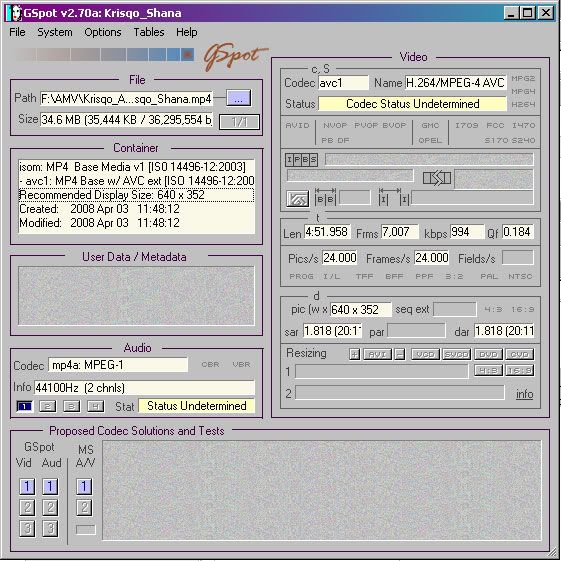
Just open the Zip file I made and run GSpot.exe. You don't need to install anything. Just drag your file into the interface and it should tell you all the information like this:
https://www.yousendit.com/transfer.php? ... QndLSkE9PQ
Just open the Zip file I made and run GSpot.exe. You don't need to install anything. Just drag your file into the interface and it should tell you all the information like this:

-
Osakaisthebomb
- Joined: Sat Jul 09, 2005 5:05 pm
- Status: 16 kib limit is a crime.
- Location: Florence,Alabama
- Contact:
Re: Osakaisthebombs question page
what info do you need from me when I put the file into it?
one thing I noticed was that it read the codec as dvsd when they are supposed to be huffyuv files.
one thing I noticed was that it read the codec as dvsd when they are supposed to be huffyuv files.
-
Phantasmagoriat
- Joined: Mon Feb 06, 2006 11:26 pm
- Status: ☁SteamPunked≈☂
- Contact:
Re: Osakaisthebombs question page
Ideally we'd want to know all information, and capturing an image of the gspot window could save some typing.
Most keyboards have a button/combination to take a screenshot. Once the screenshot is taken you can open an image editor like the GIMP or photoshop and ctrl+v paste the image into the program. Then save it as a .jpg, upload to a place like photobucket, and post the image here. To take a screenshot of just the current window, try alt+'print screen'
I don't want to get ahead of myself, but it sounds like you have DV-AVI, which might be the whole problem. Technically, that is okay to edit with-- but not great; in all likelihood you're going to want to convert it to HUFFYUV or mjpeg using vdub. [but disable the audio stream first]
Most keyboards have a button/combination to take a screenshot. Once the screenshot is taken you can open an image editor like the GIMP or photoshop and ctrl+v paste the image into the program. Then save it as a .jpg, upload to a place like photobucket, and post the image here. To take a screenshot of just the current window, try alt+'print screen'
I don't want to get ahead of myself, but it sounds like you have DV-AVI, which might be the whole problem. Technically, that is okay to edit with-- but not great; in all likelihood you're going to want to convert it to HUFFYUV or mjpeg using vdub. [but disable the audio stream first]
PLAY FREEDOOM!! | Phan Picks! | THE424SHOW | YouTube | "Painkiller" | Vanilla MIDI's
"Effort to Understand; Effort to be Understood; to See through Different Eyes."
"Effort to Understand; Effort to be Understood; to See through Different Eyes."