Problems with Adobe Premiere 7.0

Discussion and help related to Adobe video software goes here. e.x. Premiere, After Effects, Photoshop, etc.

Problems with Adobe Premiere 7.0

Postby Leon_KH_Squall » Sun Apr 15, 2007 7:46 am

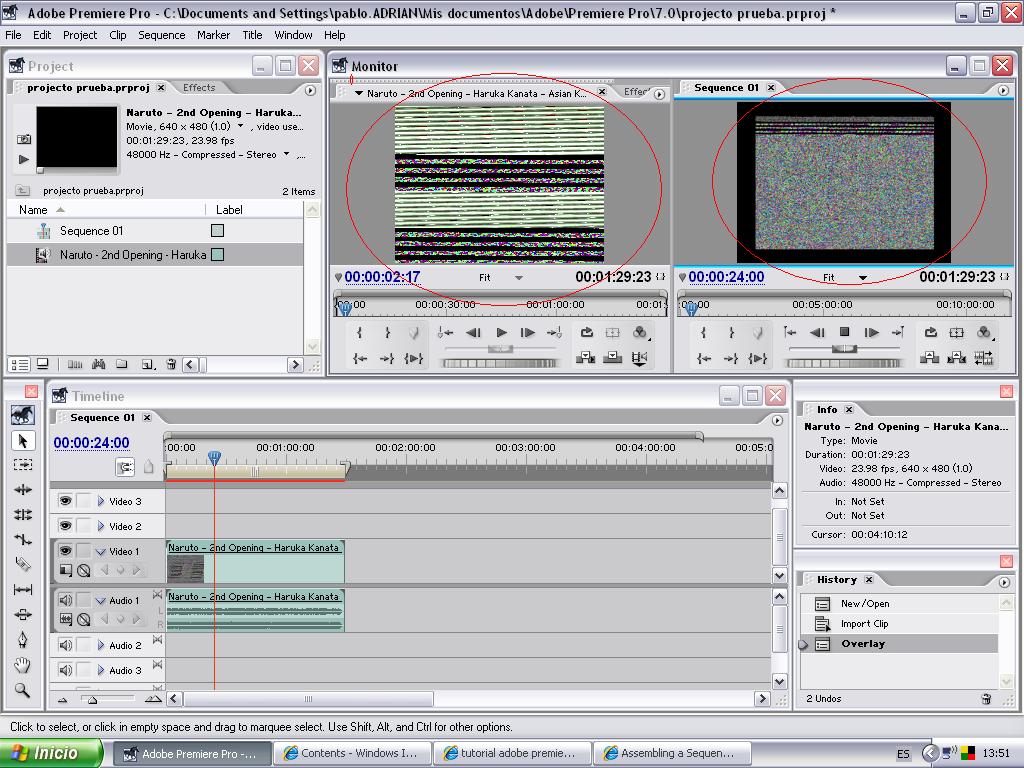
I just stopped using WMM and got Adobe premiere 7.0,and in some videos I import appear so

Image

I think they're .avi

What could that be, and how could I "repare" it?

Other videos appear stopping, will that happen when I export the video, or will they (like in WMM) play normal in the final AMV?

P.D.:the video is the 2 Naruto opening.
Leon_KH_Squall
 
Joined: 20 Sep 2006
Location: Spain

Postby Purge » Sun Apr 15, 2007 7:56 am

User avatar
Purge
 
Joined: 10 Oct 2005
Location: Under Aus

Postby reddragon_syndicate » Mon Apr 16, 2007 10:02 am

As a side note.. I dont think Pro is going to like your frame rate.
Image
[MOD17: Removed 341 instances of the word "please" and 55 exclamation marks.]
User avatar
reddragon_syndicate
 
Joined: 03 Mar 2005

Postby Leon_KH_Squall » Wed Apr 18, 2007 11:31 am

¿? What do you mean with that?
Leon_KH_Squall
 
Joined: 20 Sep 2006
Location: Spain

Postby Kariudo » Wed Apr 18, 2007 2:46 pm

permiere pro 1.0 (which is what you are using)...and all other versions of premiere for that matter have trouble with 23.98fps footage.

it shouldn't be causing this problem though...
if you haven't already, look through the topic linked to by Purge (as I suspect that's your problem, and solution)
ImageImage
Image
User avatar
Kariudo
Twilight prince
 
Joined: 15 Jul 2005
Location: Los taquitos unidos
Status: 1924 bots banned and counting!

Postby Leon_KH_Squall » Sat Apr 21, 2007 4:30 am

Oh.
And can I jange the FPS of the videos?
Leon_KH_Squall
 
Joined: 20 Sep 2006
Location: Spain

Postby Leon_KH_Squall » Sat Apr 21, 2007 4:34 am

O sh.. sorry. CHange
sorry for the doublepost, but I couldn't let there such a spelling failure!
Leon_KH_Squall
 
Joined: 20 Sep 2006
Location: Spain

Postby Xx151xX » Sat Apr 21, 2007 2:56 pm

holly crap that verson of premiere looks exactly like final cut pro O.o
Xx151xX
 
Joined: 30 Nov 2006
Location: BC Canada

Postby DarkestBuddha » Sat Apr 21, 2007 11:08 pm

hmmmm
ok i made clips of xvid.avi into .avi using avisynth and lagrith
but still getting that problem
what do i have to do?
change fps? how?
plz and thankyou
User avatar
DarkestBuddha
 
Joined: 15 Apr 2007

Postby reddragon_syndicate » Mon Apr 23, 2007 12:22 pm

To Change Frame Rate (FPS) you can use the line:

AssumeFPS()
in AviSynth like "AssumeFPS(29.97)"

This guide will help you out and here is a section of that guide that is more specific to your frame rates. To let you know.. your FPS in you video need to match up with your project settings or your going to run into more problems, and you cannot change your project settings once you've already made it... gotta make another.
Image
[MOD17: Removed 341 instances of the word "please" and 55 exclamation marks.]
User avatar
reddragon_syndicate
 
Joined: 03 Mar 2005


Return to Adobe Software

Who is online

Users browsing this forum: No registered users and 2 guests