Import issues - MKV

This forum is for questions and discussion of all the aspects of handling your footage. If you have questions about capturing/ripping footage, AviSynth, or compression/encoding/converting, look here.

Import issues - MKV

Postby nevada11 » Mon Dec 29, 2008 10:06 pm

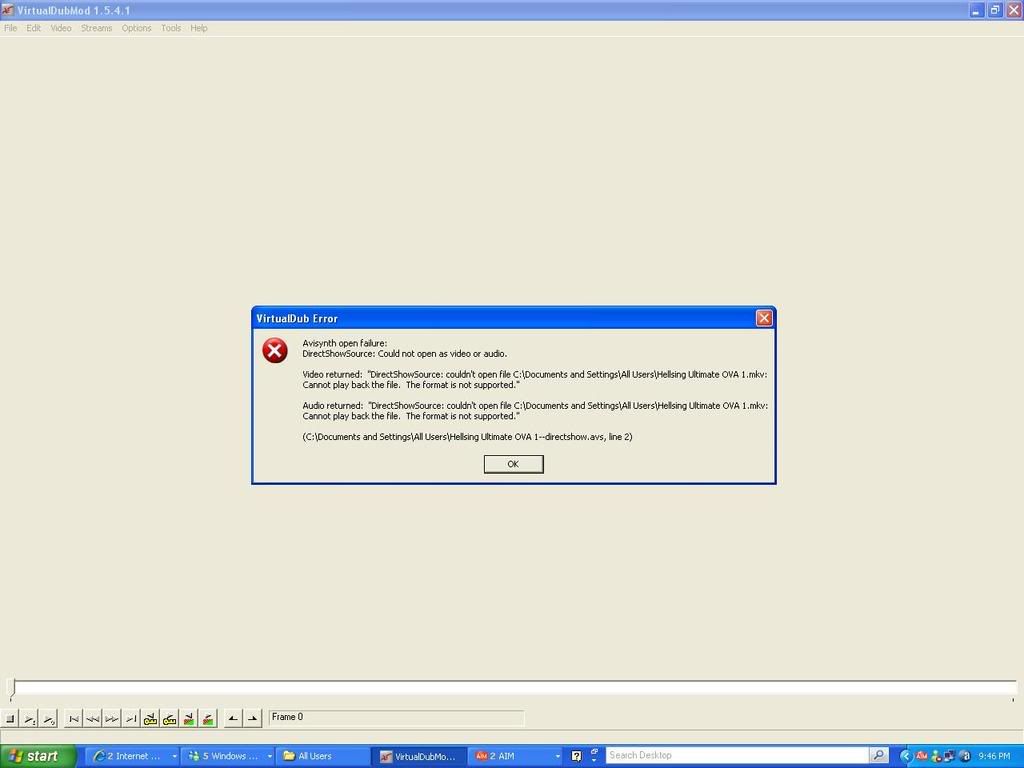
Image

Yeah, its a download source too >.<

You can see the version of Vdub there too, and opened it via avisynth and directshowsource

Please help ='[

Anymore details, feel free to ask

User avatar
nevada11
 
Joined: 07 Feb 2007
Location: New York, NY

Re: Import issues - MKV

Postby Vax » Mon Dec 29, 2008 10:23 pm

Try to use a ffmpegsource.
Download it from this Doom9 thread. Get the 1.21 version, not the beta. put the dll in your avisynth plugins folder (usually c:\program files\avisynth 2.5\plugins), and create a script with
Code: Select all
ffmpegsource("path to video file", vtrack=-1, atrack=-1)


I had a similar problem with .MKV before. And this is how I got it fixed.
User avatar
Vax
Sexy black guy
 
Joined: 11 Oct 2008
Location: New York

Re: Import issues - MKV

Postby nevada11 » Mon Dec 29, 2008 10:27 pm

Vax wrote:Try to use a ffmpegsource.
...and create a script with
Code: Select all
ffmpegsource("path to video file", vtrack=-1, atrack=-1)


Thanks for the advice (:

but I got lost from that point i quoted.
User avatar
nevada11
 
Joined: 07 Feb 2007
Location: New York, NY

Re: Import issues - MKV

Postby nevada11 » Tue Dec 30, 2008 3:42 pm

[Excuse double post]

I followed Vax's intrusctions up prior to where he mentioned the script

First, I opened the mkv file via notepad and I got the error message noting that the file is too "large" for notepad and I was advised to use another editor to edit the file.

I was told by Vax, that this is normal. I copied the code given in the post above and ready to paste. The notepad file couldn't "recognize" the mouse even after i right clicked. So I then clicked the Edit tab and then clicked paste.

I saved the document as Hellsing.avs with the same folder as my mkv file.

Now I open the .avs file in Vdub via avi synth and DirectShowSource and I get the error message:

"FFmpegSource: Couldn't open path to video file."
"(Document where .avs file is located)"

I get the same error message when I import it as File --> "Open video file". I also receive the same error message when I import the script in Zarx.

I must have gone wrong somewhere in there :|

Thanks for reading and the help.
User avatar
nevada11
 
Joined: 07 Feb 2007
Location: New York, NY

Re: Import issues - MKV

Postby Vax » Tue Dec 30, 2008 3:58 pm

"(Document where .avs file is located)"
Is that what you inserted in your script?

From what I see on your error message it's supposed to be
Code: Select all
ffmpegsource("C:\Documents and Settings\All Users\Hellsing Ultimate OVA 1.mkv", vtrack=-1, atrack=-1)

User avatar
Vax
Sexy black guy
 
Joined: 11 Oct 2008
Location: New York

Re: Import issues - MKV

Postby nevada11 » Tue Dec 30, 2008 4:39 pm

It worked as I imported it via avi synth and directshowsource

But the problem is I expected it to unpack. Now I have to save it as .avi and compress it. It's estimated to be finished in one day.

I try a direct stream copy and its already 1 GB at only 1 minute of encoding.

Is there anyway to speed the process.
User avatar
nevada11
 
Joined: 07 Feb 2007
Location: New York, NY

Re: Import issues - MKV

Postby AaronAMV » Tue Dec 30, 2008 4:41 pm

Less filters? Faster filters? Better processor? Other than that, no.

My Munto 2 took 37 hours to convert. :|
Image
User avatar
AaronAMV
eating that e. coli spinach
 
Joined: 22 Jan 2008
Location: (◔ ◡ ◔ )
Status: (◔ ◡ ◔ )

Re: Import issues - MKV

Postby nevada11 » Tue Dec 30, 2008 5:03 pm

Damn-it,

It's worth the wait perhaps.

Thanks for the help.
User avatar
nevada11
 
Joined: 07 Feb 2007
Location: New York, NY

Re: Import issues - MKV

Postby lagger_3D » Tue Jan 13, 2009 12:15 pm

Hello, I'm new to the forum. Well, actually I've been here allllll along, but have never interacted with anyone else until now... tah-dah! Okay, now down to business...

I have a mkv media file that I need to convert to avi or wmv to import into my editing software. I have sony vegas 8, but I'm self-training myself on the program and it gets frustrating so I take it into Windows Movie Maker often (I know, WHY would I want to do that? I guess I've just been using the crap for so long that it's second nature to me now). So does anyone know of a converter... preferibly FREE that is great and doesn't leave any marks on the video until you BUY the actual converter? I'm a poor college student, as I'm sure most of us are... but I have a few idea's for Witchblade amvs that no one else has done.

Thanks for the help, :D

Lagger
lagger_3D
 
Joined: 16 Sep 2005
Location: Ohio

Re: Import issues - MKV

Postby Kariudo » Wed Jan 14, 2009 6:01 am

use avisynth and virtualdub/mod to turn those .mkv files into editable (read: hueg liek xbox) .avi files

the other posts in this thread should be all you need
ImageImage
Image
User avatar
Kariudo
Twilight prince
 
Joined: 15 Jul 2005
Location: Los taquitos unidos
Status: 1924 bots banned and counting!

Re: Import issues - MKV

Postby RolltheStampede » Wed Jun 03, 2009 9:12 pm

Vax wrote:Try to use a ffmpegsource.
Download it from this Doom9 thread. Get the 1.21 version, not the beta. put the dll in your avisynth plugins folder (usually c:\program files\avisynth 2.5\plugins), and create a script with
Code: Select all
ffmpegsource("path to video file", vtrack=-1, atrack=-1)


I had a similar problem with .MKV before. And this is how I got it fixed.


hi you seem pretty knowledgable about this. could you use the avs file and edit it directly in premiere using the mkv import instead of running it through Vdub.
sort of like a dgindex file.

im at work so i cant try it first hand yet
Newest Video:Cirque du Kaliedo
Image
Video Pimpage Loves got to be there | Sungazing | 7 Seas of Enishi
User avatar
RolltheStampede
 
Joined: 15 Jun 2004
Location: Seattle, WA

Re: Import issues - MKV

Postby Kariudo » Thu Jun 04, 2009 12:09 am

that should work just fine (as fine as any other script would), ffmpegsource() is frame-accurate as well
ImageImage
Image
User avatar
Kariudo
Twilight prince
 
Joined: 15 Jul 2005
Location: Los taquitos unidos
Status: 1924 bots banned and counting!

Re: Import issues - MKV

Postby mirkosp » Fri Jun 05, 2009 7:09 pm

Yeah, as Kariudo said, direct avs editing with ffmpegsource does work just fine. However, I should note that it tends to be sensibly slower than direct avs on d2v files, since the mkvs are most likely to contain a lossy video stream which means that not all the frames are keyframes, hence the slower editing. You can notice this especially when you try to move "backwards" between frames or when you just move between far points in the source file or in the timeline. The "backwards" thing is especially noticeable if you try to export one clip with the speed reversed. It will take a lot of time. I think that exporting it with the normal speed, importing that exported clip, time-reversing it and re-exporting might take less time.
So yeah, depending on your system setup, editing with avs directly with ffmpegsource might or might not be a good idea, it's up to you, and in any case it will be slower than d2v.
Image
User avatar
mirkosp
MODkip
 
Joined: 24 Apr 2006
Location: Gallarate (VA), Italy
Status: (」・ワ・)」(⊃・ワ・)⊃

Re: Import issues - MKV

Postby Ardour » Wed Oct 21, 2009 10:45 pm

Okay, so I'm having a problem with getting the script open in VD.
Image
I followed everything in the thread to the best of my abilites. I was also wondering about the 1.21 version of ffmpegsource because I could only find version 1.12...
Help plz. And would it matter if I said that my file was a .mp4?
Thx in advanced.
There are always two choices in life: the right one and the easy one.
Image
User avatar
Ardour
 
Joined: 03 May 2009
Location: On Top of a Strawberry Ice Cream Cake
Status: Spazzy

Re: Import issues - MKV

Postby LantisEscudo » Wed Oct 21, 2009 11:13 pm

Re-open your script in Notepad and save as ANSI text, not Unicode. Avisynth doesn't recognize Unicode text.
User avatar
LantisEscudo
 
Joined: 08 Mar 2001
Location: Vermont

Next

Return to Footage Help

Who is online

Users browsing this forum: No registered users and 0 guests