I'm trying to get sections of movie files out to lessen the amount I'll be working with, but when I try to save a section out of a file in VirtualDubMod, it just restarts rendering every time, making another file that ends up being huge. It used up 10 gigs before I decided to check if something was wrong, and it was just repeatedly and endlessly rendering the file!
I aborted the stupid thing, but it just started another one in another file! I closed the program and it wouldn't stop, I ended up having to task manager the stupid bastard in order to stop it.
Can someone please explain how I can stop it from doing this? It makes no sense, and preferences doesn't reference anything like this.
Assistance much appreciated.
VirtualDubMod constantly rendering and won't stop
-
Gaelstrom

- Joined: Sun Aug 10, 2003 7:25 pm
- Status: Sending enemies to the next dimension
-
Phantasmagoriat

- Joined: Mon Feb 06, 2006 11:26 pm
- Status: ☁SteamPunked≈☂
- Contact:
Re: VirtualDubMod constantly rendering and won't stop
Double check that you are really marking off sections,
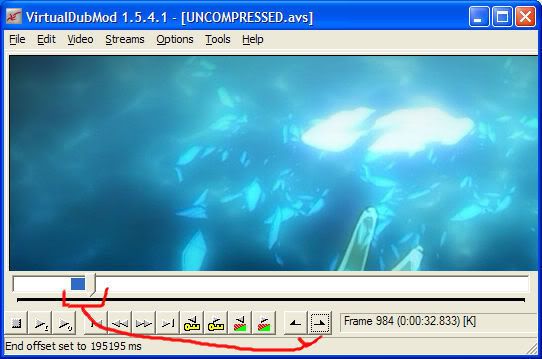
[otherwise you might actually be encoding the whole movie]
What compression settings are you using?
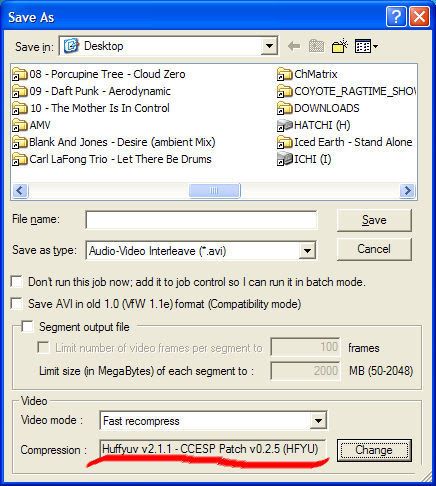
[lossless codecs like HUFFYUV will always be big, which is normal-- but Uncompressed would be even bigger]
The thing that really throws me off is that it starts up again after you abort
maybe you have a bunch of clips queued in Job Control:
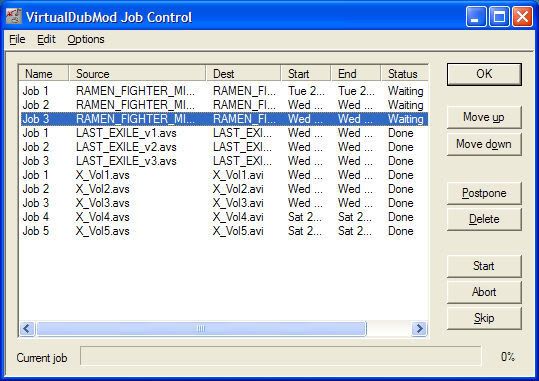
[when one job finishes, the next one automatically starts]
hope that helps
~Phan
[otherwise you might actually be encoding the whole movie]
What compression settings are you using?
[lossless codecs like HUFFYUV will always be big, which is normal-- but Uncompressed would be even bigger]
The thing that really throws me off is that it starts up again after you abort
maybe you have a bunch of clips queued in Job Control:
[when one job finishes, the next one automatically starts]
hope that helps
~Phan
PLAY FREEDOOM!! | Phan Picks! | THE424SHOW | YouTube | "Painkiller" | Vanilla MIDI's
"Effort to Understand; Effort to be Understood; to See through Different Eyes."
"Effort to Understand; Effort to be Understood; to See through Different Eyes."
-
Gaelstrom
- Joined: Sun Aug 10, 2003 7:25 pm
- Status: Sending enemies to the next dimension
Re: VirtualDubMod constantly rendering and won't stop
I tried it with the settings you mentioned and it seemed to work fine. Everything else was the same, but I was doing uncompressed and full processing mode, which may have been part of the problem. I have no idea what the optimum settings are to just get a decent version of a clip, so I just went with default, but the settings you gave seemed to work pretty well, was much faster, and didn't decide to rerender endlessly.
Also, I didn't have any jobs when this issue happened, so I dunno if that had something to do with it. I just did 'save as' and whatever. I don't even know how to send a job to wherever a job needs to be sent, I'm... exceedingly new to this
Also, I didn't have any jobs when this issue happened, so I dunno if that had something to do with it. I just did 'save as' and whatever. I don't even know how to send a job to wherever a job needs to be sent, I'm... exceedingly new to this


-
Phantasmagoriat
- Joined: Mon Feb 06, 2006 11:26 pm
- Status: ☁SteamPunked≈☂
- Contact:
Re: VirtualDubMod constantly rendering and won't stop
I think this has turned into a "Compression, Encoding, and Converting" topic so a mod might move this discussion.
I'm glad that worked out
yeah, fast recompress to HUFFYUV would be a good choice for saving clips.
To add a job to Job Control,
Just make sure you have enough space, otherwise your jobs won't finish.
More in-depth info can be found here:
http://www.animemusicvideos.org/guides/ ... rview.html
you are currently in stage 9.
I'm glad that worked out
yeah, fast recompress to HUFFYUV would be a good choice for saving clips.
To add a job to Job Control,
- Mark off your segments [like in my first picture]
- File > Save As...
- Find your output location
- Enter a file name
- Use the same settings as my second picture except:
- Check the box that says "Don't run this job now; add it to job control..."
- Click Save
- Repeat the above steps until you have marked off all the scenes you want
- then go File > Job control...
- simply Click Start [and VirtualDubMod should process the batch one by one]
- walk away, and let vdub do it's magic
- for large batches, you can let it run over night, but change:
- Options > Shutdown when finished
Just make sure you have enough space, otherwise your jobs won't finish.
More in-depth info can be found here:
http://www.animemusicvideos.org/guides/ ... rview.html
you are currently in stage 9.
PLAY FREEDOOM!! | Phan Picks! | THE424SHOW | YouTube | "Painkiller" | Vanilla MIDI's
"Effort to Understand; Effort to be Understood; to See through Different Eyes."
"Effort to Understand; Effort to be Understood; to See through Different Eyes."
-
Mister Hatt
- Joined: Tue Dec 25, 2007 8:26 am
- Status: better than you
Re: VirtualDubMod constantly rendering and won't stop
Don't use VDubMod, it's outdated and does stupid things. In regular vdub you should be using fast recompress to avoid funky colourimetry things. Grab it from Avery's site.
-
Gaelstrom
- Joined: Sun Aug 10, 2003 7:25 pm
- Status: Sending enemies to the next dimension
Re: VirtualDubMod constantly rendering and won't stop
Haha, that's why I kept having trouble with the guide a while ago when I first tried to learn this stuff. Looking through the boards, everything seemed different and I just couldn't figure out where to start.Mister Hatt wrote:Don't use VDubMod, it's outdated and does stupid things. In regular vdub you should be using fast recompress to avoid funky colourimetry things. Grab it from Avery's site.
Why is VDubMod outdated? I was under the impression is was specifically designed for stuff like this. What type of colourimetry issues do you mean, in terms for someone who has very little idea what you're speaking of?
-
LantisEscudo

- Joined: Thu Mar 08, 2001 5:21 pm
- Location: Eastern Massachusetts
- Contact:
Re: VirtualDubMod constantly rendering and won't stop
Vdubmod is outdated because it hasn't been updated since 2007. Vdub has been regularly updated, and now has almost all of the features that Mod had (except for the script editor, and AvsP is better for that, anyway).
| | |
AMV Contest Coordinator: Anime Boston 2016-2025 | Bakuretsu Con 2014-2024
AMV Contest Coordinator: Anime Boston 2016-2025 | Bakuretsu Con 2014-2024
-
Qyot27

- Surreptitious fluffy bunny
- Joined: Fri Aug 30, 2002 12:08 pm
- Status: Creepin' between the bullfrogs
- Location: St. Pete, FL
- Contact:
Re: VirtualDubMod constantly rendering and won't stop
And the Streams interface for the audio/subs that VDubMod has; Streams >>>>>>>>>>>>> VDub's Audio menu. Heck, I'd be fine if a 1.9.x variant of VDubMod came out and the only thing that separated it from regular VDub was that menu. I never used the Script editor anyway, VDMod_Resize was separated into a regular plugin years ago, and the Plugins system (which was introduced somewhere in the 1.8.x branch, IIRC) mostly serves the purpose of Mod's larger input file support and expands it - it's still missing one for MKV-VFW that isn't the DirectShow plugin, though (but it's got frickin' ASF/WMV support! and the MPEG-2 plugin is a newer version than the code for it in Mod).
Fast recompress mode preserves the colorspace you're working in; if you give it YV12 (or RGB24, or YUY2, or more), it stays in YV12 (or RGB24, or YUY2, or more) unless you've set the codec in the Compression dialog to override that. Full processing mode always converts the colorspace to RGB before giving it to the codec.
Fast recompress mode preserves the colorspace you're working in; if you give it YV12 (or RGB24, or YUY2, or more), it stays in YV12 (or RGB24, or YUY2, or more) unless you've set the codec in the Compression dialog to override that. Full processing mode always converts the colorspace to RGB before giving it to the codec.
My profile on MyAnimeList | Quasistatic Regret: yeah, yeah, I finally got a blog
-
Gaelstrom
- Joined: Sun Aug 10, 2003 7:25 pm
- Status: Sending enemies to the next dimension
Re: VirtualDubMod constantly rendering and won't stop
That's all a bit... well a lot beyond my understanding of the program in the slightest. I tried to follow, and I guess caught the gist of 'stick to that codec to maintain color' but honestly I don't even know where to begin with the more complex stuff or even where I'd use it. To this day I've always wanted to know how the fansubbers re-encode movies with such amazing compression, because I have videos for my job I've needed to compress quite a bit and never get that quality with anywhere near that small a size.
For understanding purposes, would some of you be willing to grant an anecdote on how you work with footage so I can understand the types of processes I have available to me? Nothing extensive, just a basic rundown with a bit of reasoning for a layman would make me feel much more comfortable.
If that's too much to ask, then don't worry about it. I'm just the type who learns better by being mentored than wasting hours screwing up on things I know I'll just screw up on.
For understanding purposes, would some of you be willing to grant an anecdote on how you work with footage so I can understand the types of processes I have available to me? Nothing extensive, just a basic rundown with a bit of reasoning for a layman would make me feel much more comfortable.
If that's too much to ask, then don't worry about it. I'm just the type who learns better by being mentored than wasting hours screwing up on things I know I'll just screw up on.
-
mirkosp

- The Absolute Mudman
- Joined: Mon Apr 24, 2006 6:24 am
- Status: (」・ワ・)」(⊃・ワ・)⊃
- Location: Gallarate (VA), Italy
- Contact:
Re: VirtualDubMod constantly rendering and won't stop
- Get source on the hard driveGaelstrom wrote:For understanding purposes, would some of you be willing to grant an anecdote on how you work with footage so I can understand the types of processes I have available to me? Nothing extensive, just a basic rundown with a bit of reasoning for a layman would make me feel much more comfortable.
- Index with dgindex or load it directly in avisynth depending on what applies best
- Deinterlace [if needed], crop+resize [if needed], filters [if needed]
- Load script in vdub. Set audio to no audio, video to fast recompress, then pick lagarith for compression.
- Use the newly encoded lagarith for a x264 encode.
- Get the audio and encode it to whatever format works best or I need.
- Mux video and audio together.
