I have some footage (from Memories) that I resized to 880x480 square pixels before editing. Now I'm trying to export it back to 720x480 16:9. It seems that I can do this with Adobe Premiere no problem (there is the slightest dark line on the top and bottom but nothing I am concerned with). If I try to export with mpeg2 or h.264 the settings are 720x480 with Pixel Aspect Ratio set to Widescreen 16:9 (1.212). This would be fine except I'm getting confused when I want to make an mp4 with Zarx264 instead. If I export a lossless version and then use the re-size calculator in AvsPmod I can't figure out how to get it back to 720x480. So this is the closest thing I can come up with:
LanczosResize(724, 478)
Crop(2, 0, -2, -0)
AddBorders(0,0,0,2)
It's squished but I figured it would stretch back out in Zarx264. Ok, so when I export with the aspect ratio in auto calculate at 16:9 I can't get it to play back (just a black screen). If the aspect ratio is set to 1:1 it exports fine but ends up obviously looking squished and if I override the aspect ratio in Media Player Classic to 16:9 it looks fine. Obviously, I would rather not have to overide...
First, should I skip the "crop" and "addborders" functions and just re-size to 720x480 and figure it out from there? And second, am I misunderstanding how this stuff works or am I having a problem with Zarx264?
Aspect Ratios! (880x480 Brain Pain)
-
JD_Lord1
- Joined: Sun Apr 17, 2005 7:09 pm
- Status: Float
- Location: Jerome, Arizona
- Contact:
Aspect Ratios! (880x480 Brain Pain)
the JOSH
-
Zarxrax

- Joined: Sun Apr 01, 2001 6:37 pm
- Contact:
Re: Aspect Ratios! (880x480 Brain Pain)
Well first of all, I've never heard of any sort of problem like that when using the aspect ratio flag for an mp4. Maybe mirkosp or mister hat could provide some more info on that, but my first reaction is that something must be going horribly wrong.
Otherwise, to get your aspect ratio more or less correct, all you really need to do is just make sure its resized to 848x480. Since its widescreen, you DONT want it to be 720x480.
Otherwise, to get your aspect ratio more or less correct, all you really need to do is just make sure its resized to 848x480. Since its widescreen, you DONT want it to be 720x480.
Sammie-Roto - Free rotoscoping tool
-
mirkosp

- The Absolute Mudman
- Joined: Mon Apr 24, 2006 6:24 am
- Status: (」・ワ・)」(⊃・ワ・)⊃
- Location: Gallarate (VA), Italy
- Contact:
Re: Aspect Ratios! (880x480 Brain Pain)
Zarxrax, don't confuse the guy with wrong info.
That said... 880x480 sounds odd, just how did you get there to begin with?
http://ps-auxw.de/cgi-bin/ar-calc.pl
For the future, follow that calculator.
That said... 880x480 sounds odd, just how did you get there to begin with?
http://ps-auxw.de/cgi-bin/ar-calc.pl
For the future, follow that calculator.

-
JD_Lord1
- Joined: Sun Apr 17, 2005 7:09 pm
- Status: Float
- Location: Jerome, Arizona
- Contact:
Re: Aspect Ratios! (880x480 Brain Pain)
I don't remember how I got to 880x480, I'll have to go back and look at my original files when I get the chance. But I do remember thinking that 848 was the obvious choice on the A/V tech guide and for some reason I decided not to go with it, again I'll have to go check it out... But, last night I downloaded the newest version of Zarx264 and I had no problems with the aspect ratio flag and the video turned out fine.
I did notice that there was a warning about the fact that I don't have Quicktime installed (maybe this has something to do with the previous error or does this only have to do with audio?) which is true since I just uninstalled it (after previously installing the newest version) because it was making all my icons go crazy in windows.
So my next question is this, will not having Quicktime effect how my audio is encoded or just how it is muxed with the video? Could I just make my audio separately and simply use Zarx264 to mux it with the video or does it re-compress it?
Sorry for the 20 questions but thanks for the help!
I did notice that there was a warning about the fact that I don't have Quicktime installed (maybe this has something to do with the previous error or does this only have to do with audio?) which is true since I just uninstalled it (after previously installing the newest version) because it was making all my icons go crazy in windows.
So my next question is this, will not having Quicktime effect how my audio is encoded or just how it is muxed with the video? Could I just make my audio separately and simply use Zarx264 to mux it with the video or does it re-compress it?
Sorry for the 20 questions but thanks for the help!
the JOSH
-
Zarxrax
- Joined: Sun Apr 01, 2001 6:37 pm
- Contact:
Re: Aspect Ratios! (880x480 Brain Pain)
Quicktime provides the highest quality audio encoder, and it also ensures fairly accurate audio synchronization. Its fine to use other audio encoders and mux it yourself though.
Sammie-Roto - Free rotoscoping tool
-
Cannonaire

- Joined: Wed May 05, 2010 5:59 pm
- Status: OVERLOAD
- Location: Oregon
Re: Aspect Ratios! (880x480 Brain Pain)
If you can find and post your original scripts, that would best help us to figure out how to help.JD_Lord1 wrote:I don't remember how I got to 880x480, I'll have to go back and look at my original files when I get the chance...
 Think millionaire, but with cannons. || Resident Maaya Sakamoto fan.
-
JD_Lord1
- Joined: Sun Apr 17, 2005 7:09 pm
- Status: Float
- Location: Jerome, Arizona
- Contact:
Re: Aspect Ratios! (880x480 Brain Pain)
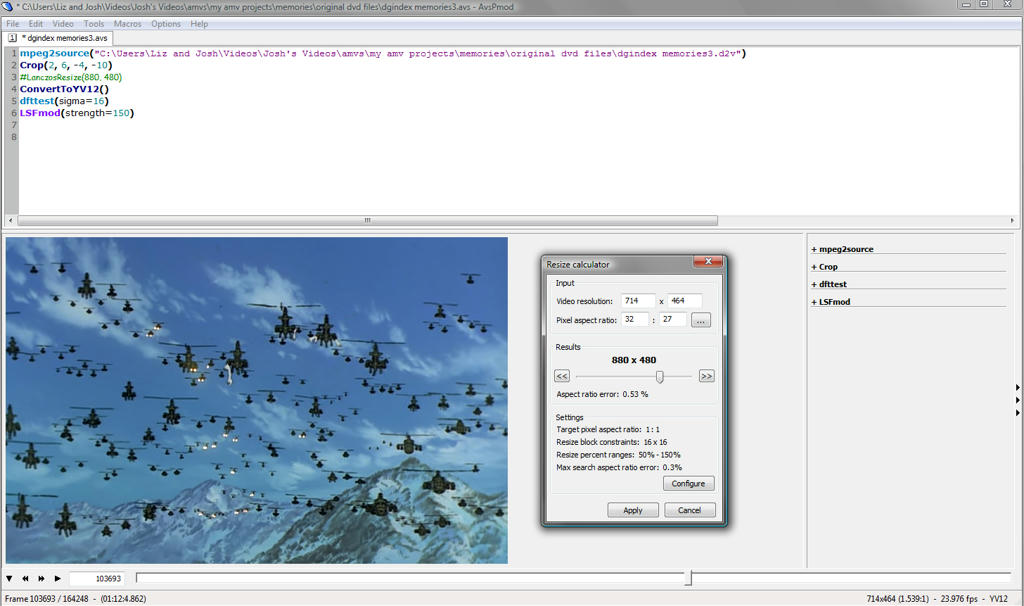
I believe what I was trying to do was keep the vertical at 480, although now that I look at it my intentions seem pointless because I cropped and then up-sized it to 480... I'm not sure if these settings for the calculator are right but this is basically how I got what I got. I did try 848x480 and compared it to the original dvd clip (just side by side with Media Player) and it did seem closer to the original. So perhaps I will re-size my AMV to 848x480 1:1 and export lossless before encoding any other way.
But I'm still not sure why 848 is the magic number. For instance, I have another video that is 848x480 and when I try to export at 720x480 16:9 in Premeire there are two (substantial) black bars on the left and right of the video.
Brain pain indeed...
the JOSH
-
BasharOfTheAges

- Just zis guy, you know?
- Joined: Tue Sep 14, 2004 11:32 pm
- Status: Breathing
- Location: Merrimack, NH
Re: Aspect Ratios! (880x480 Brain Pain)
I honestly can't tell if you're confusing PAR and DAR. Why, exactly, are you trying to export in 720x480 in the first place? Are you specifically aiming to create an anamorphic file to play on a DVD?
Anime Boston Fan Creations Coordinator (2019-2023)
Anime Boston Fan Creations Staff (2016-2018)
Another Anime Convention AMV Contest Coordinator 2008-2016
| | |
Anime Boston Fan Creations Staff (2016-2018)
Another Anime Convention AMV Contest Coordinator 2008-2016
| | |
-
Cannonaire
- Joined: Wed May 05, 2010 5:59 pm
- Status: OVERLOAD
- Location: Oregon
Re: Aspect Ratios! (880x480 Brain Pain)
What you have done is this:
Crop to 714x464
Scale to 880x480
Assuming the source is 16:9, you end up with this: (info from the AR calc found here - http://ps-auxw.de/cgi-bin/ar-calc.pl)
Leaving the source at 714x464 (actually, I'd crop a bit more off the sides) would have been ideal, but if you have already edited then it could mean re-editing to get ideal results. The situation is salvageable, though.
You have a few options:
1. If you have not used many or any effects, including masking, which rely on specific things being at specific parts of the frame, you can re-render your source files using more sensible settings and have Premiere use those clips instead of the old ones (bait-and-switch method, find instructions here: http://www.animemusicvideos.org/forum/v ... 9&t=109175). Doing so will likely take the most time, but it will ensure quality is maintained better.
2. You can also leave the video as-is at 880x480 and change the SAR. Before you start encoding with Zarx264gui, click on the advanced tab and change the "Sample Aspect Ratio" to x=22032 y=21596 (this is as precise as you can get using SAR in Zarx264gui). Doing this will take the least amount of work and you will keep about the same quality as you have at this point. The final output will not be 16:9, but the image geometry will be accurate.
3. You can use Avisynth to scale the video to 864x464 resolution. This has the benefit of giving you accurate image geometry, smaller file size, and no need to mess with DAR/SAR/PAR settings. The drawback to this one is that you will be scaling yet again, which could reduce image quality somewhat.
Hopefully I have restrained myself from getting too pedantic here. All of these options should work for you, and two of them are very easy to do. If you would like further information, just ask. Good luck, and I hope this helps!
Crop to 714x464
Scale to 880x480
Assuming the source is 16:9, you end up with this: (info from the AR calc found here - http://ps-auxw.de/cgi-bin/ar-calc.pl)
Spoiler :
You have a few options:
1. If you have not used many or any effects, including masking, which rely on specific things being at specific parts of the frame, you can re-render your source files using more sensible settings and have Premiere use those clips instead of the old ones (bait-and-switch method, find instructions here: http://www.animemusicvideos.org/forum/v ... 9&t=109175). Doing so will likely take the most time, but it will ensure quality is maintained better.
2. You can also leave the video as-is at 880x480 and change the SAR. Before you start encoding with Zarx264gui, click on the advanced tab and change the "Sample Aspect Ratio" to x=22032 y=21596 (this is as precise as you can get using SAR in Zarx264gui). Doing this will take the least amount of work and you will keep about the same quality as you have at this point. The final output will not be 16:9, but the image geometry will be accurate.
3. You can use Avisynth to scale the video to 864x464 resolution. This has the benefit of giving you accurate image geometry, smaller file size, and no need to mess with DAR/SAR/PAR settings. The drawback to this one is that you will be scaling yet again, which could reduce image quality somewhat.
Hopefully I have restrained myself from getting too pedantic here. All of these options should work for you, and two of them are very easy to do. If you would like further information, just ask. Good luck, and I hope this helps!
Think millionaire, but with cannons. || Resident Maaya Sakamoto fan.-
Cannonaire
- Joined: Wed May 05, 2010 5:59 pm
- Status: OVERLOAD
- Location: Oregon
Re: Aspect Ratios! (880x480 Brain Pain)
Sorry for the double post, but to answer your question from your original post, I think you have misconceptions about how aspect ratios, scaling, and cropping relate. I would be happy to explain further if you ask.
I would recommend against using the AR calc built in to AvsP; it is deprecated. If you want to calculate aspect ratio stuff, use this link (the same one mirkosp and I already posted): http://ps-auxw.de/cgi-bin/ar-calc.pl. I would avoid using Lanczosresize as well. Spline36Resize is a good starting point for better scaling.
One more thing to keep in mind is that your NLE might be using different AR settings for the project and each piece of source footage. An incorrect value in either will likely cause seemingly random black bars on the top and bottom or sides along with skewed image geometry.
I would recommend against using the AR calc built in to AvsP; it is deprecated. If you want to calculate aspect ratio stuff, use this link (the same one mirkosp and I already posted): http://ps-auxw.de/cgi-bin/ar-calc.pl. I would avoid using Lanczosresize as well. Spline36Resize is a good starting point for better scaling.
One more thing to keep in mind is that your NLE might be using different AR settings for the project and each piece of source footage. An incorrect value in either will likely cause seemingly random black bars on the top and bottom or sides along with skewed image geometry.
Think millionaire, but with cannons. || Resident Maaya Sakamoto fan.