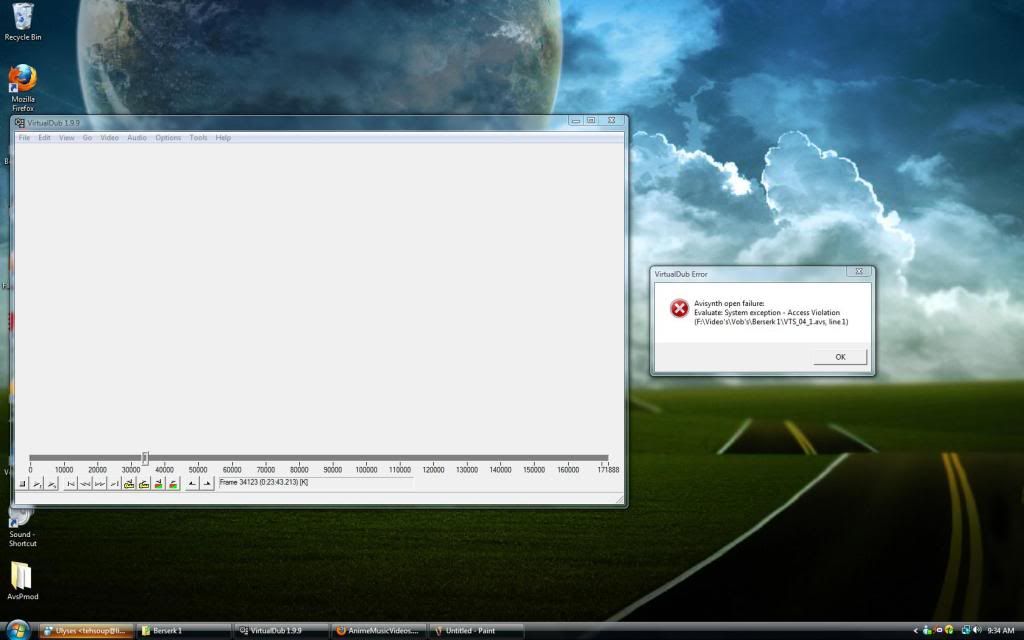
Avisynth Open Error

This forum is for questions and discussion of all the aspects of handling your footage. If you have questions about capturing/ripping footage, AviSynth, or compression/encoding/converting, look here.

Avisynth Open Error

Postby SomeWhiteFellow » Sat Jun 05, 2010 9:48 am

Avisynth Open Error: Evaluate System exception - Access violation


mpeg2source("F:\Video's\Vob's\Berserk 1\VTS_04_1.d2v",cpu=6)
LanczosResize(640,480)


I'm trying to encode my Berserk .vobs, DGIndex went fine, then I try and load the script in AvsP, VDubMod, and VDub..., each have brought me to the same result.
This has made me think it's a problem in Avisynth or something because I can load the individual vobs into vegas with no problems.
I've re-installed avisynth,restarted and nothing has worked, currently none of the Berserk scripts work...so I'm at a loss, maybe some kind of protection?
I can import other scripts in and they work perfectly fine, I just encoded my Hajime No Ippo DVD and it loads in Vdub fine, it just seems to be the Berserk thats having problems.

Sorry for the shitty screen shot Photobucket does a great job of resizing shit. :down:
Image


Any help on this?
Image
Image
User avatar
SomeWhiteFellow
 
Joined: 16 Jul 2008
Status: Kill the King

Re: Avisynth Open Error

Postby mirkosp » Sat Jun 05, 2010 10:10 am

Change cpu=6 to cpu=0 and add a setmemorymax(128) before the mpeg2source. Access violation tend to be ram issues.
Image
User avatar
mirkosp
MODkip
 
Joined: 24 Apr 2006
Location: Gallarate (VA), Italy
Status: (」・ワ・)」(⊃・ワ・)⊃

Re: Avisynth Open Error

Postby SomeWhiteFellow » Sat Jun 05, 2010 10:29 am

mirkosp wrote:Change cpu=6 to cpu=0 and add a setmemorymax(128) before the mpeg2source. Access violation tend to be ram issues.


I tried that still no luck.

Code: Select all
setmemorymax(128)
mpeg2source("F:\Video's\Vob's\Berserk 1\VTS_04_1.d2v",cpu=0)
LanczosResize(640,480)


I'm hoping that's correct?
Image
Image
User avatar
SomeWhiteFellow
 
Joined: 16 Jul 2008
Status: Kill the King

Re: Avisynth Open Error

Postby Mister Hatt » Sat Jun 05, 2010 11:00 am

Code: Select all
setmemorymax(1024)
dgdecode_mpeg2source("F:\Video's\Vob's\Berserk 1\VTS_04_1.d2v")
domyivtc()
spline36resize(640,480)

Resizing before processing is a really bad idea if you intend your processing to not look terrible, and you need to IVTC such things. Avisynth access violations are caused by either the avs core running out of memory, or individual plugins have overflows. I have no idea why anyone here uses the cpu argument at all (don't set it to 0, just leave it out altogether) but it seems to cause more trouble than it's worth. The other things that may cause your problem are unspecified mpeg2source filters (hence my dgdecode_ at the start of the line) or path issues in the d2v file itself. Double check those.
Mister Hatt
 
Joined: 25 Dec 2007
Status: better than you

Re: Avisynth Open Error

Postby mirkosp » Sat Jun 05, 2010 11:10 am

I'll point out that in Hatt's script the "domyivtc()" isn't an actual filter but just means to do your ivtc there (tfm.tdecimate or whatever you'd use, perhaps amvivtc I guess). You might have known this already, but better safe than sorry.
Image
User avatar
mirkosp
MODkip
 
Joined: 24 Apr 2006
Location: Gallarate (VA), Italy
Status: (」・ワ・)」(⊃・ワ・)⊃

Re: Avisynth Open Error

Postby SomeWhiteFellow » Sat Jun 05, 2010 1:13 pm

Mister Hatt wrote:
Code: Select all
setmemorymax(1024)
dgdecode_mpeg2source("F:\Video's\Vob's\Berserk 1\VTS_04_1.d2v")
domyivtc()
spline36resize(640,480)

Resizing before processing is a really bad idea if you intend your processing to not look terrible, and you need to IVTC such things. Avisynth access violations are caused by either the avs core running out of memory, or individual plugins have overflows. I have no idea why anyone here uses the cpu argument at all (don't set it to 0, just leave it out altogether) but it seems to cause more trouble than it's worth. The other things that may cause your problem are unspecified mpeg2source filters (hence my dgdecode_ at the start of the line) or path issues in the d2v file itself. Double check those.


So far I've tried replacing my current script with the both provided(I used AMVIVTC(mode=1) ), re-ripping, and re-indexing in a different folder, used the default script on the new files and the other scripts in Vdub but still nothing is working.
Also as for the resize before processing, well that's just force of habit, I haven't worried or worked on the script itself to much right now since it's not working....
I'm not great at this (obviously) but isn't IVTC used in order to kill/decimate interlacing and etc? Because my Berserk happens to be progressive so there isn't any interlacing, I've ran the field operation through on honor pulldown flags (which I know is usually for NTSC or 29fps, interlaced.) and Forced film(and this is usually 23fps and/or 95% film or higher and progressive so far as my experiences go. ), both give me an "error" I guess...A field order transition which has never given me problems before, is that the possible problem?...., it corrects it after I click yes to fix the field order transition, so I assumed nothing was wrong but I figured I'd ask since you say the d2v file may be producing this problem.
Image
Image
User avatar
SomeWhiteFellow
 
Joined: 16 Jul 2008
Status: Kill the King

Re: Avisynth Open Error

Postby mirkosp » Sat Jun 05, 2010 3:43 pm

Yeah, if you force film'd then there you don't IVTC. It's just that R1 DVDs that can be force filmed or area actually progressive are somewhat rare, so that's why the IVTC suggestion felt obvious. :P
Image
User avatar
mirkosp
MODkip
 
Joined: 24 Apr 2006
Location: Gallarate (VA), Italy
Status: (」・ワ・)」(⊃・ワ・)⊃

Re: Avisynth Open Error

Postby Mister Hatt » Sun Jun 06, 2010 12:17 am

It's progressive, where is it from? Every single Berserk DVD I have seen (R1, R2j, R4) has been either telecined or telecine+blended or telecine+decimated. If it really is progressive and the correct framerate, ignore IVTCing it, and just use Force FILM and it should be fine, unless of course there is an issue with your actual VOBs, which would show up as the decoder having a problem in avisynth, possibly a memory overflow but I doubt it. Field order changes don't cause this kind of thing, but seeing as you're using neuron2, you never know. See how timecop's mpeg2dec3 goes instead, it's long been known that dgindex isn't the best thing to use for DVD footage but the amv community likes to do things the dumb way.
Mister Hatt
 
Joined: 25 Dec 2007
Status: better than you

Re: Avisynth Open Error

Postby mirkosp » Sun Jun 06, 2010 12:26 am

I think he meant that it was 94% FILM or higher, which is fine to Force FILM. Also, don't just go around talking about timecop's dvd2avi ─ it's not public, only you and a few others have it, and you won't share until it's stable, so it's pointless, duh. :roll:
Image
User avatar
mirkosp
MODkip
 
Joined: 24 Apr 2006
Location: Gallarate (VA), Italy
Status: (」・ワ・)」(⊃・ワ・)⊃

Re: Avisynth Open Error

Postby Mister Hatt » Sun Jun 06, 2010 4:39 am

It is public, it's even the first google result for "timecop mpeg2dec3" broseph, it's been stable since 2003 if not longer; maybe you're thinking of something else? Additionally, if something is 94% FILM I personally wouldn't force it.
Mister Hatt
 
Joined: 25 Dec 2007
Status: better than you

Re: Avisynth Open Error

Postby SomeWhiteFellow » Mon Jun 07, 2010 3:23 pm

It's the Berserk - Box of War release, which I just found out is a remastered R1 Progressive, so I'm not sure what is going on, I'll check out that program as soon as I can.
Thanks for all the assistance even though I haven't made much progress with this yet....
Image
Image
User avatar
SomeWhiteFellow
 
Joined: 16 Jul 2008
Status: Kill the King

Re: Avisynth Open Error

Postby SomeWhiteFellow » Tue Jun 08, 2010 10:35 pm

You did it Hatt, rather a much more lengthy process involved but I have no complaints.
I import all the mpegs into the program ( I tried an avs file if I were suppose to... just in case, and it still didn't work.) render out a lagarith from that, then I get quite a few avi files, afterwards I just combine them through avisynth import into avsp and vdub and I get what I want, thanks for the help.
Image
Image
User avatar
SomeWhiteFellow
 
Joined: 16 Jul 2008
Status: Kill the King

Re: Avisynth Open Error

Postby Mister Hatt » Tue Jun 08, 2010 11:21 pm

Shouldn't take more than a minute to get it into avs, and another 20 or so to get a lagarith file out of that really. You can also chain the avs files or sources (exercise for the reader) and encode it all into a single lagarith file to begin with.

Your process should go something like:
Open VOB's in DVD2AVI
Set Force FILM or whichever other field behavior you want
Save d2v files
mpeg2dec3_mpeg2source("%02d.d2v") or something to load all your sources into a single avs file
Processan
Open avs file in vdub
Save lagarith

NB: I have no idea if the above expression code for source loading will work in stock avisynth, it does work for imagesource so I guess it should for anything else, but who knows. If not you just load them in the order you want, one source per line. They will all match up. If you want to be real clever and avoid duplicating the OP/ED and whatnot, you can use DVD Decrypter's PGS editor (I tihnk DVD Fab has one as well but it is nowhere near as good) to dump only certain cells from the VOB into a new VOB, it's really handy when doing ordered chapter rips, along with getting the episodes without the OP/ED. It's pretty much allowing you to rip the VOB files with only certain chapters, insanely useful.
Mister Hatt
 
Joined: 25 Dec 2007
Status: better than you


Return to Footage Help

Who is online

Users browsing this forum: No registered users and 1 guest