Okay, I have a couple of midi files that I downloaded off the internet. It doesn't sound too bad, but I want to use them in a new music video. I was wondering how could I convert from midi to mp3. I want to be able to edit it in Premiere. I keep posting about this topic, but no one can seem to help me through it. Even AD tried to help me, but it's like I just couldn't figure it out. There must be something wrong with my winamp program, because it just won't do it.
Sephiroth
Editing midi files
-
SephirothJenova

- Joined: Tue Jun 05, 2001 6:26 pm
- Location: St. Louis, MO, USA
- Contact:
-
Mask of Destiny
- Joined: Sun Aug 11, 2002 8:32 pm
That shouldn't be too hard. Just open up your favorite sound recording program and then open the mixer (should be accessible by double clicking the speaker in the systray). Click Options -> Properties. Click the recording radio button. Now look for something in the list that says either MIDI, or something that implies combined output. In the case of my laptop this would be called "Wave Out Mix." Make sure it's checked and then hit OK. Now look for the slider corresponding to this option. Make sure the "Select" option is checked and set the slider to an appropriate level. Now go back to your sound recording program and hit record. Now play the MIDI file and then stop recording when it's done playing. Now all you have to do is edit out the silence. This is the way I'm used to doing it; however, WinAMP can make this much easier, but only WinAMP 2. WinAMP 3 doesn't have the ability to output to a wav file (at least I haven't figured out any way to do it.) In WinAMP you just have to select the Wave file output plugin and then play the file. If you want more detailed instructions just ask.SephirothJenova wrote:I was wondering how could I convert from midi to mp3.
There are also some programs that use their own samples to make a wav out of MIDI, but I've never used one.
-
AbsoluteDestiny

- Joined: Wed Aug 15, 2001 1:56 pm
- Location: Oxford, UK
- Contact:
Winamp2 also can't record MIDI files.
In A&E's Tech guides there is a page on internet sources... you should read the section on getting audio from anything you can hear in windows.
It's essentially the same method as Mask of Destiny is suggesting but it includes free software links and pretty pictures
In A&E's Tech guides there is a page on internet sources... you should read the section on getting audio from anything you can hear in windows.
It's essentially the same method as Mask of Destiny is suggesting but it includes free software links and pretty pictures

-
Mask of Destiny
- Joined: Sun Aug 11, 2002 8:32 pm
-
stormybaka

- Joined: Sun Sep 15, 2002 3:26 am
- Location: Eye of the storm...
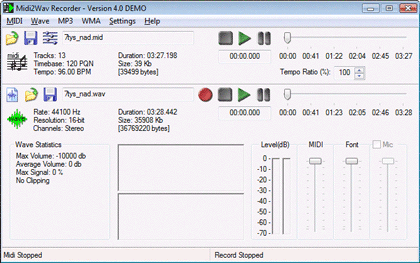
Here is a pic and link to a midi to wav convertor...No software I have used or seen as far converts to mp3 and I have used a few music editing and conversion software...There aren't too many that convert from midi...Got to bail for now but let me know if you prefer freeware and if it has to be to mp3...

-
klinky

- Joined: Mon Jul 23, 2001 12:23 am
- Location: Cookie College...
- Contact:
-
stormybaka
- Joined: Sun Sep 15, 2002 3:26 am
- Location: Eye of the storm...
Yeah it does convert to wav...klink wrote:As long as he can get it to waveforum audio from the digital sequencing of MIDI, then he should be fine. He can take a WAV and just convert it to mp3 later using LAME or something.
Here is a link worth checking out...It has a few good programs...
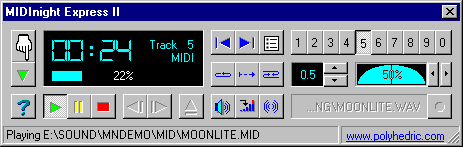
and MIDInight Express is freeware and a good program too...
www.indezine.com