VirtualDubMod, BeSweet and Bitrate Questions

Locked
User avatar
Kero777
Joined: Sun May 06, 2007 9:37 am
Org Profile

Post by Kero777 » Thu Sep 06, 2007 6:27 pm

post-it wrote:Yikes! ... that's version 1.263 .. there was a flaw in that design, the "Joint Stereo IS" X_X
Image
the flaw was first noticed when used with Virtual Dub 1.3b's introduction. Do Not Use "IS"
For the Radium? Thanks for that information just in case! :D

This is the weirdest thing... Maybe I have an older version of Lame that does this... but then again I got everything in the AMVAPP so I have no idea what's going on. I'm... so... frustrated... Grrrr....

Changing the bitrate seems to make a difference with how much shorter/longer the conversion is... but nothing is close enough to the way I want it. This is making no sense to me what-so-ever. Why would that make a difference? The lengths seem to be random.
Thanks to: Qyot27, Jaddziadax, BasharOfTheAges, Scintilla, Post-It, Anubisx00, Kariudo and everyone else for helping this Newby out! :P

"Hard work is worthless for those that don't believe in themselves." -Naruto Uzumaki

User avatar
post-it
Joined: Wed Jul 17, 2002 5:21 am
Status: Hunting Tanks
Location: Chilliwack - Fishing
Org Profile

Post by post-it » Thu Sep 06, 2007 7:08 pm

.. the time before your Audio begins Encoding depends on "the Encoder."

Raduim requires 50 milli-seconds to start and then Encodes "Real-Time"

LAME was never that stable; it can vary from 10 ms to 500 ms before Encoding begins 0_0

Radium Encodes are predictable and can be re-duplicated over and over and over ^_^
which means; if the Audio is off Sync, just adjust the "Delay" in the set-up section.
8-)

User avatar
Kero777
Joined: Sun May 06, 2007 9:37 am
Org Profile

Post by Kero777 » Thu Sep 06, 2007 8:43 pm

post-it wrote: if the Audio is off Sync, just adjust the "Delay" in the set-up section.
Thanks again for your replies, Post-it... but I have tried that (with Lame at least). No luck. :cry: I even tried exporting uncompressed from Vegas and importing into Audacity and Winamp and exporting from them to see if those programs would make a difference, but I still get a silent delay ranging from 30ms-100ms at the beginning and a small amount at the end. It throws my timing off too much. *Sigh* I guess I'm kind of stubborn about Lame working because of the horror stories I've heard about other codecs. I'll probably be up all night again trying to figure this out. I didn't spend all that time on my videos for the timing to be off and for my audio to sound not-so-good. :)
Thanks to: Qyot27, Jaddziadax, BasharOfTheAges, Scintilla, Post-It, Anubisx00, Kariudo and everyone else for helping this Newby out! :P

"Hard work is worthless for those that don't believe in themselves." -Naruto Uzumaki

trythil
is
Joined: Tue Jul 23, 2002 5:54 am
Status: N͋̀͒̆ͣ͋ͤ̍ͮ͌ͭ̔̊͒ͧ̿
Location: N????????????????
Org Profile

Post by trythil » Thu Sep 06, 2007 8:48 pm

post-it wrote:.. the time before your Audio begins Encoding depends on "the Encoder."

Raduim requires 50 milli-seconds to start and then Encodes "Real-Time"

LAME was never that stable; it can vary from 10 ms to 500 ms before Encoding begins 0_0
Stop spreading misinformation.

Builds of the default distribution of LAME introduce an encoder delay of 576 samples, end of story.

Read the source code (libmp3lame/encoder.h, libmp3lame/lame.c) to verify this.

User avatar
Kero777
Joined: Sun May 06, 2007 9:37 am
Org Profile

Post by Kero777 » Thu Sep 06, 2007 9:36 pm

Thanks for telling me that very useful information, Trythil! :D I read about it on a couple of different webpages. Here is a good link: http://lame.sourceforge.net/tech-FAQ.txt From what I understand, the silent samples put at the beginning and end of the Lame file are the number of samples that need to be skipped at the beginning and end to come out with the exact number of samples from the original .wav file. But what I don't understand is how everyone tweaks it so the audio matches their video length exactly or pretty darn close. Some AMVs I examined in VirtualDubMod which contained the Lame Codec had their video dead exact to the ms of the audio and some were off by as little as 1ms-40ms and some were in the low and high hundreds. Is there a way around the silence without quality loss or a cut file so it syncs up pretty darn close to the original file? :? Maybe I'm just being paranoid and it doesn't put off my sync as much as I think ... but as much as half a second seems like a lot of time...
Thanks to: Qyot27, Jaddziadax, BasharOfTheAges, Scintilla, Post-It, Anubisx00, Kariudo and everyone else for helping this Newby out! :P

"Hard work is worthless for those that don't believe in themselves." -Naruto Uzumaki

User avatar
Kero777
Joined: Sun May 06, 2007 9:37 am
Org Profile

Post by Kero777 » Thu Sep 06, 2007 10:12 pm

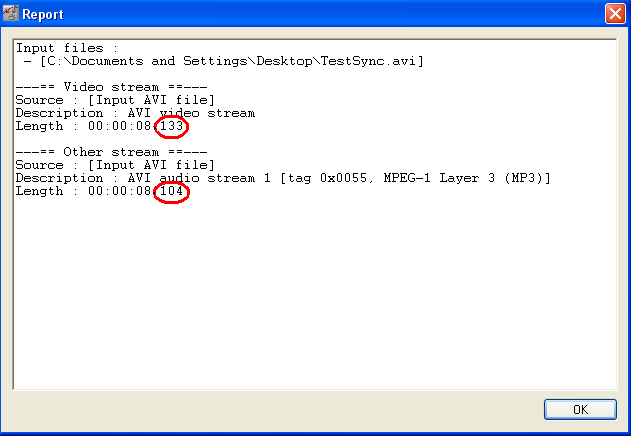
Sorry for the double post. :oops: Even with the extra samples because of the Lame Mp3 encoding, VirtualDubMod is telling me that my audio is off because it is too SHORT. That doesn't make sense to me either.

Image

*Runs into a brick wall*
Thanks to: Qyot27, Jaddziadax, BasharOfTheAges, Scintilla, Post-It, Anubisx00, Kariudo and everyone else for helping this Newby out! :P

"Hard work is worthless for those that don't believe in themselves." -Naruto Uzumaki

User avatar
post-it
Joined: Wed Jul 17, 2002 5:21 am
Status: Hunting Tanks
Location: Chilliwack - Fishing
Org Profile

Post by post-it » Thu Sep 06, 2007 11:39 pm

trythil wrote:
post-it wrote:.. the time before your Audio begins Encoding depends on "the Encoder."

Raduim requires 50 milli-seconds to start and then Encodes "Real-Time"

LAME was never that stable; it can vary from 10 ms to 500 ms before Encoding begins 0_0
Stop spreading misinformation.

Builds of the default distribution of LAME introduce an encoder delay of 576 samples, end of story.

Read the source code (libmp3lame/encoder.h, libmp3lame/lame.c) to verify this.
.. Radium was put to the test back in 1999 and stated that, "yes, MP3's are directly editable." Image this test was completed and varified eight (8) years ago with no excuses as to why it works the way it does. The length of the WAV is exactly the length of the MP3. The faster your computer the faster then Encode. Everything Encoded by Radium is Directly Editable. Radium works in Real-Time Mode; always has, always will. :twisted: :up: Radium was Real-Time before that name "Real Time Mode" had any meaning. End Of This Non-Sense - in real time 8-)

trythil
is
Joined: Tue Jul 23, 2002 5:54 am
Status: N͋̀͒̆ͣ͋ͤ̍ͮ͌ͭ̔̊͒ͧ̿
Location: N????????????????
Org Profile

Post by trythil » Fri Sep 07, 2007 12:29 am

Kero777 wrote:Is there a way around the silence without quality loss or a cut file so it syncs up pretty darn close to the original file?
Short of calculating the encode/decode delays yourself (as you know, many MP3 decoders introduce their own delay) and adding the appropriate amount of blank video, I don't know of one.

However...if you're as close as your screenshot says you are, it's close enough. A 29 millisecond discrepancy probably isn't going to kill you, especially not over a video the duration of a typical AMV. (To put it into perspective: At 29.97 frames per second, one frame is around 33 milliseconds long.)
post-it wrote:nonsense
You neither read nor understood my reply. The amount of delay inserted by an encoder pretty much has nothing to do with encoding time, so there's no point in showing encode time graphs.

Your assertion about the padding introduced by LAME (which, from your post, I'm now doubting had anything to do with padding at all) is misleading, as it implies that there is a random factor involved in that padding. There isn't.

trythil
is
Joined: Tue Jul 23, 2002 5:54 am
Status: N͋̀͒̆ͣ͋ͤ̍ͮ͌ͭ̔̊͒ͧ̿
Location: N????????????????
Org Profile

Post by trythil » Fri Sep 07, 2007 12:42 am

Quick question for Kero777:

Can you describe your current muxing procedure? It sounds like you've done several things, and I'm having difficulty figuring out exactly what it is you're now doing.

I don't know why VirtualDubMod's muxing is giving you that behavior; you may want to ask a VirtualDubMod developer about that. (Assuming any are currently active.) Avery Lee (VirtualDub's developer) might also know.

User avatar
Kero777
Joined: Sun May 06, 2007 9:37 am
Org Profile

Post by Kero777 » Fri Sep 07, 2007 11:38 am

trythil wrote: ...if you're as close as your screenshot says you are, it's close enough. A 29 millisecond discrepancy probably isn't going to kill you, especially not over a video the duration of a typical AMV. (To put it into perspective: At 29.97 frames per second, one frame is around 33 milliseconds long.)
Thank you for replying again (Sorry for the late reply. I was exhausted and went to bed) I checked the frame difference of mine and it's about a frame and a half... it really bothers me because I can clearly see the difference. :? I will try doing what you said and contact the VirtualDub/DubMod developers to see if they know something...
trythil wrote:Can you describe your current muxing procedure? It sounds like you've done several things, and I'm having difficulty figuring out exactly what it is you're now doing.
Of course I can. :) Sorry if I was vague. Here is what I am doing:
1) Exporting the video with sound from Sony Vegas (I tried exporting the audio separately, but same results... even using BeSweet)
2) Following E&A's Technical Guide to make an XviD/DivX file by going through the first pass.
3) If the first pass is good enough, I go to Streams> Full Processing Mode> Compression > Lame MP3 > 192kbps CBR. Then I select direct stream copy and select Okay.

When it is done, it is a frame in a half to two frames off. SOME other music conversion codecs don't seem to add any silence in the beginning, but the quality isn't half as good. :(

Any ideas from anyone? Please? I'm running out of them. :?

Thanks to: Qyot27, Jaddziadax, BasharOfTheAges, Scintilla, Post-It, Anubisx00, Kariudo and everyone else for helping this Newby out! :P

"Hard work is worthless for those that don't believe in themselves." -Naruto Uzumaki

Locked

Return to “Video & Audio Help”